Ephemeral Docker Envs Beat Shared Staging
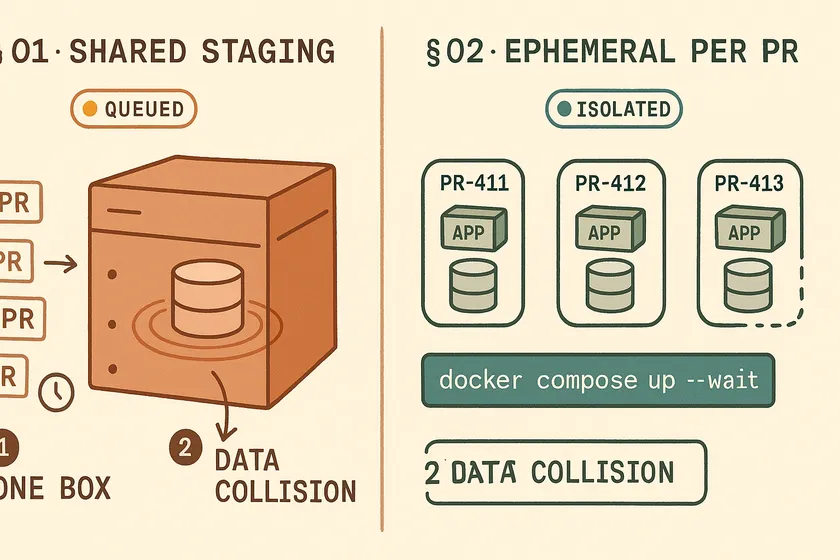
Table of Contents
In April I laid out a three-tier ladder for test environment isolation. Tier 2 was Docker Compose. Tier 3 was per-PR ephemeral environments — Kubernetes namespaces, ArgoCD, “2-3 years away” for most enterprise teams. I filed Compose under local-dev parity and assumed that making an environment per-PR required an orchestrator.
That gap between the tiers doesn’t exist. A Docker Compose ephemeral test environment in CI is a per-PR environment: same file, one environment variable, one teardown step. No cluster, no GitOps pipeline. I’ve since watched a team build one in three days.
What I was right about is subtler, and it’s the part nobody writes about: the hard part isn’t Docker. It’s the seed. On the first stack we built, starting Postgres and the API took 3 and a half minutes. Loading the data those tests needed took 6 minutes and 10 seconds — 53% of the run, before a single assertion fired.
Why does one shared staging box break parallel test suites?
Because a shared environment has exactly one database, and your tests do not agree about what should be in it. Two PRs deploy within the same hour, one suite’s fixtures overwrite the other’s, and both runs fail on data that neither team touched. The environment isn’t flaky — it’s contended.
At a Canadian property-and-casualty insurer, this was a standing Monday problem. Eleven developers, two SDETs, one environment everyone called QA2, and a 180-test Playwright regression suite pointed at it. When two PRs landed inside the same hour — which happened constantly, because nobody wants to sit in a queue — roughly one run in three failed on policy fixtures someone else had already claimed.
13
Engineers sharing one environment
38 min
Average PR wait for QA2
1 in 3
Runs failing on contended data
This is the same collision I’ve written about at the test-data layer, where shared test users sabotage a parallel suite — but a rung lower in the stack. You can fix user collisions with a worker-scoped user pool. You cannot fix database collisions that way, because the whole environment is the shared resource. The only real fix is to stop sharing it.
What is an ephemeral test environment, and why per pull request?
An ephemeral test environment is a complete, isolated copy of your stack — app, database, seeded data — created when a pull request opens and destroyed when the tests finish. Nothing survives between runs. No queue, no drift, no residue from last Tuesday’s PR.
The version nobody markets — because there’s no product to sell around it — is a compose.yaml running on the CI runner you already pay for. It buys the isolation, which is the whole point, and skips the shareable URL, which automated tests don’t need.
How do you build a Docker Compose ephemeral test environment in CI?
Four moves: a compose file that shares nothing, healthchecks that tell the truth, data seeded at container init, and a workflow that names each stack after its PR and destroys it afterward. One compose file, one healthcheck flag most people get wrong, twenty lines of workflow YAML.
Step 1: The compose skeleton — publish nothing
The first instinct is to copy your local compose.yaml and add it to CI. Don’t. The local file publishes host ports so you can hit the DB from your laptop, and host ports are the single most common reason two CI jobs on one runner kill each other.
name: policy-api
services:  db:    image: postgres:17-alpine    environment:      POSTGRES_USER: app      POSTGRES_PASSWORD: app      POSTGRES_DB: appdb
  api:    build: .    environment:      DATABASE_URL: postgres://app:app@db:5432/appdb    depends_on:      - db
Note what isn’t there. No ports: — services reach each other over the Compose network by service name (db:5432), which is namespaced per project and cannot collide. No top-level version: key: it’s obsolete, informative only, and Compose warns you about it. If your file still starts with version: "3.8", delete that line today. And no named volume on the Postgres data directory — deliberate, and Step 3 explains why.
Step 2: Healthchecks — your depends_on is lying to you
depends_on: [db] waits for the container to start, not for Postgres to be ready. Everyone knows this. The fix everyone reaches for is condition: service_healthy plus a pg_isready healthcheck — and that fix is also broken, in a way that took me most of a day to see.
The official Postgres image runs your init scripts against a temporary server that listens only on the Unix socket (the entrypoint starts it with listen_addresses=''). A socket-based pg_isready answers accepting connections during that window. Compose marks the container healthy, your API starts, and it connects into the gap while the seed is still loading. It’s why the image still ships no default HEALTHCHECK after years of asking — the maintainers’ own guidance on that thread is to use --host 127.0.0.1.
Forcing the check over TCP fixes it, because the temporary server isn’t there:
services: db: image: postgres:17-alpine healthcheck: # -h forces TCP. Without it, pg_isready answers on the Unix socket # while /docker-entrypoint-initdb.d scripts are still running, # and Compose reports "healthy" on a database that has no tables. test: ["CMD-SHELL", "pg_isready -h 127.0.0.1 -U app -d appdb"] interval: 2s timeout: 3s retries: 30 start_period: 20sNow the API can gate on it honestly. Use wget rather than curl in the app healthcheck — Alpine images ship BusyBox wget but not curl, and a healthcheck that shells out to a binary that doesn’t exist reports unhealthy forever:
api: build: . healthcheck: test: ["CMD", "wget", "-qO-", "http://localhost:8080/health"] interval: 2s retries: 20 start_period: 10s depends_on: db: condition: service_healthyOf the three valid conditions, only service_healthy means what you want.
Finally, the suite itself runs as a service inside the network — so it reaches the API at http://api:8080 and needs no host port at all. Put it behind a profile so up ignores it:
tests: build: context: . dockerfile: Dockerfile.tests environment: BASE_URL: http://api:8080 profiles: ["ci"] # `up` skips it; `run` starts it on demand depends_on: api: condition: service_healthyStep 3: Seed the data — and let the volume die
Postgres runs everything in /docker-entrypoint-initdb.d once, in filename order, and only if the data directory is empty. Mount your schema and fixtures there:
db: image: postgres:17-alpine volumes: # Runs once, in filename order, only when PGDATA is empty. - ./db/init:/docker-entrypoint-initdb.d:roThe “only if empty” clause is the trap. Attach a named volume to PGDATA — as every local dev compose file does, because you want your data to survive down — and on the second CI run the directory isn’t empty, so the entrypoint skips initialization entirely and your seed script never executes. No error. No warning. Your tests run against whatever the last PR left behind. It’s invisible unless you go looking for it, and it’s behind a large share of “passes locally, fails in CI.”
So: no named volume for the database in the CI compose file. Let the container’s writable layer hold PGDATA and evaporate with the container. Ephemeral means ephemeral.
If you use a migration tool, keep migrations out of the up path — put them behind a profile and run them explicitly. That also sidesteps a live Compose bug where up --wait exits 1 when a one-shot container completes successfully:
migrate: build: . command: ["npm", "run", "migrate:up"] profiles: ["tools"] # `up` skips it; `run` starts it on demand depends_on: db: condition: service_healthyStep 4: Wire it to GitHub Actions
Two things make the stack per-PR rather than per-repo: a unique project name, and a teardown that always runs.
name: PR testson: pull_request
jobs:  e2e:    runs-on: ubuntu-latest    timeout-minutes: 20    env:      COMPOSE_PROJECT_NAME: pr-${{ github.event.number }}    steps:      - uses: actions/checkout@v7
      - name: Start the stack        run: docker compose up --wait --wait-timeout 180 db api
      - name: Apply migrations        run: docker compose run --rm migrate
      - name: Run the suite        run: docker compose run --rm tests
      - name: Dump logs on failure        if: failure()        run: docker compose logs --no-color
      - name: Tear down        if: always()        run: docker compose down -v --remove-orphans
COMPOSE_PROJECT_NAME namespaces the containers, the network, and the volumes. Without it Compose derives the project name from the checkout directory — which is byte-for-byte identical across every job on that runner. That’s your collision.
Two more details that took real runs to learn. docker compose up --wait waits for services to be running or healthy — so on a service with no healthcheck it degrades to waiting for “running,” which tells you nothing about whether the thing works. It’s exactly as strong as Step 2, no stronger. And always pass --wait-timeout; without it, a service that will never become healthy hangs the job until timeout-minutes kills it, and you get no logs.
For the exit code, docker compose run --rm tests returns the test container’s code directly. The popular alternative — up --abort-on-container-exit — returns the code of whichever container died first, which on a healthy run is frequently not your test container. That’s how you get a permanently green pipeline hiding real bugs.
How do you verify the environment actually came up?
Don’t assert that the port is open. Assert that the data is there. A container can be running, healthy, and completely empty.
docker compose ps --format 'table {{.Service}}\t{{.Status}}'# db    Up 24 seconds (healthy)# api   Up 11 seconds (healthy)
# The check that actually matters: did the seed land?docker compose exec -T db psql -U app -d appdb -c 'select count(*) from policy;'
Fail the job if that count is zero. It’s the container-stack version of the three-layer smoke check — data exists, service responds, auth works — and it turns Step 3’s silent stale-volume failure into a loud one.
If your tests run on the runner rather than inside the network and genuinely need a host port, publish it without a fixed number (ports: ["5432"]) and ask Docker where it landed:
DB_PORT=$(docker compose port db 5432 | cut -d: -f2)echo "DATABASE_URL=postgres://app:app@localhost:${DB_PORT}/appdb" >> "$GITHUB_ENV"Common errors and how to fix them
Bind for 0.0.0.0:5432 failed: port is already allocated
Two jobs on one runner both tried to publish 5432, or a previous run leaked a container. Stop publishing fixed host ports — put the test runner inside the Compose network so it talks to db:5432 directly. If you must publish, use ephemeral ports as above.
dependency failed to start: container db is unhealthy
Your healthcheck never passed within retries × interval. In order of likelihood: the command doesn’t exist in the image (curl in Alpine), start_period is shorter than your seed, or the service is genuinely broken. Run docker compose logs db before assuming it’s the third.
The seed script silently never ran
A named volume on PGDATA survived the last run, so the directory wasn’t empty and the entrypoint skipped /docker-entrypoint-initdb.d. Drop the volume and tear down with down -v --remove-orphans — plain down leaves named volumes behind. This one costs a day the first time.
The pipeline is green but the tests failed
You’re on --abort-on-container-exit without --exit-code-from, so CI is reading the exit code of the first container to die. Switch to docker compose run --rm tests.
What changes at enterprise scale?
Three things, and only one of them is what people expect. The database seed becomes the dominant cost — 53% of the run on the insurer’s first stack, against 24% for building images. Layer caching quietly degrades once you cross the 10 GB Actions cache ceiling. And the runner-minute bill turns out to be trivial next to the engineer wait time it removes.
The seed is the bottleneck, not Docker
Here’s where the insurer’s first run went — 11 minutes 40 seconds, cold:
| Phase | Time | Share |
|---|---|---|
| Pull + build images | 2m 50s | 24% |
| Container start + healthchecks | 40s | 6% |
| Database seed | 6m 10s | 53% |
| Actual tests | 2m 00s | 17% |
Everybody’s instinct is to attack the build. The build was never the problem — as is usually the case once you actually measure where a slow suite spends its time. Here it was loading a policy-admin schema — a policy-to-claim-to-payment chain across 40-odd tables — through psql on every run.
The fix is to stop seeding at runtime. Bake a Postgres image that already contains the initialized data directory: run the init scripts once at image build time, commit the result as a layer, and push it to GHCR. Seed time becomes layer-pull time. Combined with prebuilding the app image and swapping up --build for docker compose pull --quiet, the run came down to just over four minutes.
11m 40s
Cold run, seeding at runtime
4m 05s
Pre-seeded image + prebuilt app
6m 10s → 35s
DB seed alone
The same lesson as pushing test setup out of the UI and into an API data layer: the fastest data setup is the one that already happened.
Layer caching quietly stops working
The standard advice is cache-from: type=gha / cache-to: type=gha,mode=max with docker/build-push-action. It works, and then around week three it doesn’t, and nobody notices because the failure mode is “CI got slow again.”
The GitHub Actions cache is a 10 GB pool per repository, shared with everything else using actions/cache, and evicted least-recently-used once you cross it. mode=max caches intermediate layers from every stage of a multi-stage build — which is what makes it useful, and what makes you hit the ceiling fastest. Once you’re thrashing you pay export time on every run and miss the cache anyway: strictly worse than no caching. For large images, point a registry-backed cache (type=registry,mode=max) at GHCR, which has no such ceiling.
The cost is not the argument you think it is
Do the arithmetic before anyone quotes you a platform. A four-minute stack run on a 2-core Linux runner, at GitHub’s published per-minute rate for private repos, is a few cents. Thirty PR runs a day lands around a dollar — call it a few hundred dollars a year, and even if that rate moves 25% either way the conclusion doesn’t. Compare that to seat-based preview-environment pricing, then compare both to 38 minutes of engineer wait time per PR.
The vendor cost-of-staging content is full of confident numbers — “$78k/yr wasted for a 10-engineer team,” “16-18% of infra spend” — attributed to sources I could not locate. Ignore all of it. Your runner bill and your merge-queue wait times are numbers you already have.
When is a shared environment still the right call?
When the thing you’re testing against can’t be duplicated. There are five of these, and they’re the reason “just make it ephemeral” is advice that gets people stuck.
Third-party sandboxes you don’t own. The insurer’s credit-bureau and payment-gateway sandboxes were rate-limited per API key, and the vendors issued exactly one key per registered environment. You cannot spin up twelve of those. Those integrations stayed mocked in the ephemeral stack and were exercised against the shared environment on a nightly schedule — which is the honest hybrid, and it’s what we shipped.
Services that don’t containerize. Oracle licensing, mainframes, VPN-gated internal APIs. Unchanged from what I said in April.
Performance and soak testing. A stack that lives four minutes tells you nothing about a memory leak, and a runner is the wrong shape for load generation. Those need a long-lived target with production-shaped data.
Manual exploratory QA. A Compose stack on a runner has no URL a product manager can click. If that’s the requirement, you want a real preview environment — and now the platform vendors are actually selling you something.
Forty services. At that point the compose file is a work of fiction, and Kubernetes was the right answer all along.
For everything else — and “everything else” is most teams under about ten services — the ephemeral stack wins, and it wins this week rather than next fiscal year.
Your next step
Take the compose file you already run locally, copy it to compose.ci.yaml, and delete three things: the version: key, every ports: mapping, and the named volume on your database. Then add one healthcheck with -h 127.0.0.1 and run it in a PR job with COMPOSE_PROJECT_NAME: pr-${{ github.event.number }}.
That’s an afternoon. And before you optimize anything, time the seed — put a timestamp before and after your init scripts on the very first run. If it’s more than a third of your pipeline, you know which problem you’re actually solving, and it isn’t Docker. Fix that number and you’ll find the rest of the isolation story falls out cheaply, the same way parallel execution turns out to be a configuration change rather than a refactor project once you stop guessing at the bottleneck.
Does depends_on wait for my database to be ready?
No. depends_on with the short syntax waits only for the container to start, not for the process inside it to accept connections. You need the long syntax with condition: service_healthy plus a healthcheck on the dependency. The three valid conditions are service_started, service_healthy, and service_completed_successfully.
Why does pg_isready report healthy before my seed scripts finish?
The official Postgres image runs /docker-entrypoint-initdb.d scripts against a temporary server that listens only on the Unix socket. A socket-based pg_isready succeeds during that window, so Compose marks the container healthy while the database still has no tables. Force the check over TCP — pg_isready -h 127.0.0.1 -U app -d appdb — because the temporary server isn’t listening on TCP. It’s also why the image still ships no default HEALTHCHECK — the maintainers’ guidance on that long-open thread is to use --host 127.0.0.1.
Can I run two PR environments on the same CI runner without port conflicts?
Yes. Set a unique COMPOSE_PROJECT_NAME per PR (pr-${{ github.event.number }}) and remove all fixed host port mappings so services talk over the Compose network by service name. Compose derives the project name from the checkout directory by default, which is identical across every job on that runner — that’s the usual source of collisions.
Why didn't my docker-entrypoint-initdb.d seed script run?
Postgres only runs init scripts when the data directory is empty. If a named volume on PGDATA survived a previous run, the entrypoint skips initialization silently and your tests run against stale data from the last PR. Remove the named volume from your CI compose file and tear down with docker compose down -v --remove-orphans — plain down leaves named volumes in place.
Should I use Testcontainers or Docker Compose in CI?
They’re not exclusive, and the framing is a trap. Use Compose when you want the whole stack — app, database, dependencies — defined in one file that developers also run locally, which keeps CI and the laptop identical. Use Testcontainers when a test needs to own a single dependency’s lifecycle from inside the test process. Testcontainers also ships a Compose module that drives a compose file directly, and Spring Boot supports both side by side.
Do I need Kubernetes for per-PR ephemeral environments?
Not for automated tests. Kubernetes buys you a shareable URL, cross-node behavior, and a long-lived environment for manual QA. If all you need is isolated automated test runs, a Docker Compose stack on the CI runner delivers the same isolation for the cost of runner minutes — no cluster, no GitOps pipeline. I said the opposite in April; the isolation was never the part that needed Kubernetes.
Don't miss a thing
Subscribe to get updates straight to your inbox.

No spam · Unsubscribe anytime