Passing Inputs to Tests with GitHub Actions
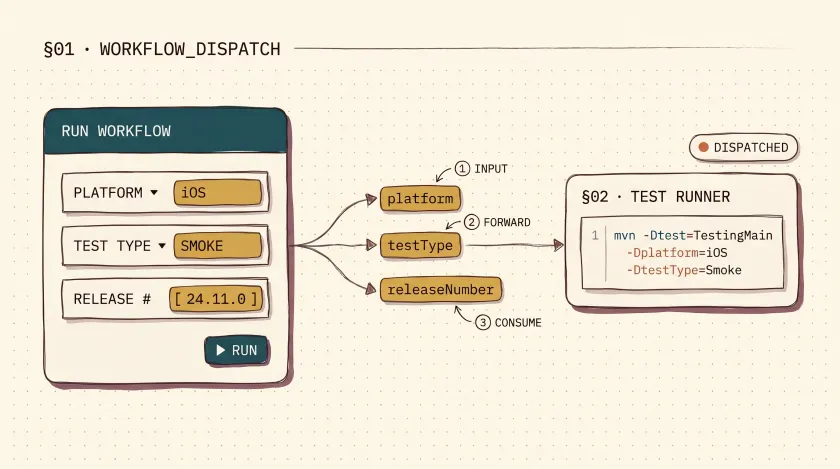
Table of Contents
If your pipeline needs one run for Android smoke tests, another for iOS regression, and a third for a specific release candidate, duplicating workflows gets messy fast. GitHub Actions inputs let you keep one workflow and decide at run time what it should execute.
The feature is simple, but it pays off quickly: less YAML duplication, cleaner manual runs, and a test command that can adapt to the exact scenario you want to validate.
Why workflow inputs are useful
Inputs are most helpful when the same test job can be reused across multiple cases:
- Choose a platform without creating a separate workflow per platform
- Switch between smoke, regression, and focused suites from the Actions UI
- Pass release or environment metadata into the test run
- Keep one source of truth for how tests are launched
The common trigger for this is workflow_dispatch, which exposes a form in the GitHub Actions UI.
If the workflow is going to notify the team after it runs, I usually pair these inputs with the kind of Slack summary described in my guide to sending test results to Slack. And if the automation is running on a dedicated Windows box instead of ephemeral CI workers, the operational side starts to look more like a Task Scheduler-managed automation server than a pure cloud pipeline.
Define the inputs in workflow_dispatch
Here’s a practical example:
name: Test Scheduler
on:  pull_request:    types:      - opened      - synchronize      - reopened    paths:      - "**/*.java"  workflow_dispatch:    inputs:      platform:        description: "Select platform"        type: choice        options:          - Android          - iOS          - API        required: true        default: "iOS"      testType:        description: "Select test type"        type: choice        options:          - Smoke          - Regression        required: true        default: "Smoke"      releaseNumber:        description: "Release number"        type: string        required: true
This keeps the workflow readable while still letting the person triggering the run control the context.
Pass the values into your test command
Once the inputs exist, pass them to Maven as system properties:
- name: Run Maven tests run: > mvn -Dtest=TestingMain test -Dplatform="${{ inputs.platform }}" -DtestType="${{ inputs.testType }}" -DreleaseNumber="${{ inputs.releaseNumber }}"You can do the same thing with Gradle, npm scripts, Playwright CLI flags, or environment variables. The core idea is the same: the workflow collects the input, then forwards it to the test runner.
Read the values inside your code
In Java, those inputs are available through System.getProperty():
import org.testng.annotations.Test;
public class TestingMain {
    @Test    public void testing() {        String platform = System.getProperty("platform", "iOS");        String testType = System.getProperty("testType", "Smoke");        String releaseNumber = System.getProperty("releaseNumber", "local");
        System.out.println("Platform: " + platform);        System.out.println("Test type: " + testType);        System.out.println("Release number: " + releaseNumber);    }}
For real projects, don’t stop at printing the values. Use them to decide which suite to run, which environment to point at, or which dataset to seed.
Good use cases for inputs
- Platform selection: Android vs iOS vs API
- Suite selection: smoke, regression, or a focused module
- Environment targeting: development, staging, or pre-production
- Feature flags: on/off toggles for experiments
- Locale coverage:
en-US,fr-CA,de-DE - Release metadata: build number, version tag, or branch label
A few guardrails
Inputs make workflows flexible, but they’re not the answer to everything:
- Don’t use inputs for secrets. Put secrets in GitHub Actions secrets, not in workflow fields.
- Don’t use inputs when a matrix is the better fit. If you need to run every browser or every platform automatically, use a matrix.
- Validate dangerous values. If an input can point at production or trigger destructive cleanup, gate it carefully.
Inputs vs matrix jobs
I use inputs when a human is choosing a scenario at run time. I use a matrix when the pipeline itself should fan out automatically. That distinction sounds small, but it keeps workflows much easier to reason about six months later.
Keep the test command thin
The more branching logic you push into YAML, the harder the workflow becomes to maintain. I prefer passing a few clear inputs into a script or test runner that already knows how to interpret them. The workflow should collect context, not become your business logic layer.
Advanced example
If your workflow needs more than three fields, GitHub Actions supports booleans and additional choices cleanly:
name: Advanced Test Workflow
on:  workflow_dispatch:    inputs:      environment:        description: "Select environment"        type: choice        options:          - Development          - Staging          - Production        required: true        default: "Development"      featureToggle:        description: "Enable new feature"        type: boolean        required: false      userRole:        description: "Select user role for testing"        type: choice        options:          - Admin          - Editor          - Viewer        required: true        default: "Viewer"      testSuite:        description: "Select test suite"        type: choice        options:          - All          - UserModule          - PaymentModule          - NotificationModule        required: true        default: "All"      locale:        description: "Select locale for testing"        type: choice        options:          - en-US          - fr-FR          - es-ES          - de-DE        required: true        default: "en-US"
If your current workflow has drifted into multiple near-identical files, this is usually the first simplification worth making. One workflow, a handful of inputs, and a test command that knows how to consume them is enough for most teams.
Don't miss a thing
Subscribe to get updates straight to your inbox.

No spam · Unsubscribe anytime