Send Test Results to Slack Without Losing the Signal
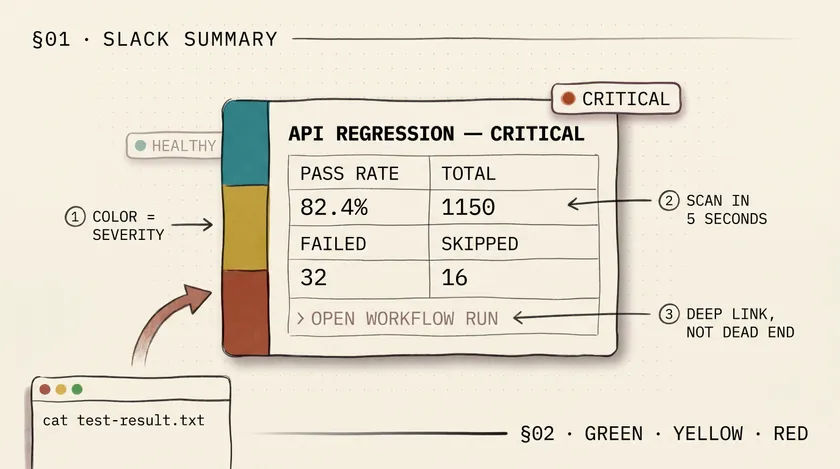
Table of Contents
A report nobody opens is barely better than no report at all. In most teams, Slack or Microsoft Teams is where broken builds actually get noticed, so that’s where your test summary should go.
The goal is not to paste the full report into chat. The goal is to answer three questions in five seconds:
- Did the suite pass cleanly?
- If not, how bad is it?
- Where do I click for details?
If you’re already using manual workflow inputs to control platform or suite selection, this pattern fits cleanly into the same pipeline structure as parameterized GitHub Actions test runs. And if the machine running your suite is a long-lived Windows box, pair the notification with the basic maintenance checks from my Task Scheduler automation server setup so the message reaches Slack for the right reasons.
Why color helps when used carefully
Color is useful when it maps to action instead of decoration:
- Green: healthy run, no immediate action
- Yellow: something regressed, but the suite is still mostly intact
- Red: this needs attention now
I usually start with these thresholds:
- Green:
>= 95%pass rate - Yellow:
85% - 94.99% - Red:
< 85%
Adjust the numbers to fit your suite. A mature smoke suite might need 100% to count as green. A large nightly regression suite might justify a little more tolerance.
Example: Slack implementation with GitHub Actions
In this example, target/test-result/test-result.txt contains a simple summary line generated by your test framework:
Total tests run: 1150, Passes: 1102, Failures: 32, Skips: 16The GitHub Actions step below parses those values, calculates a success rate, assigns a color, and posts a Slack message with a direct link back to the run:
jobs:  test:    runs-on: ubuntu-latest    steps:      - name: Run tests        run: mvn clean test
      - name: Post Slack summary        if: always()        id: result        env:          PLATFORM: ${{ inputs.platform || 'API' }}          TEST_TYPE: ${{ inputs.testType || 'Regression' }}          SLACK_WEBHOOK: ${{ secrets.SLACK_WEBHOOK }}        run: |          CONTENT=$(cat target/test-result/test-result.txt)
          TOTAL_TESTS=$(echo "$CONTENT" | awk -F'[ ,]+' '{print $4}')          PASSES=$(echo "$CONTENT" | awk -F'[ ,]+' '{print $6}')          FAILURES=$(echo "$CONTENT" | awk -F'[ ,]+' '{print $8}')          SKIPS=$(echo "$CONTENT" | awk -F'[ ,]+' '{print $10}')
          if [ "$TOTAL_TESTS" -eq 0 ]; then            SUCCESS_RATE="0.00"            RATE_INT=0          else            SUCCESS_RATE=$(awk "BEGIN {printf \"%.2f\", ($PASSES/$TOTAL_TESTS)*100}")            RATE_INT=$(awk "BEGIN {printf \"%d\", ($PASSES/$TOTAL_TESTS)*100}")          fi
          echo "total=${TOTAL_TESTS}" >> "$GITHUB_OUTPUT"          echo "passes=${PASSES}" >> "$GITHUB_OUTPUT"          echo "failures=${FAILURES}" >> "$GITHUB_OUTPUT"          echo "skips=${SKIPS}" >> "$GITHUB_OUTPUT"          echo "rate=${SUCCESS_RATE}" >> "$GITHUB_OUTPUT"
          if [ "$RATE_INT" -ge 95 ]; then            STATUS="Healthy"            COLOR="#2eb886"          elif [ "$RATE_INT" -ge 85 ]; then            STATUS="Needs attention"            COLOR="#daa038"          else            STATUS="Critical"            COLOR="#e01e5a"          fi
          RUN_URL="${GITHUB_SERVER_URL}/${GITHUB_REPOSITORY}/actions/runs/${GITHUB_RUN_ID}"
          PAYLOAD=$(cat <<EOF          {            "attachments": [              {                "color": "$COLOR",                "blocks": [                  {                    "type": "header",                    "text": {                      "type": "plain_text",                      "text": "$PLATFORM $TEST_TYPE - $STATUS"                    }                  },                  {                    "type": "section",                    "text": {                      "type": "mrkdwn",                      "text": "*Pass rate:* ${SUCCESS_RATE}%\n*Total:* ${TOTAL_TESTS}\n*Passed:* ${PASSES}\n*Failed:* ${FAILURES}\n*Skipped:* ${SKIPS}"                    }                  },                  {                    "type": "context",                    "elements": [                      {                        "type": "mrkdwn",                        "text": "<${RUN_URL}|Open workflow run>"                      }                    ]                  }                ]              }            ]          }EOF          )
          curl -X POST \            -H "Content-type: application/json" \            --data "$PAYLOAD" \            "$SLACK_WEBHOOK"
      - name: Write GitHub step summary        if: always()        run: |          {            echo "## Test summary"            echo ""            echo "| Metric | Value |"            echo "| --- | --- |"            echo "| Platform | ${{ inputs.platform || 'API' }} |"            echo "| Test type | ${{ inputs.testType || 'Regression' }} |"            echo "| Total tests | ${{ steps.result.outputs.total }} |"            echo "| Passed | ${{ steps.result.outputs.passes }} |"            echo "| Failed | ${{ steps.result.outputs.failures }} |"            echo "| Skipped | ${{ steps.result.outputs.skips }} |"            echo "| Pass rate | ${{ steps.result.outputs.rate }}% |"          } >> "$GITHUB_STEP_SUMMARY"
Why this version works better
- It posts on every run, not only on failure, so the team keeps a heartbeat of suite health.
- The color is tied to a threshold, so people can scan the channel quickly.
- It includes a deep link back to the run, so the chat message is a summary, not a dead end.
About attachments vs Block Kit
Slack has been nudging teams toward Block Kit for a while, and that is the right long-term direction for layout. I still use attachments here for one reason: they are the simplest way to get a severity-colored sidebar. If Slack eventually removes that option, keep the same block content and move the severity signal into the header text or emoji instead of relying on color alone.
Keep the chat message intentionally small
If the Slack message starts looking like a miniature HTML report, you’ve overdone it. Chat is for triage. Your detailed report belongs in the workflow run, a portal, or an artifact link that people can open when they actually need depth.
Implementation checklist
- Store the Slack webhook URL in repository secrets.
- Keep the message short enough to scan in a busy channel.
- Include a report or run link every time.
- Use Slack Block Kit Builder if you want to refine the layout visually.
- Revisit your thresholds once you have a month of real data.
If your team already has Allure, Jenkins, or another full report portal, Slack should be the front door, not the whole house. A good message gets people to the details quickly instead of forcing them to dig for them.
Don't miss a thing
Subscribe to get updates straight to your inbox.

No spam · Unsubscribe anytime