Stop Sharing Test Environments — Build One You Control
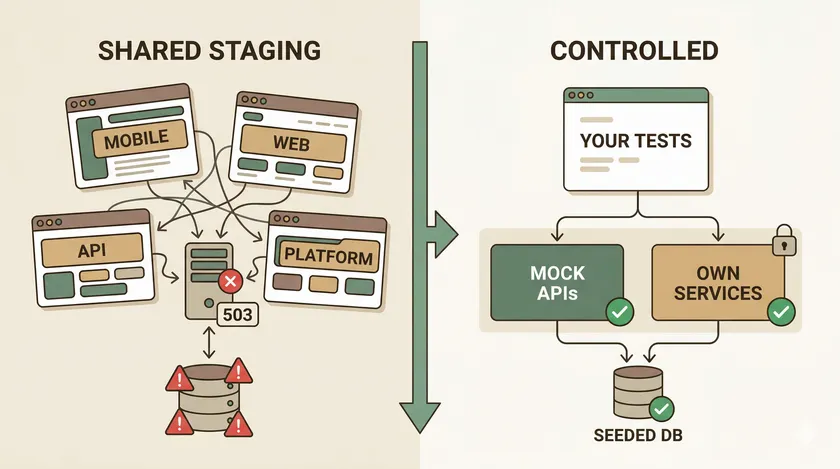
Table of Contents
It’s Monday morning. The nightly regression suite is red — 34 of 120 UI tests failed. You open the first failure, expecting a product bug, and find a 503 from the backend API that hasn’t been your team’s responsibility since last quarter’s reorg. Your tests didn’t fail. Your environment did. And until you build a controlled test environment that your team actually owns, this will keep happening every week.
The Environment Nobody Owned
At a large Canadian telecom, 4 squads worked across platform and mobile. The mobile team — my team — ran Appium-based UI tests against the platform team’s backend APIs. We didn’t own those APIs. We didn’t control when they deployed, when they toggled feature flags, or when they decided to “quickly test something in staging.”
Every Monday felt the same. The test suite would go red overnight, and the first 30 minutes of standup were spent triaging which failures were real bugs versus which were platform’s API returning 500s because someone left a half-deployed branch running. That’s time you never get back, and it’s time nobody tracks.
The math was ugly:
4
Squads sharing one environment
weekly
Frequency of env-caused failures
~90%
UI tests blocked by API instability
When 4 squads share a single staging environment, the coordination overhead alone is a part-time job. Feature flags were the worst — platform would gate a new API version behind a flag, forget to enable it in staging, and our mobile tests would silently fall back to a deprecated endpoint that returned different response shapes. We’d spend half a day debugging what looked like a serialization bug before realizing the flag was off.
The real cost wasn’t just the hours burned on environment triage every single week. It was the trust erosion. Developers stopped believing test failures meant anything. “Probably just the environment” became the team’s default reaction to red builds. When actual product bugs did show up in the regression suite, they’d sit unexamined for days because everyone assumed it was another environment hiccup.
We never fixed this. I left that engagement with the same shared staging environment still breaking mobile tests every Monday. No one had the political capital to demand a dedicated environment — it was always “too expensive” or “not a priority this quarter.” The mobile team adapted by running a local subset of critical tests and treating the full regression suite as informational rather than gating.
That’s the wrong answer, and I knew it then. Here’s what I’d build today.
Why Do Shared Test Users Break Parallel Test Runs?
Shared test users are the single most common cause of “it worked yesterday” failures in enterprise test suites. When two parallel threads log in as the same user, one thread’s actions mutate the account state — cart contents, preferences, session tokens — and the other thread’s assertions fail against data it didn’t create. The fix isn’t retry logic. It’s dedicated test users with a naming convention that makes pollution traceable.
At a telecom with millions of CRM records, we had exactly one test user for checkout flows. Every suite used it. When the loyalty team’s nightly run added 3,000 reward points to that account, the billing team’s assertions broke because the total was off by exactly 3,000 points. Debugging took two days. The naming convention we adopted afterward took 20 minutes to implement.
User Lifecycle Drift
Test users accumulate invisible state. Loyalty points accrue, billing flags get set, compliance holds trigger. After six months of continuous runs, your “clean” test user looks nothing like the persona you originally provisioned.
You have two strategies: provision once, reset before each suite or provision fresh per test run. The first is practical when provisioning takes minutes — common in telecom and financial services where account creation involves credit checks or KYC validation. The second is cleaner but only viable when provisioning is fast. Start with reset scripts; graduate to fresh provisioning when your test data layer supports it.
PII and Compliance Constraints
In regulated industries, you can’t freely spin up test users. Test accounts exist in real CRM systems, generate real billing records, and can appear in regulatory reports. I’ve seen a test user trigger an actual collections notice because nobody flagged it as synthetic.
Use reserved synthetic identity ranges — account numbers starting with 9999-XXXXX, phone numbers in the 555 block — and flag them with a test_account: true attribute that data governance teams can filter on. According to the 2023 DORA State of DevOps Report, elite-performing teams are 1.4x more likely to have automated test data management — and a clean boundary between test and production identities is table stakes for that.
Where to Start: Test Users
Don’t wait for a full test data factory. Start with a pool of 8-10 pre-provisioned users following the naming convention above, one reset script that runs before each suite, and a config file in your repo mapping which users belong to which suites. That pool plus a 30-line reset script will eliminate more flaky tests than any retry mechanism. For a deeper dive into how shared test users sabotage parallel suites, I covered the Playwright-specific patterns separately.
How Do You Keep Test Data From Drifting Between Runs?
Targeted seed scripts that run before each suite are the most reliable way to prevent test data drift. They’re fast (seconds, not minutes), version-controlled alongside your tests, and idempotent by design — TRUNCATE + INSERT or UPSERT patterns mean you can run them ten times and get the same result every time. Skip the heavyweight snapshot restores unless you genuinely need hundreds of interdependent tables rebuilt at once.
The Drift Nobody Notices Until It’s Too Late
Here’s what actually happens to your test database over a week of continuous runs. Orphaned records pile up from tests that created data but crashed before cleanup. Status fields get flipped by one suite and never reset for the next. Lookup tables accumulate duplicate entries from parallel inserts without proper conflict handling — the same class of race condition that causes flaky tests in shared environments. By Friday, your “clean” test environment looks nothing like what you provisioned on Monday.
A 2024 Tricentis study found that 38% of software failures in production traced back to insufficient test environment management — and dirty test data is the most common symptom. Your tests aren’t flaky. Your data is.
Seed Scripts: The Default Choice
A good seed script does three things: wipes the relevant tables, inserts exactly the reference data your tests need, and handles conflicts gracefully. Here’s the skeleton I use as a starting point:
-- Idempotent: safe to run before every suiteTRUNCATE TABLE test_accounts CASCADE;TRUNCATE TABLE test_policies CASCADE;
-- Reference data (lookup tables)INSERT INTO regions (id, name) VALUES (1, 'Ontario'), (2, 'Quebec'), (3, 'BC')  ON CONFLICT (id) DO NOTHING;
-- Dedicated test users from Pillar 1INSERT INTO test_accounts (id, email, status)VALUES  (99901, 'testuser-checkout-qa1-01@corp.com', 'ACTIVE'),  (99902, 'testuser-checkout-qa1-02@corp.com', 'ACTIVE'),  (99903, 'testuser-search-qa1-01@corp.com', 'ACTIVE')ON CONFLICT (id) DO UPDATE SET status = 'ACTIVE';
Notice how the test user emails follow the naming convention from Pillar 1. The ON CONFLICT ... DO UPDATE on test accounts means even if a previous run left an account in SUSPENDED status, the seed resets it. This script runs in under 2 seconds on a database with 4 million rows — fast enough to execute before every suite without anyone complaining.
Full Snapshot Restore — When It Earns Its Keep
Snapshot restores have their place: hundreds of interdependent tables, complex foreign key graphs, stored procedures that generate derived data. I’ve worked in insurance environments where the policy-to-claim-to-payment chain spanned 40+ tables, and rebuilding that from seed scripts would’ve been its own engineering project. But the costs are real — 5-50GB dump files, 5-20 minutes to restore, and snapshots that drift stale within days of creation. The hidden cost is worse: teams skip refreshes because they take too long, which means the snapshot becomes exactly the kind of drifted environment you were trying to avoid.
The Staleness Trap
This is the pattern that burns teams. The nightly suite runs at 2 AM against a freshly seeded database — everything passes. The morning crew reruns the suite at 11 AM after three developers have been debugging failed tests by manually tweaking data. Half the suite goes red. “But it passed last night!” Yes, because the data was clean last night. Seed scripts sidestep this entirely because they’re cheap enough to run before every suite, not just once a day.
What About Testcontainers and API-Based Seeding?
Testcontainers are excellent for integration tests where you need an isolated database per test class — but they’re the wrong scope for a shared UI test environment where multiple suites and team members need consistent data. For API-based seeding that builds test data through your application’s own endpoints, I covered that approach in detail in the API test data layer case study.
Environment Isolation — Separate What You Own
Here’s the litmus test: if another team’s deploy can break your tests, you don’t have a controlled environment. You have a shared environment with your name on it. Everything in Pillars 1 and 2 — dedicated users, seeded data — gets wiped out the moment the platform team pushes a half-baked feature branch to staging at 4 PM on a Friday. Environment isolation is where you draw the boundary between “our tests” and “their infrastructure.”
According to the 2023 DORA State of DevOps Report, elite-performing teams deploy 973x more frequently than low performers — which means shared staging environments absorb exponentially more deploys, more state mutations, and more risk of collision. If your team isn’t isolating its test environment from that blast radius, every upstream deploy is a coin flip on whether your suite stays green.
The Decision Ladder: Three Tiers of Isolation
Not every team needs Kubernetes. Not every team can even get Docker approved by IT. Here’s how I think about environment isolation as a progression, not a menu.
Tier 1: Mock the APIs you don’t own. This is the starting point for 80% of enterprise teams, and it’s underrated. Playwright’s page.route() lets you intercept HTTP calls and return canned responses — zero infrastructure, zero DevOps tickets, zero waiting for someone to provision a VM. WireMock gives you the same thing server-side for API-level tests. The tradeoff is obvious: you’re testing against a contract, not the real service. But when the alternative is testing against a service that returns 503s every other Monday because someone left a debug flag on, mocks win. This is also the fix for the session cookies corrupting parallel test data problem — when your tests own the responses, there’s no shared state to corrupt.
Tier 2: Docker Compose stack. For teams with a local dev culture and services that actually containerize, a docker-compose.yml that spins up your API, database, and message broker gives you full isolation without a cloud bill. But I’ll be honest — at a large telecom, containerizing even a slice of the environment was blocked by Oracle licensing restrictions, VPN-gated internal services, and mainframe integrations that had no container story. If your services are cloud-native and your team already uses Docker for local dev, this tier is a natural fit. If you’re dealing with legacy infrastructure, skip to Tier 1 and save yourself three months of IT procurement negotiations.
Tier 3: Ephemeral per-PR environments. Kubernetes namespaces with ArgoCD or Flux spinning up a fresh environment for every pull request — this is the gold standard and it’s where the industry is heading. Every PR gets its own isolated stack, tests run against it, and the environment gets torn down when the PR merges. But this is only realistic for teams already running on K8s with a mature GitOps pipeline. For most enterprise teams, this is 2-3 years away. Mention it in your roadmap, don’t put it in next quarter’s OKRs.
Feature Flags: The Hidden Environment Variable
Remember the war story from the intro — platform gating API versions behind feature flags and forgetting to enable them in staging? Feature flags are environment state that nobody treats as environment state. If your tests depend on a flag being ON to hit the right API version, you have two options: own that flag’s value in your test environment configuration, or mock the API regardless of flag state. The second option is more resilient. Flags change. Mocks don’t — unless you change them.
Build a test-flags.json in your repo that declares the flag states your tests expect. Run a pre-suite check that verifies the environment matches. When it doesn’t, fail fast with a clear message instead of letting 120 tests cascade into cryptic assertion errors.
Shared Staging vs. Controlled Environment
The architecture difference between “hope nobody deploys during our test run” and “our tests are immune to upstream changes” comes down to who owns what.

On the left, everyone shares the same API and database. One bad deploy — or one test user leaking state between suites — takes down every team’s test runs. On the right, your team owns its services layer (whether that’s mocks, a Docker stack, or an ephemeral namespace), and upstream deploys don’t touch it.
Where to Start: Isolation
Pick Tier 1. Today. Take your three most-failed tests from last month, check whether they failed because of your code or someone else’s API, and mock the external dependency with page.route(). You’ll have a working proof of concept in an afternoon, and your Monday mornings will never look the same.
Mock the APIs You Don’t Own
If the platform team’s payment gateway is returning 503s, your checkout UI tests shouldn’t care. The whole point of Pillar 3’s Tier 1 is that you draw a line between the services you own and the ones you don’t — and you mock everything on the other side of that line. Playwright’s page.route() makes this trivially easy, and it’s the single highest-ROI change I recommend to teams stuck in shared staging hell.
Here’s the pattern I use. Mock the external dependency, let your own backend traffic flow through untouched:
// Mock only the payment gateway — an API we don't ownawait page.route('**/api/payment-gateway/**', route => {  route.fulfill({    status: 200,    json: { status: 'approved', transactionId: 'MOCK-TXN-001' }  });});
// Everything else (our own backend) flows through normally
That’s it. No WireMock server to maintain, no Docker container to spin up, no DevOps ticket to file. Your checkout tests now pass regardless of whether the payment gateway team is mid-deploy, running load tests, or just having a bad Monday.
Three Pitfalls That Will Waste Your Afternoon
Beyond route ordering, two more gotchas catch teams regularly:
-
Service Workers bypass
page.route()entirely. If the app registers a Service Worker that intercepts fetch requests, your mocks never fire. The fix is one line: setserviceWorkers: 'block'in your browser context options. I lost half a day to this on a progressive web app before finding it buried in the Playwright docs on Service Workers. -
Async handlers must resolve. Every route handler must call
fulfill(),continue(), orabort(). If you forget — say, an early return in a conditional branch skips the fulfillment — the request hangs indefinitely with zero error output. The test eventually times out, and the error message points at the wrong line. Always add a fallbackroute.continue()at the bottom of conditional handlers.
What You Mock and What You Don’t
The rule is simple: mock what you don’t control, test what you do for real. Your own backend API, your own database, your own auth service — those get tested with real requests against the seeded data from Pillar 2. External payment gateways, third-party identity providers, partner APIs with rate limits — those get mocked. If you find yourself mocking your own team’s services, that’s a smell. Either your services aren’t reliable enough for testing (fix them) or your test environment isn’t isolated enough (go back to Pillar 3).
Mocking tells you your UI works; contract tests tell you the real API still matches your mocks. Without that second check, your mocks drift from reality and your green test suite becomes a confidence trap.
Beyond page.route(): HAR Files and Mock Servers
For complex third-party APIs with dozens of endpoints, Playwright’s routeFromHAR() lets you record real responses once and replay them — no hand-crafted JSON fixtures for every edge case. When mocks need to be shared across UI tests, API integration tests, and local development, a dedicated mock server like WireMock or MSW earns its keep by centralizing the contract in one place that multiple consumers can reference.
How Do You Know Your Controlled Test Environment Is Actually Ready?
You run a three-layer smoke check before the test suite, not after. A controlled environment that worked last Tuesday doesn’t guarantee it works today — seed scripts fail silently, mock servers crash between deploys, and database migrations break test user schemas without anyone noticing. The CI gate that verifies environment health is the difference between “we set it up once” and “it actually stays reliable.”
The Three-Layer Smoke Check
Most teams verify their environment by checking whether the setup script exited with code 0. That’s necessary but nowhere near sufficient. I’ve watched a seed script exit cleanly while inserting zero rows because someone renamed a column in a migration and the INSERT silently failed on a DEFAULT NULL constraint. The suite ran, 300 tests failed with “user not found,” and the team spent 40 minutes debugging test code before someone thought to check the database.
Here’s what actually catches environment failures before they waste your morning:
Layer 1: Data exists. Query the database directly and verify at least one known test user from your Pillar 1 naming convention exists. Don’t just check “did the seed script exit 0” — check “did the seed script actually insert the rows we need.” A SELECT COUNT(*) FROM test_accounts WHERE email LIKE 'testuser-%' that returns 0 tells you everything you need to know in under a second.
Layer 2: Service responds. Send an HTTP GET to your mock server (or your own API) and confirm you get a 200 back. “Is the process running” is not the same as “is the process accepting requests.” I’ve seen Docker containers report healthy via docker ps while the application inside was stuck in a boot loop, returning connection resets on every request.
Layer 3: Integration works. Have a test user actually log in end-to-end. User exists in the database does not mean the auth service is configured to accept that user’s credentials. This is where environments silently break — the database has the user, the API is running, but the OAuth config was overwritten by a deploy and the login flow returns a 401. According to Puppet’s 2023 State of DevOps, teams with automated environment validation resolve infrastructure incidents 60% faster than those relying on manual verification. Each layer takes seconds, and together they catch the three categories of failure that cause 90% of “the environment is broken” mornings.
Fail Fast, Fail Loud
When the smoke check fails, abort the entire test run immediately. Print a clear error — “Environment not ready: test user testuser-checkout-qa1-01@corp.com not found in database — aborting test run” — and exit with a non-zero code. The alternative is letting 300 tests run against a broken environment, each one failing with a different cryptic assertion error, and your team spending an hour piecing together that they all share the same root cause.
This is also where you enforce the most important framing distinction: infrastructure failure vs. test failure. When the smoke check fails, open an infra ticket, not a bug report. This sounds obvious, but in practice most teams dump environment failures into the same bug tracker as product defects, where they rot in the backlog because no developer can reproduce them locally. Tagging the failure as infrastructure routes it to the right team and prevents the “we’ll look at it next sprint” death spiral.
Here’s a GitHub Actions workflow that makes environment health a hard gate:
jobs:  setup-env:    runs-on: ubuntu-latest    steps:      - uses: actions/checkout@v4      - name: Seed test database        run: psql -f scripts/seed-test-data.sql      - name: Verify environment health        run: |          ./scripts/smoke-check.sh || (echo "::error::Environment not ready — aborting" && exit 1)
  test:    needs: setup-env    runs-on: ubuntu-latest    steps:      - uses: actions/checkout@v4      - name: Run Playwright tests        run: npx playwright test
The needs: setup-env dependency means the test job never starts unless the environment health check passes. No more “the suite ran for 12 minutes and every test failed because Postgres wasn’t seeded.” If you’re running environment setup on a schedule rather than per-PR, the same smoke check pattern works with automation server scheduling — the principle is identical regardless of trigger.
What Goes in the Smoke Check Script
Keep it simple. The script should run in under 10 seconds and check exactly three things:
#!/bin/bashset -euo pipefail
# Layer 1: Test data existsUSER_COUNT=$(psql -t -c "SELECT COUNT(*) FROM test_accounts WHERE email LIKE 'testuser-%'")[ "$USER_COUNT" -gt 0 ] || { echo "FAIL: No test users found in database"; exit 1; }
# Layer 2: API respondscurl -sf http://localhost:3000/health > /dev/null || { echo "FAIL: API health check failed"; exit 1; }
# Layer 3: Auth works end-to-endTOKEN=$(curl -sf -X POST http://localhost:3000/auth/login \  -H 'Content-Type: application/json' \  -d '{"email":"testuser-checkout-qa1-01@corp.com","password":"Test123!"}' | jq -r '.token')[ "$TOKEN" != "null" ] && [ -n "$TOKEN" ] || { echo "FAIL: Test user login failed"; exit 1; }
echo "Environment health check passed"
Each failure message tells you exactly what broke and at which layer. No grepping through logs, no guessing. When this script fails at 2 AM on the automation server, the on-call engineer knows within 5 seconds whether it’s a data issue, a service issue, or an auth configuration issue — and which team to page.
What I’d Build Differently
Looking back at that telecom engagement, the mistake wasn’t that the platform team was unreliable — they were shipping fast and had their own priorities. The mistake was that the mobile team never built independence from them. We treated their environment stability as a given, and when it wasn’t, we had no fallback except “wait and rerun.”
Waiting for someone else’s environment to be stable is not a test strategy. It’s a dependency you chose not to manage.
If I went back, I’d start with Tier 1 mocking on the three most-failed tests, build a seed script for our dedicated test users, and add a smoke check to CI — all in the first sprint. Not a six-month infrastructure project. A week of focused work that would’ve saved us months of Monday morning triage.
Here’s your next step: pick your most-failed test from last month. Trace the failure to its root cause. If that root cause was something outside your team’s control — a shared API returning errors, another team’s deploy breaking your data, a feature flag someone toggled — that’s your signal to start building a controlled environment. And if your suite is passing but you’re not sure it’s catching real bugs, that’s a different problem worth examining: green test suites can hide real bugs when environment instability masks what’s actually being tested.
Why do shared staging environments make tests unreliable?
Shared staging environments introduce variables your team doesn’t control — other teams’ deployments, shared test data, and API instability. When any of these change, your UI tests fail for reasons unrelated to your code.
The problem compounds with scale. At a telecom with dozens of squads sharing one staging environment, any team’s deploy could break any other team’s tests. A controlled environment isolates your test suite from these external factors so failures always mean something is wrong with your code.
Should I mock all API dependencies in my UI tests?
No — only mock the APIs you don’t own. Your own backend should be tested for real. Mocking everything creates false confidence because your mocks can drift from the real API without anyone noticing.
The complement to mocking is contract testing. Mocks tell you your UI works against the expected API shape. Contract tests tell you the real API still matches that shape.
Does a controlled environment mean I don't need integration tests?
No. A controlled environment isolates your UI tests from external instability, but you still need integration tests to verify that real services work together correctly. They serve different purposes:
- Controlled environment: “Do my UI tests pass regardless of what other teams are doing?”
- Integration tests: “Do our services actually work together when connected?”
Both are necessary. The controlled environment prevents false negatives; integration tests catch real incompatibilities.
How do I convince my team to invest in a controlled test environment?
Track the cost of environment instability in terms leadership understands: hours lost to reruns, false bug reports that waste developer time, and releases delayed because “staging is down again.”
Present the controlled environment as a time-saving investment with a specific ROI — not a QA wish-list item. Start small: mock one external API dependency for your most-failed test suite. When that suite’s pass rate jumps, you have your business case.
Don't miss a thing
Subscribe to get updates straight to your inbox.

No spam · Unsubscribe anytime