We Cut 150 Min of Test Setup with 3 Java Classes
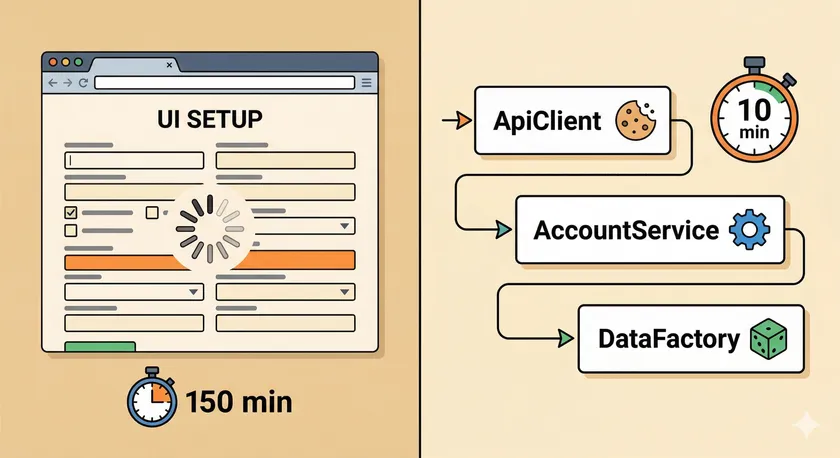
Table of Contents
200 of our 250 Playwright tests spent more time creating test data than actually testing. Each test clicked through 4-5 forms — search an account, load it, copy it, fill out policy details — before a single assertion ran. The suite burned roughly 150 minutes on data setup alone. Three Java classes — an API client, a domain service, and a data factory — brought that under 10.
The Application Nobody Writes Tutorials About
The platform was a large insurance underwriting system. Every screen lived inside nested iframes. Authentication was session-based — JSESSIONID cookies from a form login, no Bearer tokens. And the “API” was a 15-year-old JSONServlet that spoke form-action protocol instead of REST.
Every Playwright API tutorial out there shows the same thing: POST /api/users with a clean JSON body. Our reality looked like this:
[ { "action": "pm_saveProgram", "viewId": "programEditSummaryView", "actionClass": "com.example.ProgramAction" }, { "programForm": { "clientId": "7033", "uwId": "205", "underwritingYear": "2026", "policyStartDate": "01/01/2026" } }]An array where the first element defines the server action and the second carries form data. Responses came back with globalMessage, cascading selects for dropdowns, and server-generated IDs buried three levels deep. Not exactly the { "id": 42 } you see in documentation examples.
How HAR Files Became the Blueprint
I recorded HAR files for every critical flow — create, search, copy, delete. Not to mock anything at runtime, but to understand what the API actually expected. When you’re staring at a JSONServlet that accepts arrays of form-action payloads, the official documentation (if it exists) is usually wrong or outdated. The HAR file is the truth.
Here’s what the recordings revealed:
- The protocol is stateful. Changing the underwriter field triggers a server-side cascade that reloads available business classes. The response depends on prior submissions in the same session.
- IDs are environment-specific. Client ID
7033maps to “Entergy Corporation” in QA3 but a different client in QA1. - Form data is order-dependent. The JSONServlet validates that you’ve called
initViewbeforepm_saveProgram. Calling operations out of sequence returns validation errors.
Once I understood the protocol from the HAR recordings, wrapping each operation in a service method was straightforward.
Should You Use page.request() or Standalone APIRequestContext?
Use page.request() when your app relies on session-based auth. Use standalone APIRequestContext when you need API calls before the browser launches or with separate credentials.
page.request() returns an APIRequestContext that shares cookies with the browser context automatically. Authenticate via API and the browser gets the session. Log in through the browser and API calls carry the cookie. For our JSESSIONID-based app, this was non-negotiable.
Standalone contexts from playwright.request().newContext() have isolated cookie jars — useful for admin operations with different credentials, but they won’t share state with your UI tests.
The 3-Class Solution
Each class has one job. Together, they replace 150 minutes of UI clicking.
Class 1: ApiClient — The HTTP Foundation
Wraps page.request() for cookie sharing, handles serialization with Jackson, and provides clean error logging:
public class ApiClient {    private final APIRequestContext request;    private final String baseUrl;    private final ObjectMapper mapper = new ObjectMapper();
    public ApiClient(Page page, String baseUrl) {        this.request = page.request();        this.baseUrl = baseUrl;    }
    public ApiResponse post(String path, Object body) {        APIResponse raw = request.post(            baseUrl + path,            RequestOptions.create().setData(body));        return new ApiResponse(raw.status(), raw.text());    }}
Line 4: Jackson handles the JSON serialization the framework doesn’t give us natively. Line 7: page.request() means every call carries the browser’s session cookie — no token management required.
Class 2: AccountApiService — The Domain Wrapper
This is where the JSONServlet complexity gets buried. Every public method maps to a user-visible operation — create, search, copy, delete — while hiding the array-based protocol underneath:
public class AccountApiService {    private static final String SERVLET = "oldApi/JSONServlet";    private final ApiClient client;
    public AccountCreateResult createAccount(Account account) {        Object[] payload = new Object[]{            Map.of("action", "pm_saveProgram",                   "viewId", "programEditSummaryView"),            Map.of("programForm", account.toFormData())        };        ApiResponse response = client.post(SERVLET, payload);        return parseAccountId(response);    }
    public void deleteAccount(int accountId) {        Object[] payload = new Object[]{            Map.of("action", "pm_removeProgram",                   "viewId", "programEditSummaryView"),            Map.of("programForm", Map.of("accountId", accountId))        };        client.post(SERVLET, payload);    }}
Lines 6-9: That array protocol — first element for the action, second for form data — is the pattern every JSONServlet call follows. Once you recognize it, wrapping new operations takes minutes.
The service also maintains lookup maps for environment-specific IDs:
private static final Map<String, String> CLIENT_MAP = Map.of( "ENTERGY CORPORATION", "7033", "ACME INSURANCE GROUP", "4521");Hardcoded? Yes. Fragile? Somewhat. But these client-to-ID mappings change once a year at most, and maintaining them beats clicking through a search dialog 200 times per suite run.
Class 3: Account POJO — The Data Factory
Factory methods generate valid test data with sensible defaults and unique names for parallel test isolation:
public static Account getRandomPropertyAccount() { Account account = new Account(); account.setAccountName("H_Auto_" + RandomTestData.getSimpleDate() + "_" + RandomTestData.getRandomNumeric(5)); account.setUnderwriter("John Smith"); account.setInsuranceType("Property"); account.setApiClientId(CLIENT_MAP.get("ENTERGY CORPORATION")); account.setPolicyStartDate(RandomTestData.getTodayDate()); account.setPolicyEndDate(RandomTestData.getTomorrowDate()); return account;}Lines 3-4: The name prefix H_Auto_ plus a timestamp and random number guarantees uniqueness across parallel workers. It also enables pattern-based bulk cleanup — more on that next.
How Do You Handle Cleanup When Tests Fail?
Orphaned test data is the silent cost of API-driven setup. A test creates an account, fails mid-assertion, and the @AfterMethod cleanup never executes cleanly. After a few failed runs, the environment is littered with stale test accounts.
We used two patterns together:
Pattern 1: Bulk delete by name prefix with a safety limit to prevent accidental mass deletion:
public int deleteAccounts(String namePattern, int safetyLimit) { List<AccountRef> matches = searchAccounts(namePattern); if (matches.size() > safetyLimit) { throw new IllegalStateException( "Found " + matches.size() + " matches for '" + namePattern + "' — exceeds safety limit of " + safetyLimit); } matches.forEach(ref -> deleteAccount(ref.getId())); return matches.size();}Line 4: That safety limit exists because I once wrote a cleanup query with a pattern that matched production-like account names. In a QA environment, no harm done. In UAT? That’s a career-limiting bug. The safety limit forces you to be deliberate.
Pattern 2: @AfterMethod cleanup with the name prefix:
@AfterMethod(alwaysRun = true)public void cleanupTestData() { new AccountApiService(apiClient()) .deleteAccounts("H_Auto_", 50);}The alwaysRun = true ensures cleanup runs even when the test fails. The pattern H_Auto_ catches everything our factory creates. The safety limit of 50 protects against surprises.
Results
~150 min
Setup time (before)
~10 min
Setup time (after)
200 of 250
Tests affected
3
Classes added
The numbers break down simply. Each UI-based test data setup — searching an account, loading it, copying it through form clicks — took roughly 45 seconds. Through the API, the same operation completes in about 3 seconds. Across 200 tests, that’s 150 minutes down to 10.
Beyond speed, we gained reliability. UI-based setup was the #1 source of flaky tests caused by session cookie corruption. Slow-loading iframes, intermittent form validation popups, and stale element references during setup — all gone. Tests now test the feature they’re supposed to test, not the data creation flow.
Parallel execution also improved. UI-based setup with shared browser state caused thread safety issues we’d been patching for months. API setup is inherently thread-safe — each call is stateless and independent.
What I’d Do Differently
Start with the registry pattern from day one. We added the bulk-delete-by-prefix approach as a workaround after orphaned data became a problem. A proper registry that tracks every created entity and cleans up in reverse order would have been cleaner.
Use standalone APIRequestContext for admin operations. Some cleanup tasks need admin credentials that differ from the test user’s session. Mixing admin and user operations through the same page.request() means the browser’s cookie jar gets overwritten. Separate contexts for separate roles.
Extract the lookup maps to config. Hardcoded client-to-ID maps work until you add a new environment. A properties file per environment — loaded by the existing ConfigReaderService — would have saved us from editing Java code every time QA4 came online.
Does page.request() share cookies with the browser?
Yes. page.request() returns an APIRequestContext that automatically shares cookies with the BrowserContext. API authentication flows set cookies the browser uses, and browser logins set cookies API calls carry. This is the key reason to prefer page.request() over standalone contexts for session-based apps.
How should I use HAR files in my test automation?
Use HAR files as documentation. Record the manual flow to understand exactly what the API expects — endpoints, payloads, headers, response formats. Then wrap those exact calls in service methods. For legacy APIs like JSONServlet, the HAR recording is often more accurate than any written documentation. It’s your most reliable reference for building the API layer.
How do I prevent orphaned test data in parallel tests?
Use unique name prefixes per test (timestamp + random number), run cleanup in @AfterMethod with alwaysRun = true, and add a safety limit to bulk delete operations. The name prefix pattern lets you clean up by pattern match without needing individual account IDs.
Does this pattern work with Playwright Node.js or Python?
Yes — the architecture (ApiClient, domain service, data factory) is language-agnostic. In Node.js you get a json() method on APIResponse which simplifies deserialization. The pattern of wrapping legacy APIs in a clean service layer applies to any language Playwright supports.
Why not use direct database inserts instead of API calls?
Database inserts bypass business logic and validation. Our JSONServlet enforces field dependencies, cascading lookups, and audit logging that direct SQL would skip. API-driven setup creates data that matches what a real user would produce — with all the server-side side effects intact. If you need to validate that your API contracts are intact, you need to go through the API.
This API data layer is one pillar of a controlled test environment — the broader strategy for isolating your test suite from external instability.
Start with your HAR files. Record the manual flow you want to automate, read the protocol, then wrap those exact API calls in a service class with a clean interface. You don’t need a modern REST API to do API-driven test data management — you just need the discipline to hide the ugliness behind a good abstraction.
Don't miss a thing
Subscribe to get updates straight to your inbox.

No spam · Unsubscribe anytime