Our Enterprise Approved AI — And Why It's the Biggest Risk
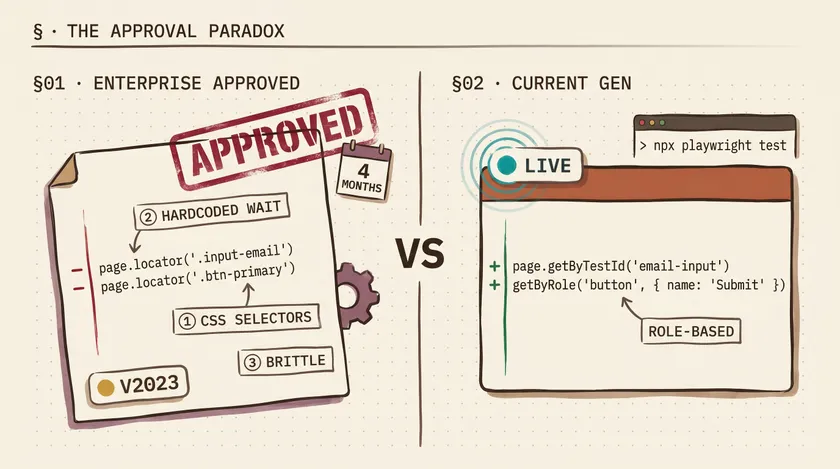
Table of Contents
Our enterprise spent four months evaluating AI coding tools. Procurement reviews, security assessments, vendor calls, legal sign-offs. They approved GitHub Copilot pinned to an older model version. Now the team has an AI assistant that ignores half our coding standards, generates brittle selectors, and hallucinates API methods that don’t exist — but everyone trusts it because it’s “enterprise approved.”
That stamp of approval is the most dangerous part. Not the AI itself, but the false confidence it creates.
Why Enterprises Lock Down AI — And Why It’s Not All Wrong
I want to be fair here. I’ve worked at a large insurer where data governance isn’t optional — it’s regulatory. Customer claims data, health records, financial PII. If that leaks through an AI provider’s training pipeline, you’re not writing a postmortem. You’re talking to lawyers. The companies that move slowly on AI adoption aren’t stupid. Some of them are managing real risk.
The problem is how they manage it. A typical enterprise procurement cycle for a developer tool takes 3-6 months. By the time legal reviews the terms of service, security validates the data handling architecture, and IT provisions the licenses, the model you evaluated is already a generation behind. The version that passed your security review in October isn’t the version that’s best at writing safe, correct code in March. And the engineers on your team know it — because they’re using the latest models at home on personal projects and watching what happens when you let AI write your test suite with a capable model versus what they get at work.
This is where the gap starts. Not a technology gap. An experience gap. Your engineers know what good AI-assisted development feels like, and then they walk into the office and use a version that fights them.
What the Approved Version Actually Gives You
Here’s a concrete example from a project at the insurer. We use Playwright for our test automation. Our coding standard says: use getByTestId or role-based locators. Never use CSS class selectors for test assertions — they break during UI redesigns, and our frontend team ships design changes biweekly.
I asked the approved Copilot agent mode to generate a login test. Here’s what it produced:
test('should log in successfully', async ({ page }) => { await page.goto('/login'); await page.locator('.input-email').fill('user@test.com'); await page.locator('.btn-primary').click(); await page.waitForSelector('.dashboard-header'); expect(await page.title()).toContain('Dashboard');});Every locator is a CSS class. waitForSelector instead of Playwright’s built-in auto-waiting. A title check that proves nothing about the actual login state. This is the kind of code a model generates when it was trained on older patterns and doesn’t understand modern Playwright idioms.
Here’s what a current-generation model gives you for the same prompt:
test('should log in successfully', async ({ page }) => {  await page.goto('/login');  await page.getByTestId('email-input').fill('user@test.com');  await page.getByRole('button', { name: 'Sign in' }).click();
  await expect(page.getByTestId('dashboard-welcome')).toBeVisible();});
Role-based locators. getByTestId for elements without semantic roles. Playwright’s expect with auto-waiting. No CSS classes that’ll break next sprint. This isn’t a minor style difference — it’s the difference between a test that survives 6 months of UI iteration and one that breaks the first time a designer changes a class name.
Agent Mode: Powerful in Theory, Painful in Practice
The approved version does include agent mode — the feature where the AI can read your codebase, make multi-file changes, and iterate on errors. On paper, that’s impressive. In practice, with an older model behind it, agent mode is like giving an intern access to your entire repository. They’ll make changes everywhere, and you’ll spend longer reviewing and reverting than if you’d just written it yourself.
I watched a colleague ask agent mode to add error handling to our API test utilities. It modified 7 files. Three of those changes broke existing tests. One silently swallowed exceptions that our error tracking depended on. The colleague spent 90 minutes untangling the changes — and the original task would have taken 20 minutes by hand.
| Scenario | Older Approved Model | Current-Gen Model |
|---|---|---|
| Follows Playwright best practices | Rarely — defaults to old patterns | Consistently uses modern API |
| Respects project coding standards | Ignores unless heavily prompted | Follows with basic instruction |
| Agent mode multi-file edits | Breaks adjacent code frequently | Understands context boundaries |
| Generates correct TypeScript types | Generic any types common | Infers proper types |
The Paradox: Restrictions Creating More Risk
Here’s what keeps me up at night. The AI restrictions that are supposed to reduce risk are actively creating three new categories of risk that nobody’s tracking.
Shadow AI Is Already Happening
Every enterprise has a “no unauthorized AI tools” policy. Every enterprise also has frustrated engineers pasting proprietary code into ChatGPT and Claude because the approved tool can’t handle their actual task. I’ve seen it happen. Not at one company — at every company I’ve consulted at in the past two years.
At the insurer, I watched engineers copy-paste internal API response schemas into personal ChatGPT windows to generate type definitions. The exact data the policy was designed to protect was flowing through unsanctioned channels because the sanctioned tool couldn’t do the job. Nobody was being malicious. They were being productive. And the company’s security posture was worse than if they’d just approved a capable, properly configured tool.
Bad Code Passes Review Because “The Tool Is Approved”
This one is subtle and dangerous. When a developer writes code by hand and submits a PR, reviewers scrutinize it. When a developer submits AI-generated code and mentions “Copilot helped with this,” there’s a psychological bias to trust it more, not less. The tool passed procurement. It’s sanctioned. Surely it produces reasonable code.
I reviewed a PR where the AI-generated test had a hardcoded 5-second waitForTimeout instead of using Playwright’s auto-waiting locators. Pre-AI, any reviewer would have caught that immediately. But the comment said “generated with Copilot” and two approvals went through without flagging it. That hardcoded wait added 5 seconds to every test run, and there were 40 tests in the file. That’s 3+ minutes of unnecessary CI time per run, multiplied across 15-20 daily runs across the team.
The Debugging Tax
Time your engineers spend fixing bad AI suggestions is time they’re not spending on actual work. At the insurer, I started tracking this informally for my own tasks over a two-week sprint. Out of 8 instances where I used the approved Copilot for test generation, I spent more time fixing the output than I would have spent writing it from scratch in 5 of those 8 cases. A 62% failure rate on time savings. That’s not a productivity tool — that’s a productivity tax with a nice UI.
What Enterprises Should Actually Evaluate
The fix isn’t to throw the doors open and let everyone use whatever AI tool they want. That’s a genuine security risk. The fix is to evaluate AI tools on the criteria that actually matter for both security and productivity.
Most enterprises I’ve worked with evaluate AI tools on exactly one axis: data governance. Where does the data go? Is it used for training? Is it encrypted in transit? Those are important questions, and most enterprise security teams do this well.
But they completely ignore two other criteria that directly impact code quality and, by extension, application security.
A Three-Part AI Evaluation Framework
1. Data Governance — Where does your code go?
Enterprises handle this well. Evaluate data residency, training data policies, SOC 2 compliance, encryption. This is table stakes and non-negotiable. Keep doing this.
2. Model Quality — Is the output actually safe and correct?
This is where enterprises fail. A model that generates insecure code patterns, ignores your framework’s best practices, or hallucinates nonexistent APIs is a security risk, not just a productivity problem. Bad AI-generated code that passes review because of the trust bias described above ends up in production. Model capability isn’t a nice-to-have — it’s a security criterion.
3. Developer Experience — Will engineers actually use it, or route around it?
If the approved tool is frustrating enough that developers use unsanctioned alternatives, your data governance evaluation is worthless. The tool engineers actually use is the one your policy should cover. Evaluate whether the approved tool is good enough that engineers won’t be tempted to shadow-AI their way around it.
The evolution of the SDET role with AI isn’t just about learning new tools. It’s about advocating within your organization for the right tools — and having the technical credibility to explain why model version matters to a security team that thinks all versions are equivalent.
What I’d Do Differently
If I could go back to the start of the procurement process at the insurer, I’d push for three things:
First, I’d insist on a model review cadence written into the agreement. Not “we’ll revisit in a year.” Quarterly lightweight reviews where we test the current approved version against a newer version on our actual codebase and measure output quality. That gives security a structured process instead of ad-hoc “can we please upgrade” requests.
Second, I’d create a shared document of AI-generated code failures from the first month. Concrete examples with time cost. Nothing convinces a procurement team faster than “this approved tool cost us 14 engineering hours in defect fixes last month.”
Third, I’d separate the data governance approval from the model version approval. The vendor’s data handling doesn’t change when they release a new model. Once the vendor is approved, model updates should go through a lighter-weight review — not the full 4-month cycle.
The one action you can take today: ask your security team this question — “When did we last evaluate whether our approved AI model version is still the best option for generating safe, correct code?” If the answer is “at initial procurement” or a blank stare, you’ve found the gap.
If you’re navigating AI adoption at an enterprise and want practical strategies that cut through the vendor hype — not theory, but lessons from actually doing this across multiple large organizations — sign up for the newsletter. I share weekly QA automation insights, no fluff, just battle-tested strategies from 10+ years in the trenches.
Why do enterprises restrict which AI models developers can use?
Primarily for data governance — preventing proprietary code and customer data from being processed by third-party AI providers without proper security controls. In regulated industries like insurance and finance, there are additional compliance requirements around data residency and processing. These are legitimate concerns. The problem isn’t the restriction itself — it’s that most enterprises only evaluate data governance and ignore model quality, which creates different risks.
Is GitHub Copilot's agent mode good enough for enterprise development?
It depends heavily on the model version your enterprise has approved. Agent mode with a current-generation model can be genuinely productive for multi-file refactors, test generation, and boilerplate tasks. Agent mode with an older model tends to make broad, incorrect changes that take longer to fix than doing the work manually. Ask your IT team which model version your Copilot instance uses, and compare it to what’s publicly available. If there’s a generational gap, agent mode will likely create more work than it saves.
How can I advocate for better AI tools at my enterprise?
Start with data. Track time spent fixing AI-generated code versus time saved. Document specific examples where the approved model produced incorrect, insecure, or outdated patterns. Frame the argument in terms the security team cares about: bad code is a security risk. Propose a quarterly model review process — not a full procurement cycle, but a lightweight assessment. And emphasize that frustrated engineers using unapproved tools is a bigger data leakage risk than upgrading the approved model version.
Don't miss a thing
Subscribe to get updates straight to your inbox.

No spam · Unsubscribe anytime