Thread Safety in Parallel Tests: The 3-Day Bug
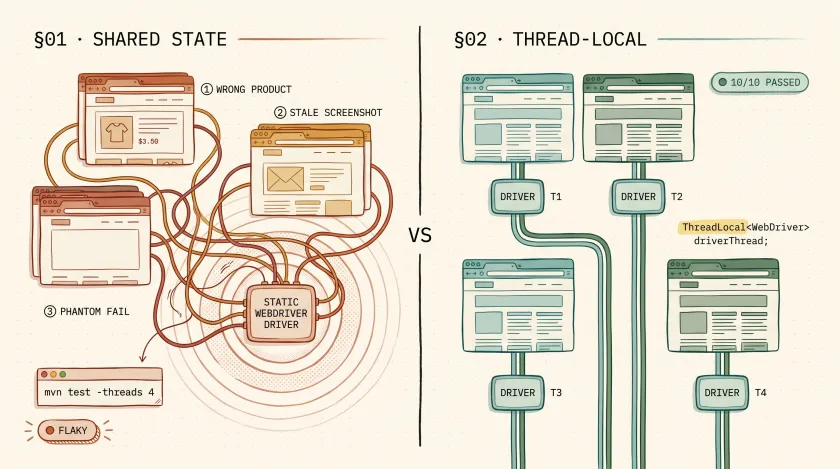
Table of Contents
We had 800 tests running in parallel across 4 threads on a large retail platform. Once a week — never more, never less — a handful of tests would fail with assertion data that didn’t match any test case. A test verifying a product name would assert on a completely different product. A login test would screenshot a dashboard that belonged to a different test’s user. Every failing test passed when rerun individually. It took us three days to find the root cause: our WebDriver instances were leaking between threads.
What Are the Signs of a Thread Safety Bug in Your Test Suite?
Thread safety bugs in parallel test suites disguise themselves as flaky tests. The failures are non-deterministic, disappear on rerun, and the error messages lead you to the wrong root cause. If your tests pass individually but fail when run together, shared mutable state between threads is almost always the culprit.
- Tests pass solo but fail in parallel. This is the number one signal. If a test passes with
--threads 1but fails with--threads 4, the test logic isn’t the problem — shared state is. - Assertion values from a different test. You’re asserting on “Wireless Headphones” but the actual value is “Running Shoes.” That data belongs to a test running on another thread.
- Screenshots show the wrong page. Your test failed on the checkout page, but the failure screenshot shows a product listing page. The WebDriver instance was shared, and another thread navigated away.
- Failures cluster around test count thresholds. We noticed failures only happened when the suite had 700+ tests. With fewer tests, the thread contention was too brief to cause visible issues. This is why thread safety bugs slip through for months before they’re caught.
What Must Be Thread-Local in Parallel Test Execution?
Three categories of state must be thread-local in any parallel test framework: the browser/WebDriver instance, test data, and reporting context. If any of these are shared across threads via static fields, you will get intermittent failures that look like flaky tests but are actually thread contention issues. Here’s each one in detail.
1. The Browser/WebDriver Instance
This is the most common violation and the one that bit us. If two threads share a WebDriver instance, one thread’s navigate() call affects what the other thread sees.
// BAD — shared static field, all threads use the same driverpublic class DriverFactory {    private static WebDriver driver; // Every thread reads and writes this
    public static WebDriver getDriver() {        if (driver == null) {            driver = new ChromeDriver();        }        return driver;    }}
The fix is ThreadLocal, which gives each thread its own isolated instance:
// GOOD — each thread gets its own driver instancepublic class DriverFactory {    private static final ThreadLocal<WebDriver> driverThread = new ThreadLocal<>();
    public static WebDriver getDriver() {        if (driverThread.get() == null) {            driverThread.set(new ChromeDriver());        }        return driverThread.get();    }
// CRITICAL: clean up after each test to prevent memory leaks public static void quitDriver() { WebDriver driver = driverThread.get(); if (driver != null) { driver.quit(); driverThread.remove(); } }}2. Test Data
If your tests create data during execution — a user account, an order, a temporary file — that data must be scoped to the thread or the test. Two tests creating a user with the same email on different threads will collide.
// GOOD — unique test data per thread using thread IDpublic class TestDataFactory {    public static String uniqueEmail() {        return "test-" + Thread.currentThread().getId()            + "-" + System.currentTimeMillis() + "@example.com";    }
    public static String uniqueUsername() {        return "user-" + Thread.currentThread().getId()            + "-" + System.currentTimeMillis();    }}
On the retail platform, our thread safety bug was compounded by test data collision. Two threads creating a cart for “testuser@example.com” meant one thread’s cart got the other thread’s products. Making emails unique per thread eliminated an entire class of phantom failures.
3. Reporting Context
If you’re using Extent Reports or a similar thread-aware reporting library, the test context must be thread-local. We covered this in detail in our squad tagging implementation for Extent Reports, where ThreadLocal<ExtentTest> ensures each thread’s results are attributed correctly.
public class ReportManager {    private static final ThreadLocal<ExtentTest> testThread = new ThreadLocal<>();
    public static void startTest(String name) {        ExtentTest test = extent.createTest(name);        testThread.set(test);    }
    public static ExtentTest getTest() {        return testThread.get();    }}
Without this, test logs from thread 1 bleed into thread 2’s report entry. The result is a report where the failure logs don’t match the test that actually failed — which sends your team on a debugging detour.
How Do TestNG’s Parallel Modes Affect Thread Safety?
TestNG offers three parallel modes — methods, classes, and tests — and each one changes what state is safe to share. The methods mode gives the best speed improvement but is the least forgiving of shared state, requiring full ThreadLocal discipline across your entire framework. Here’s how each mode works:
| Mode | What Runs in Parallel | Safe to Share Across Tests? |
|---|---|---|
methods | Individual test methods | Nothing — each method may run on any thread |
classes | Test classes | Instance fields are safe within a class, not across classes |
tests | <test> blocks from testng.xml | Tests within a block are sequential; across blocks, nothing is safe |
<suite name="Regression" parallel="methods" thread-count="4"> <!-- parallel="methods" is the most aggressive — requires full ThreadLocal discipline --> <test name="AllTests"> <classes> <class name="tests.LoginTests"/> <class name="tests.CheckoutTests"/> <class name="tests.SearchTests"/> </classes> </test></suite>Most teams I work with use parallel="methods" because it gives the best speed improvement. But it’s also the mode that’s least forgiving of shared state. If you’re getting intermittent failures with methods, try switching to classes temporarily. If failures disappear, your problem is shared state between methods — and you need more ThreadLocal.
How Do You Verify Your Test Suite Is Thread-Safe?
Run your parallel suite at least 10 times consecutively. A single passing run proves nothing because thread safety bugs are probabilistic — they depend on timing, CPU load, and which tests happen to run on the same thread. If even one run out of ten fails, you have a thread safety issue. Here’s the verification approach we use:
# Run the suite 10 times in parallel — any failure in any run means thread safety issuefor i in {1..10}; do echo "Run $i of 10" mvn test -Dsurefire.parallel=methods -Dsurefire.threadCount=4 if [ $? -ne 0 ]; then echo "FAILED on run $i — thread safety issue detected" exit 1 fidoneecho "All 10 runs passed — suite is likely thread-safe"On the retail project, our suite passed 1 out of 1 parallel runs consistently. When we ran it 10 times, it failed on runs 3, 7, and 9. That’s a thread safety bug. If your suite passes 10 consecutive parallel runs, you can be reasonably confident it’s thread-safe — though “reasonably” is doing heavy lifting. We run 20 iterations before major releases.
Before
Random failures at 8+ threads
After
10/10 consecutive runs passing
What I’d Do Differently
If I were setting up parallel execution from scratch, I’d make ThreadLocal the default from day one — not something we retrofit after finding bugs. Every base class, every factory, every shared utility would use ThreadLocal storage. The overhead is negligible. The debugging time saved is enormous.
I’d also add a CI gate that runs the suite 5 times in parallel on every PR. Finding thread safety issues before merge is infinitely cheaper than finding them in the nightly run when nobody remembers what they changed.
Understanding coupling and why loose coupling matters helps here too — tightly coupled test infrastructure (shared drivers, shared data, shared state) is exactly what makes parallel execution fragile.
Your Next Step
Check your WebDriver factory. Is the driver stored in a static field or a ThreadLocal field? If it’s static, add ThreadLocal this week — even if you’re not running tests in parallel yet. When you eventually turn on parallel execution (and you will, because a 45-minute suite demands it), you’ll thank yourself for having the foundation already in place.
If your suite already runs in parallel, run it 10 times in a row. If even one run fails, you have a thread safety bug. The fix is almost always ThreadLocal. The hard part is finding which shared state is leaking — and now you know the three places to look first.
Frequently Asked Questions
Does ThreadLocal work with JUnit 5 parallel execution?
Yes. JUnit 5’s parallel execution uses a ForkJoinPool under the hood, and ThreadLocal works the same way it does with TestNG. The key difference is configuration — JUnit 5 uses junit-platform.properties with junit.jupiter.execution.parallel.enabled=true, but the ThreadLocal pattern for WebDriver, test data, and reporting context is identical.
Can you use ThreadLocal with Playwright for Java?
Yes, and you should. Playwright’s Java bindings create Browser, BrowserContext, and Page objects that are not thread-safe. Wrap your Page instance in a ThreadLocal the same way you would a Selenium WebDriver. The Playwright team recommends one BrowserContext per test, which maps naturally to a ThreadLocal per thread.
What is the performance overhead of using ThreadLocal in test automation?
Negligible. ThreadLocal uses a hash map internal to each thread, so lookups are O(1). In our 800-test suite, switching from a shared static WebDriver to ThreadLocal added zero measurable overhead to test execution time. The only cost is memory — each thread holds its own browser instance — but that’s the whole point of parallel isolation.
How do you debug thread safety issues in a CI pipeline where you can't reproduce locally?
Run the suite multiple times in CI using a loop script and capture thread IDs in your logs. Add Thread.currentThread().getId() to your reporting context so every log line includes which thread produced it. When a failure occurs, filter logs by that thread ID and compare against other threads running at the same timestamp. The collision point is usually obvious once you have thread-annotated logs.
Don't miss a thing
Subscribe to get updates straight to your inbox.

No spam · Unsubscribe anytime