Your Test Suite Is Slow for 5 Reasons — Not Just One
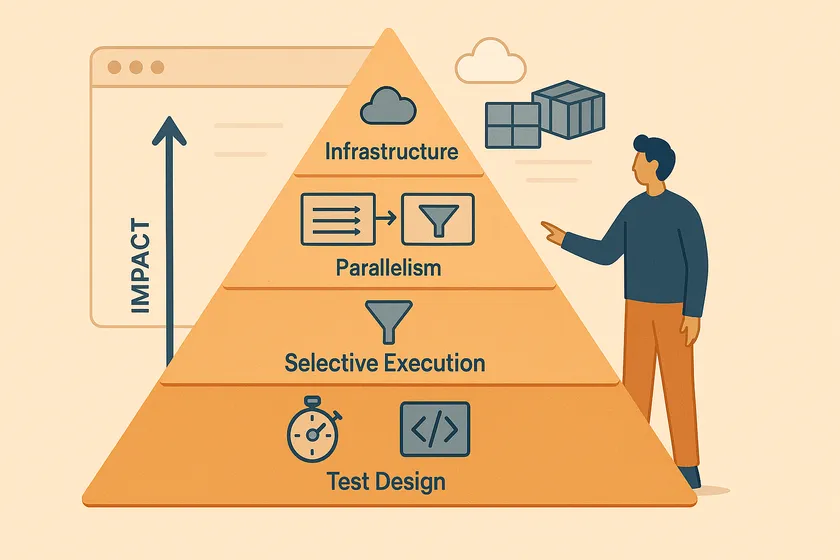
Table of Contents
Most teams do one thing when their test suite is slow: they add parallelism. And it helps — but it’s not enough. I’ve worked on suites that ran 4 hours sequentially, and adding parallelism got them to 30 minutes. But the real gains came from fixing the other four reasons the suite was slow in the first place. A fast test suite isn’t the result of one optimization. It’s the result of five, applied in the right order.
Why Does the Order of Optimization Matter?
Parallelizing a suite of slow, poorly designed tests gives you slow tests running in parallel. You go from 4 hours to 45 minutes instead of 4 hours to 15 minutes — because each individual test is still doing unnecessary work. The order matters because earlier optimizations compound with later ones.
Fix a 30-second test so it runs in 5 seconds. Then parallelize it across 8 sessions. That’s 5 seconds, not 30 — an 80x improvement instead of 8x. Here’s the full stack, ranked by the order you should tackle them:
- Test design — make individual tests faster
- Setup optimization — stop repeating expensive operations
- Selective execution — run fewer tests
- Parallelism — thread-level, process-level, or both
- Infrastructure — cloud platforms, CI caching, containers
Layer 1: How Do You Make Individual Tests Faster?
The fastest parallelism optimization in the world can’t fix a test that takes 30 seconds because it logs in through the UI, navigates 3 pages, and waits for arbitrary timeouts. Fix the tests first.
Replace UI Operations with API Calls
If your test is verifying checkout logic, it doesn’t need to click through the login page, navigate to the product, and add to cart through the UI. Set up state via API, then test only the specific UI interaction you care about.
@Testpublic void shouldApplyDiscountCode() {    // API setup — 200ms instead of 15 seconds of UI clicks    String cartId = apiClient.createCart(testProduct);    apiClient.addItem(cartId, testProduct.getId(), 2);    apiClient.loginAs(testUser);
    // Only the UI interaction being tested    page.navigate("/cart/" + cartId);    page.fill("[data-testid='discount-code']", "SAVE20");    page.click("[data-testid='apply-discount']");    assertThat(page.locator(".total")).hasText("$80.00");}
One test at a large telecom went from 45 seconds to 6 seconds with this change. Multiply that across 200 similar tests and you’ve saved hours before touching parallelism.
Kill Hard Waits
Every Thread.sleep(3000) in your test code is 3 seconds of waste multiplied by however many tests use it. Replace with explicit waits that resolve the moment the condition is met.
// BAD — wastes up to 5 seconds every timeThread.sleep(5000);driver.findElement(By.id("dashboard")).click();
// GOOD — resolves in milliseconds if element is already presentnew WebDriverWait(driver, Duration.ofSeconds(10)) .until(ExpectedConditions.elementToBeClickable(By.id("dashboard"))) .click();Layer 2: How Do You Stop Repeating Expensive Setup?
If every test in your suite logs in through the UI, and login takes 5 seconds, a 300-test suite spends 25 minutes just logging in. Cache it.
Cached Authentication State
Playwright’s storageState and Selenium’s cookie injection both let you authenticate once and reuse the session. We covered the full pattern — including the per-worker isolation pitfall — in our guide to shared test users in parallel suites.
export default defineConfig({ projects: [ { name: 'setup', testMatch: /.*\.setup\.ts/, // Runs once, saves auth state to disk }, { name: 'tests', dependencies: ['setup'], use: { storageState: '.auth/state.json' }, }, ],});Shared Test Data Fixtures
If 50 tests all need the same product catalog, don’t create it 50 times. Create it once in a @BeforeSuite method and share it read-only. The key word is read-only — if tests modify the shared data, you’re back to the race conditions that parallel execution exposes.
Layer 3: How Do You Run Fewer Tests Without Losing Coverage?
The fastest test is the one that doesn’t run. Selective execution means only running the tests affected by a code change, not the entire suite on every commit.
Tag-Based Filtering
Tag your tests by feature area, priority, or risk level. Run the full suite nightly; run only the affected tags on each PR.
<suite name="PR-Suite"> <!-- Only critical and recently-changed areas --> <test name="AffectedTests"> <groups> <run> <include name="checkout"/> <include name="auth"/> </run> </groups> <classes> <class name="tests.CheckoutTests"/> <class name="tests.AuthTests"/> </classes> </test></suite>Risk-Based Execution
Not all tests have equal value. A login test catches real production issues. A test for a tooltip’s hover state almost never does. Rank your tests by the cost of the bug they’d catch and run the high-risk ones on every PR, the low-risk ones nightly.
Layer 4: How Do You Parallelize Your Test Suite?
This is where most guides start. But by the time you get here, layers 1-3 have already made each test faster, eliminated redundant setup, and reduced the total test count. Parallelism now multiplies those gains.
There are two levels of parallelism, and choosing the right one determines whether you need a framework rewrite or not. I wrote a deep dive on this in Parallel Execution Without the Refactor Tax — here’s the summary.
Thread-Level Parallelism
Multiple threads in one JVM process, sharing the same memory space. This is what TestNG’s parallel execution modes and JUnit 5’s parallel config give you.
<suite name="Regression" parallel="methods" thread-count="8"> <test name="AllTests"> <packages> <package name="tests.*"/> </packages> </test></suite>The cost: Every shared resource — WebDriver, test data, reporting context — must be wrapped in ThreadLocal. I documented the 3-day debugging nightmare this caused in Thread Safety in Parallel Tests. It’s the right approach long-term, but it’s a 2-3 week refactoring project.
Best for: New frameworks designed with thread safety from day one, or teams with the bandwidth for a proper refactor.
Process-Level Parallelism
Separate OS processes, each with its own JVM and memory space. No shared state, no ThreadLocal needed. The operating system enforces the isolation.
Ways to achieve it:
- Maven Surefire’s
forkCount— each fork is a separate JVM - Separate OS user accounts — each running an independent test subset
- Docker containers — each test group in its own isolated container
- Cloud platforms (BrowserStack, Sauce Labs, LambdaTest) — managed infrastructure, same isolation
- CI matrix strategies — GitHub Actions or Jenkins parallel jobs
The cost: More resource overhead per process (each one loads a full JVM). But zero framework changes.
Best for: Existing frameworks that need parallel execution now without a rewrite.
Combined: Process × Thread
The fastest approach. Run multiple processes, each with multiple threads inside.
4 processes × 4 threads = 16 tests running simultaneously.
Process-level gives you inter-process isolation for free. You still need ThreadLocal within each process — but your blast radius for shared state bugs is 4 tests per process, not your entire suite. If one process has a thread safety issue, the other three keep running cleanly.
<plugin> <groupId>org.apache.maven.plugins</groupId> <artifactId>maven-surefire-plugin</artifactId> <configuration> <!-- Process-level: 4 separate JVM forks --> <forkCount>4</forkCount> <reuseForks>true</reuseForks> <!-- Thread-level: each fork runs 4 threads --> <parallel>methods</parallel> <threadCount>4</threadCount> </configuration></plugin>Layer 5: How Do You Optimize Test Infrastructure?
Infrastructure is the final multiplier. It doesn’t make individual tests faster, but it reduces the overhead around test execution.
CI Pipeline Caching
Cache your dependencies, browser binaries, and build artifacts. A cold Playwright install takes 30-60 seconds. A cached one takes 2 seconds.
- name: Cache Playwright browsers  uses: actions/cache@v4  with:    path: ~/.cache/ms-playwright    key: playwright-${{ hashFiles('package-lock.json') }}    restore-keys: |      playwright-
- name: Install Playwright (uses cache if available)  run: npx playwright install --with-deps
Docker-Based Test Environments
Docker gives you reproducible, isolated test environments. Each container starts with a known state — no “it works on my machine” debugging. Tools like Selenoid spin up browser containers on demand, and each container is inherently process-level isolated.
CI Matrix Strategies
GitHub Actions and Jenkins both support matrix strategies that distribute test groups across parallel runners. This is process-level parallelism at the CI level — each runner is a separate machine.
jobs: test: strategy: matrix: shard: [1, 2, 3, 4] steps: - run: npx playwright test --shard=${{ matrix.shard }}/4What Order Should You Optimize In?
| Layer | Impact | Effort | When |
|---|---|---|---|
| 1. Test design | High — fixes compound with every other layer | Low-medium | Always first |
| 2. Setup optimization | Medium — eliminates the most repeated cost | Low | Before parallelism |
| 3. Selective execution | High — avoids running unnecessary tests entirely | Medium | For PR pipelines |
| 4. Parallelism | High — multiplies all previous gains | Medium-high | After layers 1-3 |
| 5. Infrastructure | Medium — reduces overhead, not test time | Medium | When pipeline overhead is the bottleneck |
The mistake I see most often: teams jump straight to layer 4 because it feels like the most “engineering” solution. But a suite of 300 slow, redundant tests running in parallel is still a slow suite — just a parallel slow suite.
Your Next Step
Run your 10 slowest tests individually and time each one. Ask: is this test slow because of what it’s testing, or because of how it’s testing it? If any test spends more time on setup (login, navigation, data creation) than on actual assertions, that’s a layer 1 or layer 2 fix. Start there. Parallelism comes after.
Should I optimize for speed or stability first?
Stability. A fast but flaky suite is worse than a slow but reliable one because nobody trusts the results. Fix shared state issues, test data collisions, and implicit ordering dependencies before adding parallelism. Parallelism amplifies instability — if your suite has a 2% flake rate sequentially, it’ll have an 8-10% flake rate in parallel because you’re increasing the chance of state collisions.
How fast should a test suite be?
For PR pipelines, aim for under 10 minutes total. For nightly regression, under 30 minutes. These aren’t arbitrary — 10 minutes is the threshold where developers start context-switching to other work, and 30 minutes is the limit for a usable overnight feedback loop. If you’re over these numbers, start at layer 1.
Does this apply to API tests too?
Yes, but the emphasis shifts. API tests are already fast individually (no browser overhead), so layers 1-2 have less impact. Jump to layers 3-4 sooner. API tests also have fewer shared state issues in parallel since there’s no browser session to manage — but test data collisions still apply.
Can I skip layers and go straight to parallelism?
You can, and sometimes you should — if you need results by Friday, process-level parallelism is the fastest win. But come back and address layers 1-3 afterward. Otherwise you’re paying for more parallel sessions than you need because each test takes longer than it should.
Don't miss a thing
Subscribe to get updates straight to your inbox.

No spam · Unsubscribe anytime