Managing UI Text in Test Automation
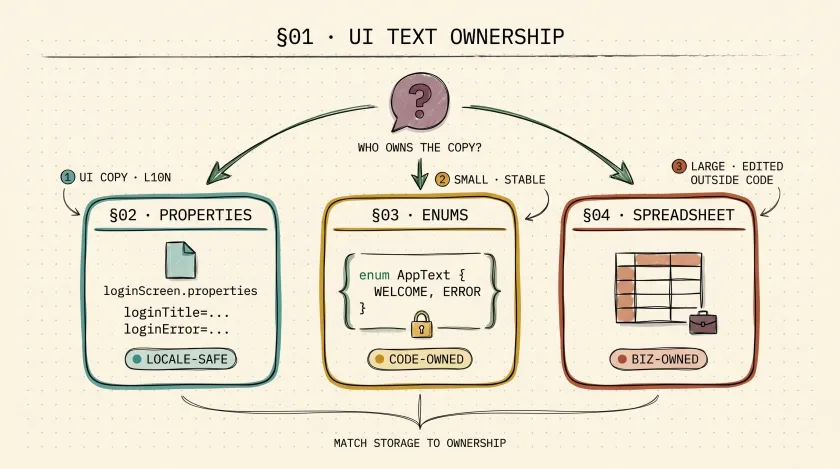
Table of Contents
Text assertions look simple until the application starts changing quickly. Copy gets revised. Product names shift. Marketing wants different wording by region. Suddenly the same message is duplicated across page objects, step definitions, and test data files, and every release turns into a search-and-replace exercise.
The problem is not “how do I store a string?” The problem is who owns the text, how often it changes, and whether tests can stay readable while it does.
This gets even more important once your team starts leaning on text for selector strategy. If your locators depend on visible copy, you need a sane way to manage that copy across locales and releases. I cover the selector side in why I prefer text-based locators and the XPath edge cases in my breakdown of text() vs dot notation.
Start with one rule
Only externalize text that earns its cost.
If a string is stable, local to one test, and unlikely to change, hardcoding it may be perfectly fine. Externalize text when:
- the same text is reused across many tests
- the text differs by locale or environment
- non-developers own the copy
- changing the text should not require code edits in ten places
Over-abstracting every string is how frameworks become harder to read than the app they test.
Option 1: Properties files for UI copy
Properties files are my default when the text is user-facing and might vary by language, environment, or brand.
Example:
loginTitle=Welcome to Your ApploginError=Invalid username or passwordAnd a small loader:
public class TextDataManager {    private final Properties textProperties = new Properties();
    public TextDataManager(String screenName) throws IOException {        String filePath = "path/to/your/" + screenName + ".properties";        try (FileInputStream fis = new FileInputStream(filePath)) {            textProperties.load(fis);        }    }
    public String getText(String key) {        return textProperties.getProperty(key);    }}
This approach works well when:
- the same copy appears in multiple tests
- localization matters
- content changes are frequent but still structured
The tradeoff is indirection. If every assertion now reads through three layers of helper classes, you’ve made the suite harder to understand. Keep the access path shallow.
Option 2: Enums for stable, code-owned text
Enums are useful when the set of values is small, well-known, and unlikely to change outside engineering control:
public enum AppText {    WELCOME_MESSAGE("Welcome to Our App"),    LOGIN_ERROR("Invalid credentials");
    private final String text;
    AppText(String text) {        this.text = text;    }
    public String getText() {        return text;    }}
This gives you compile-time safety and a discoverable set of constants. I like enums for:
- fixed labels in internal tools
- status text used across API and UI assertions
- small canonical vocabularies the team owns directly
I do not like enums for copy that changes every sprint. Recompiling code to update marketing text is a bad ownership model.
Option 3: Spreadsheets when the business owns the data
Excel or CSV-backed text is sometimes the right answer, especially when QA analysts, business users, or localization teams update the values. The mistake is using spreadsheets by default just because they’re familiar.
If you go this route, load once and keep the access API simple:
import org.apache.poi.ss.usermodel.*;
import java.io.FileInputStream;import java.util.HashMap;import java.util.Map;
public class ExcelDataManager {    private static final Map<String, String> textDataMap = new HashMap<>();
    public static void loadTextData(String excelFilePath) throws Exception {        try (FileInputStream fileInputStream = new FileInputStream(excelFilePath);             Workbook workbook = WorkbookFactory.create(fileInputStream)) {            Sheet sheet = workbook.getSheetAt(0);
            for (Row row : sheet) {                Cell keyCell = row.getCell(0);                Cell valueCell = row.getCell(1);                textDataMap.put(keyCell.getStringCellValue(), valueCell.getStringCellValue());            }        }    }
    public static String getText(String key) {        return textDataMap.get(key);    }}
Use spreadsheets when:
- non-developers must edit the data directly
- the dataset is large enough that code-based storage becomes noisy
- your team already has a controlled process for versioning those files
Avoid them when the values are tiny, static, or tightly coupled to code. Spreadsheets add parsing overhead and make refactors harder to track.
Complementary tools people forget
Text management is not only about where the string lives.
Accessibility tools help validate meaning
If text is critical to the user journey, accessibility checks matter too. A label that visually looks correct but is disconnected from its input is still broken. Tools like Axe catch issues that pure string assertions miss.
Visual regression still matters for rendering
Copy can be present and still be unusable because of truncation, overflow, or layout collapse. That is where visual regression tools earn their keep. I would not use them for every text check, but for critical UI surfaces they catch a different class of failure than string assertions.
A quick decision guide
| Option | Best when | Main risk |
|---|---|---|
| Properties files | UI copy changes by locale, environment, or feature | Too much indirection if overused |
| Enums | Small, stable, code-owned text | Hard to maintain when copy changes often |
| Excel or CSV | Business users maintain large datasets | Extra complexity for small use cases |
What I default to
My default order is simple:
- Hardcode truly local strings
- Use properties files for reusable UI copy
- Use enums for small stable vocabularies
- Use spreadsheets only when ownership demands it
The best text strategy is the one that matches how the text actually changes. If the ownership model and the storage model disagree, your tests will slowly turn into a maintenance project.
Don't miss a thing
Subscribe to get updates straight to your inbox.

No spam · Unsubscribe anytime