XPath text() vs Dot — Why Your Text Match Fails
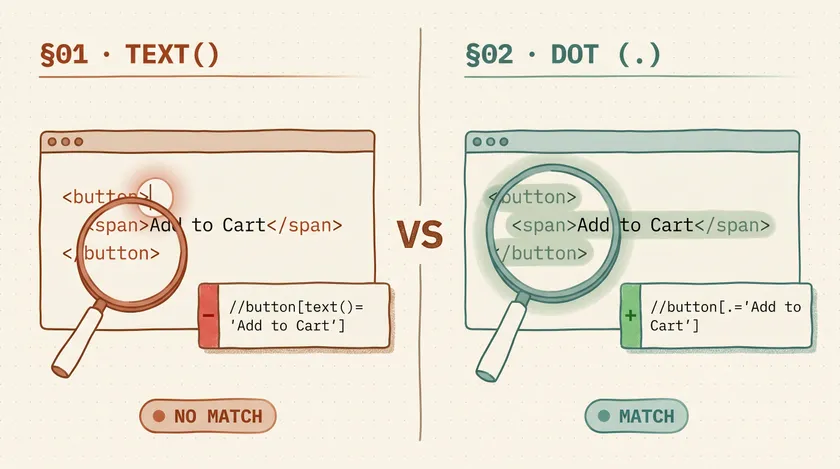
Table of Contents
I once spent the better part of a day debugging a Selenium test that passed on my machine and failed in CI. The locator was //button[text()='Add to Cart']. Looked perfectly fine. The problem? The actual HTML had a nested <span> inside the button, so text() was matching the text node outside the span — an empty string. Switching to . (dot notation) fixed it instantly. That one-character change saved the pipeline.
If you’ve used XPath text matching in test automation, you’ve probably hit a version of this. The differences between text(), ., contains(), and normalize-space() look minor in documentation but cause real failures in production test suites. Here’s what each actually does and when to use which.
text() — The Strict Direct-Child Match
text() selects the text node that’s a direct child of the element. It does not see text inside nested child elements. This is the single most misunderstood XPath function in test automation.
Nested markup is the common failure mode
<button>Add to Cart</button><!-- text() sees: "Add to Cart" ✅ -->
<button><span>Add to Cart</span></button><!-- text() sees: "" ❌ (text lives inside <span>, not <button>) -->
<button>Add to <strong>Cart</strong></button><!-- text() sees: "Add to " ❌ (only the first text node, not "Cart") -->
In a Selenium test, this plays out like this:
// This ONLY works if the button text is a direct childdriver.findElement(By.xpath("//button[text()='Add to Cart']"));// ✅ Matches: <button>Add to Cart</button>
// This silently fails to match — no error, just no element founddriver.findElement(By.xpath("//button[text()='Add to Cart']"));// ❌ Fails: <button><span>Add to Cart</span></button>Use text() when: You’re certain the element has no nested markup and you want an exact match. Honestly, that’s a narrow use case. In most enterprise apps, buttons and labels have nested spans, icons, or formatting elements.
. (Dot) — The Concatenated Text Match
The dot represents the string value of the current node, which is the concatenation of all descendant text nodes. This is almost always what you actually want when matching visible text.
<button><span>Add to</span> Cart</button><!-- dot sees: "Add to Cart" ✅ (concatenates all text nodes) -->
<div class="alert"> <strong>Warning:</strong> Item out of stock</div><!-- dot sees: "Warning: Item out of stock" ✅ -->// Dot matches ALL visible text inside the element, including nested childrendriver.findElement(By.xpath("//button[.='Add to Cart']"));// ✅ Matches both <button>Add to Cart</button>// ✅ AND <button><span>Add to Cart</span></button>This is the one I default to. On a retail platform I worked on, we had about 400 XPath locators using text(). After a front-end redesign that wrapped button text in <span> elements for styling, 90 of those locators broke overnight. We replaced them all with dot notation in a single refactor and didn’t have that class of failure again.
Use . (dot) when: You want to match the full visible text of an element regardless of its internal HTML structure. This should be your default for XPath text matching.
contains() — The Partial Match
contains() checks whether a string appears anywhere within another string. Pair it with either text() or . depending on whether you need direct-child or concatenated matching.
// Partial match on concatenated text — the flexible optiondriver.findElement(By.xpath("//div[contains(., 'Welcome back')]"));// ✅ Matches: <div>Welcome back, Halmurat</div>// ✅ Matches: <div><span>Welcome back</span>, Halmurat</div>
// Partial match on direct text node onlydriver.findElement(By.xpath("//div[contains(text(), 'Welcome')]"));// ✅ Matches: <div>Welcome to the dashboard</div>// ❌ Fails: <div><em>Welcome</em> to the dashboard</div>
Partial matches need a narrow search area
contains() is useful for dynamic text — greetings with usernames, counts that change, timestamps. But it comes with a trap that catches people: it matches substrings, so contains(., 'Order') matches “Order Placed,” “Order Cancelled,” “Reorder Items,” and “Order” itself.
On a banking platform with about 1,200 tests, we had a contains(., 'Account') locator that started matching 6 elements after a new dashboard feature added “Account Summary” and “Account Settings” cards alongside the original “Account Balance” widget. The test didn’t fail — it silently clicked the wrong element and the assertions passed by coincidence. We only caught it during a manual review.
Use contains() when: You need partial matching for dynamic text, and you’ve verified that the substring is unique enough within its DOM context.
normalize-space() — The Whitespace Fixer
HTML rendering collapses whitespace, but the DOM doesn’t. An element that looks like “Submit Order” on screen might be \n Submit Order\n in the source. normalize-space() strips leading/trailing whitespace and collapses internal whitespace to single spaces.
<button> Submit Order</button><!-- normalize-space() sees: "Submit Order" ✅ --><!-- text() sees: "\n Submit\n Order\n" ❌ --><!-- dot sees: "\n Submit\n Order\n" ❌ -->// Handles whitespace from formatted HTML sourcedriver.findElement(By.xpath("//button[normalize-space()='Submit Order']"));// ✅ Matches even with newlines and extra spaces in the source
// Combine with contains() for partial match + whitespace handlingdriver.findElement(By.xpath("//button[normalize-space(.)='Submit Order']"));Whitespace bugs often masquerade as timing bugs
Use normalize-space() when: You’re matching multi-word text or your tests run against different build configurations where whitespace rendering may vary.
The @text Myth
One thing worth clearing up: @text is not a valid XPath expression. The @ symbol is for attributes (@class, @id, @data-testid). There is no text attribute in HTML. If you see @text in someone’s code, it’s a bug — it will silently match nothing.
Quick Reference: Which One to Use
| Function | Matches | Whitespace | Nested Text | Best For |
|---|---|---|---|---|
text()='...' | Exact, direct child only | Sensitive | No | Simple elements with no child markup |
.='...' | Exact, all descendants | Sensitive | Yes | Most text matching — default choice |
contains(., '...') | Partial, all descendants | Sensitive | Yes | Dynamic text, greetings, counts |
normalize-space()='...' | Exact, whitespace-normalized | Normalized | Yes | Multi-word text, cross-environment stability |
Common Patterns — Copy-Paste Ready
These are the XPath text patterns I’ve actually used in production Selenium suites. Grab the one you need and adapt it.
// Button with text inside a nested <span> or <i> icon//button[normalize-space(.)='Submit Order']
// Div with mixed text and child elements (alerts, banners)//div[contains(., 'Warning:') and contains(@class, 'alert')]
// Table cell by exact visible text//table//td[normalize-space(.)='Pending Review']
// Element with leading/trailing whitespace in source HTML//label[normalize-space()='Email Address']
// Partial match for dynamic text (e.g., "Welcome, Halmurat" or "Welcome, Admin")//div[contains(., 'Welcome,')]
// Error or validation message matching//span[contains(@class, 'error') and contains(., 'is required')]
// Link by visible text even when it wraps <strong>, <em>, or <span>//a[normalize-space(.)='View Full Report']Why I’m Moving Away From XPath Text Matching Entirely
Here’s the honest take: if you’re starting a new automation project today, you probably shouldn’t be writing raw XPath at all. Playwright’s built-in text locators handle all of these edge cases — whitespace normalization, nested elements, partial matching — without you needing to remember which XPath function does what.
// Playwright handles all the edge cases automaticallyconst submitBtn = page.getByRole('button', { name: 'Submit Order' });const welcome = page.getByText('Welcome back');// No whitespace issues, no nested element issues, no substring trapsBut if you’re maintaining an existing Selenium suite — and let’s be realistic, most enterprise teams are — knowing the difference between text() and . will save you hours of debugging. I’ve been there. A one-character change shouldn’t take a full day to figure out.
Your Next Step
Open your test codebase and search for text()= in your XPath locators. For each one, check whether the target element has nested markup. If it does, switch to dot notation. That single change will eliminate an entire category of flaky failures.
If you’re dealing with broader selector stability problems beyond just XPath, check out why text-based locators outperform CSS selectors for the full picture on building a resilient locator strategy.
Don't miss a thing
Subscribe to get updates straight to your inbox.

No spam · Unsubscribe anytime