Stop Launching a Browser Per Test in Playwright
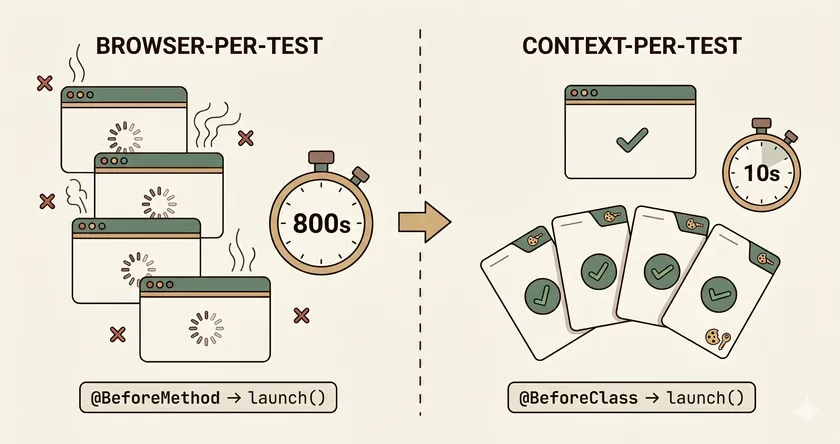
Table of Contents
You migrated from Selenium to Playwright. Your tests pass. Your locators are cleaner. But your CI is still slow — maybe even slower than before. The culprit is almost always the same: you brought Selenium’s execution model with you and threw away Playwright’s key advantage.
In Selenium, new ChromeDriver() per test is the only reliable way to get clean isolation. Every Selenium team learns this the hard way — share a driver across tests and you get cookie bleed, stale sessions, and phantom failures. So when those teams move to Playwright, they do the natural thing: call playwright.chromium().launch() in every @BeforeMethod. A fresh browser for every test. Clean slate every time.
It works. Tests pass. Isolation is real. But it’s like buying a Tesla and towing it with a horse. You’ve adopted the tool without adopting the architecture that makes it fast.
At a large retailer, we migrated ~400 Selenium tests to Playwright and kept the browser-per-test pattern for the first month. CI time barely changed. We couldn’t figure out why Playwright wasn’t delivering the speed everyone promised — until we realized we’d replicated Selenium’s heavyweight isolation model inside a framework designed for lightweight isolation.
How much does browser-per-test actually cost?
For a 200-test suite running 4 parallel workers, browser-per-test adds roughly 800 seconds of pure launch overhead. Context-per-test does the same job in about 10 seconds. The math is straightforward.
Each playwright.chromium().launch() call spawns a new Chromium process. The Playwright API sets a default timeout of 30 seconds for this operation — that alone signals it’s not a lightweight call. In practice, browser launch takes 3-6 seconds depending on hardware and whether Chrome needs to initialize caches, GPU processes, and network services.
Each browser.newContext() creates an isolated session inside an already-running browser. Playwright’s docs describe contexts as “fast and cheap to create” — in practice, creation takes just a handful of milliseconds. No process spawn, no cache initialization, no GPU startup.
3-6s
Browser launch
~ms
Context creation
~300MB
Memory per browser
minimal
Memory per context
The numbers on a 200-test suite
For a concrete comparison with 4 parallel workers:
| Metric | Browser-per-test | Context-per-test |
|---|---|---|
| Isolation overhead | 200 × ~4s = ~800s | 200 × ~ms = ~seconds |
| Peak memory (4 workers) | 4 × ~300MB = ~1.2GB | 1 browser + 4 contexts ≈ ~400MB |
| Estimated CI time | ~12-15 min | ~6-8 min |
Memory pressure on CI runners
The memory difference matters more than most teams realize. GitHub Actions runners have 7GB of RAM. With browser-per-test and 4 workers, you’re burning 1.2GB on browser processes alone. Add your application under test, Node.js, and the OS, and you’re flirting with OOM kills — which show up as flaky tests, not memory errors.
Why does Playwright have BrowserContext?
Playwright has BrowserContext because test isolation doesn’t require process-level separation. A BrowserContext provides completely isolated sessions — cookies, storage, cache — within a single browser process, eliminating the 3-6 second startup cost of launching a new browser each time. It’s Playwright’s answer to the isolation problem that Selenium solved with expensive process spawning.
BrowserContext is a lightweight isolated session inside a single browser process. It has its own cookies, localStorage, sessionStorage, and cache — the same isolation guarantees you’d get from a fresh browser, without the process startup cost. Playwright’s docs describe them as “equivalent to incognito-like profiles.”
// One browser, many isolated contextsBrowser browser = playwright.chromium().launch();BrowserContext userContext = browser.newContext();BrowserContext adminContext = browser.newContext();// Each has completely separate cookies, storage, cacheThis is Playwright’s answer to the test isolation problem. Selenium solved it with process-level isolation (new browser = new process = clean state). Playwright solves it with context-level isolation (same browser process, separate state containers). The isolation is equally strong — cookies from userContext cannot leak into adminContext — but the overhead is orders of magnitude lower.
The Playwright team explicitly recommends context-per-test as the default model: “Playwright creates a context for each test, and provides a default Page in that context.” If you’re overriding this with browser-per-test, you’re fighting the framework’s design.
The refactor
Here’s the change. It takes 5 minutes and touches exactly two methods in your base test class.
Selenium habit — new browser per test
public class BaseTest {    protected Page page;    private Browser browser;
    @BeforeMethod    public void setup() {        // 3-6 seconds per test        browser = playwright.chromium().launch();        page = browser.newPage();    }
    @AfterMethod    public void teardown() {        browser.close();    }}
Playwright-native — new context per test
public class BaseTest {    private static Browser browser;    protected BrowserContext context;    protected Page page;
    @BeforeMethod    public void setup() {        // Milliseconds per test        context = browser.newContext();        page = context.newPage();    }
    @AfterMethod    public void teardown() {        context.close();    }}
The browser in the “after” version is launched once in a @BeforeClass or static initializer — one Chromium process per thread, reused across all tests on that thread. Each test gets a fresh BrowserContext with isolated cookies, storage, and cache. When the test ends, context.close() destroys all state. The next test starts clean.
This is the pattern that cut our retailer CI from ~14 minutes to ~7 minutes. The tests were identical. The assertions were identical. The only change was swapping launch() for newContext() in the base class.
If you’re running parallel tests with TestNG, the same principle applies: one browser per thread (stored in a ThreadLocal<Browser> or scoped with @BeforeClass), and a fresh context per @Test. We covered the thread safety patterns in detail — the context model eliminates most of the ThreadLocal<WebDriver> ceremony Selenium teams are used to.
When is browser-per-test actually right?
To be fair, there are legitimate cases for launching a new browser per test:
- Browser extension testing — extensions load at browser launch, not per-context
- Different browser flags per test — e.g.,
--disable-gpufor one test,--enable-features=Xfor another - Testing browser launch behavior itself — cold start timing, first-run dialogs
These are edge cases. For 95%+ of test suites, context-per-test is the correct default. If your @BeforeMethod calls launch() and you’re not testing one of the scenarios above, you’re paying Selenium’s tax with none of Playwright’s benefits.
Your next step
Open your base test class right now. If @BeforeMethod calls launch() or playwright.chromium().launch(), change it to browser.newContext(). Move the browser launch to @BeforeClass. Run your suite and compare the CI time. The change takes 5 minutes. The impact on a 200+ test suite is usually measured in minutes per run — minutes that compound across every CI pipeline trigger, every PR check, every nightly regression.
If you’re also seeing shared test user race conditions or storageState contamination in your parallel suite, those are separate problems with separate fixes. But they’re all rooted in the same question: are you using Playwright the way Playwright was designed, or are you running Selenium patterns inside a Playwright wrapper?
Is BrowserContext as isolated as a new browser?
Yes, for all user-facing state. Each BrowserContext has its own cookies, localStorage, sessionStorage, and cache — they are “completely isolated, even when running in a single browser”. Tests in different contexts cannot see each other’s state. The only shared resources are process-level internals like DNS cache and TLS session cache, which don’t affect test behavior.
Does context-per-test work with TestNG parallel execution?
Yes. Create one Playwright instance and one Browser per thread (via @BeforeClass or ThreadLocal<Browser>), then create a new BrowserContext per test in @BeforeMethod. The browser stays alive across tests on that thread while each test gets fresh isolation. We covered the full thread safety setup in a separate post.
What about storageState leaking between contexts?
storageState is loaded per-context via newContext(new Browser.NewContextOptions().setStorageStatePath(path)), not shared globally. If you’re seeing contamination, you’re likely reusing a context across tests or loading a stale state file that includes localStorage entries from third-party scripts. Each new context starts clean — see our deep dive on storageState contamination for the full debugging guide.
Don't miss a thing
Subscribe to get updates straight to your inbox.

No spam · Unsubscribe anytime