Your Selectors Keep Breaking — Start Using Text
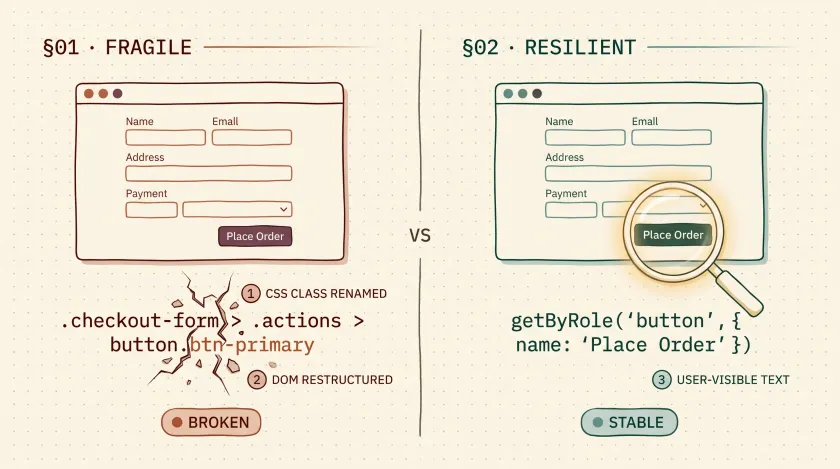
Table of Contents
Every sprint, somewhere in a large enterprise, a UI redesign lands and 30% of the automation suite turns red. Not because features broke — because someone renamed a CSS class from btn-primary to btn-cta-primary. I’ve watched teams burn entire days triaging failures that had nothing to do with actual bugs. The fix that cut our selector-related failures by over 60% on one project was embarrassingly simple: we started locating elements by what users actually see — the text.
Why Selectors Fail More Than They Should
Here’s a pattern I’ve seen at nearly every enterprise I’ve worked with. A front-end team migrates from Bootstrap to a design system, or upgrades from Angular Material v14 to v15, or just refactors their component library. Every id, every class, every data- attribute is fair game for changes. And every one of those changes has the potential to break a test that was working fine yesterday.
The core problem is coupling. When your tests depend on implementation details — CSS classes, DOM structure, auto-generated IDs — you’ve welded your test suite to the front-end codebase. Every UI commit becomes a potential test-breaking event, and your team spends more time maintaining selectors than catching real bugs.
Text-based locators flip that relationship. The visible text on a button, a link, or a heading is a product decision, not an implementation detail. Product owners decide that the button says “Submit Application.” That text goes through design review, accessibility review, and translation. It doesn’t change because a developer refactored a component.
Text Locators Match How Users Think
When a QA engineer writes a manual test case, they never write “Click the element with class btn-submit-form-action.” They write “Click the Submit button.” Text-based locators let your automation mirror exactly how users and testers think about the application.
This isn’t just about readability — though that matters too. It’s about catching the right failures. If someone changes the button text from “Submit” to “Send,” your text locator breaks. And it should break, because that’s a user-facing change that needs to be verified. A CSS selector wouldn’t catch that at all.
Consider these two approaches side by side.
The Fragile Way
// Tied to implementation details — breaks when devs refactorWebElement submitBtn = driver.findElement( By.cssSelector(".checkout-form > .actions > button.btn-primary"));This selector breaks if the dev wraps .actions in a new container, renames btn-primary, or restructures the form layout. None of those changes affect what the user sees.
The Resilient Way
// Tied to user-visible text — breaks only when UX changesWebElement submitBtn = driver.findElement(By.linkText("Place Order"));This only breaks if the button text itself changes — which is a legitimate change your tests should catch.
How Playwright Got This Right
Playwright’s locator API was designed around this philosophy from day one, and it’s one of the reasons I recommend teams consider migrating from Selenium wrapper classes to Playwright’s built-in locators. The getByRole and getByText locators combine text matching with accessibility semantics, giving you stability and specificity in a single call.
// Playwright's text-based locators — clean and stableconst submitButton = page.getByRole('button', { name: 'Place Order' });const cancelLink = page.getByRole('link', { name: 'Cancel' });
// Partial matching for dynamic textconst welcomeBanner = page.getByText('Welcome back,');const cartCount = page.getByText(/\d+ items in cart/);
Notice what’s happening here. getByRole('button', { name: 'Place Order' }) doesn’t just find text — it finds a button with that text. So if there’s a paragraph that also says “Place Order,” you won’t get a false match. That’s the kind of precision that makes text locators production-ready.
Selenium’s Text Options
Selenium has supported text locators for years, though fewer teams use them than should. Here’s what’s available.
// Exact link text matchWebElement docs = driver.findElement(By.linkText("Documentation"));
// Partial text match — useful for dynamic contentWebElement welcome = driver.findElement(By.partialLinkText("Welcome"));
// XPath text matching — more flexible but verboseWebElement submitBtn = driver.findElement(    By.xpath("//button[text()='Submit']"));
If you’re working with XPath text matching and running into whitespace or nested text issues, I covered the nuances of text() vs dot notation and normalize-space() in detail in our guide to mastering XPath text locators.
When Text Locators Don’t Work (And What to Do Instead)
The Duplicate Text Problem
If your page has three buttons that all say “Delete,” text alone won’t cut it. You need to scope your search.
// Scope text locators to a specific sectionconst userRow = page.getByRole('row', { name: 'john@example.com' });const deleteBtn = userRow.getByRole('button', { name: 'Delete' });In Selenium, you’d use XPath axes or chain locators to narrow the context. The pattern is the same: find the container first, then find the text within it.
Icons and Non-Text Elements
Buttons with only icons and no visible text need a different approach. This is where aria-label and data-testid earn their place.
// Icon-only button — use aria-labelconst closeBtn = page.getByRole('button', { name: 'Close dialog' });
// If no accessible name exists, data-testid as last resortconst chartWidget = page.getByTestId('revenue-chart');
Internationalized Apps
Here’s a nuance that surprises people: text locators can actually work well with internationalized (multi-language) apps, but you need a strategy. On one project at a large financial services company, we kept our locators in a properties file keyed by locale. The tests read the same locator keys regardless of language — the resolution happened at runtime.
public class ButtonLocators {    private final ResourceBundle bundle;
    public ButtonLocators(Locale locale) {        // Loads submit.button=Place Order (en) or submit.button=Passer commande (fr)        this.bundle = ResourceBundle.getBundle("locators", locale);    }
    public By submitButton() {        return By.xpath("//button[text()='" + bundle.getString("submit.button") + "']");    }}
Was it perfect? No. But it was significantly more maintainable than managing separate XPath trees per locale, which is what the team had been doing before.
The Selector Priority Framework I Actually Use
After years of dealing with selector maintenance across enterprise projects, I’ve settled on a clear priority order. This isn’t theoretical — it’s what I teach teams I consult with.
| Priority | Locator Type | When to Use |
|---|---|---|
| 1st | getByRole + name | Default for interactive elements (buttons, links, inputs) |
| 2nd | getByText | Static content, headings, labels |
| 3rd | getByLabel | Form fields with proper labels |
| 4th | data-testid | Complex widgets, icon-only elements, last resort |
| 5th | CSS/XPath | Legacy code or truly pathological DOM structures |
On a recent project — a large insurance platform with roughly 2,800 UI tests — we migrated from a CSS-heavy selector strategy to this framework. Selector-related test maintenance dropped from about 12 hours per sprint to under 4. That’s real time back for writing tests that catch actual bugs.
Before
12 hours
After
Under 4 hours
Your Move
Pick one page object or test file in your project — whichever one breaks most often. Audit its selectors. I’d bet at least half of them are CSS selectors or XPaths that could be replaced with text-based locators. Replace them, run the suite, and see how the next UI update treats you.
If your team is still spending more time fixing selectors than finding bugs, that’s a strategy problem worth solving. Get in touch — I help teams build automation frameworks that stay green through UI redesigns, not in spite of them.
Don't miss a thing
Subscribe to get updates straight to your inbox.

No spam · Unsubscribe anytime