Playwright's New CLI Debugger Finally Works in Headless CI
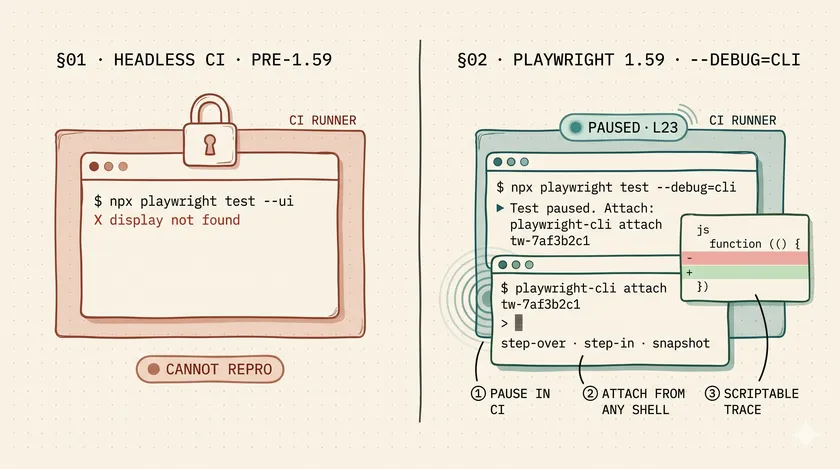
Table of Contents
It’s 2 AM. PagerDuty rang. The staging pipeline is blocked because a checkout test is flaking — and only on the ephemeral runner, never locally. You open the Playwright HTML report in your browser, find the red test, click the trace icon, wait for Trace Viewer to load, scrub through 40 actions, find nothing conclusive, download the zip, try to open it locally, realize the runner’s Node version differs, rerun the test with --ui, wait for a browser to spin up, finally spot what looks like a race condition. That loop — start to hypothesis — took 35 minutes. With Playwright 1.59’s new --debug=cli mode, the same loop takes three.
Why the Playwright debug story had a gap for five years
For the last half-decade, Playwright’s official debug story was: UI Mode for local dev, Trace Viewer for post-hoc inspection, and PWDEBUG=1 for a last-ditch browser-based debugger. All of them share the same fatal flaw for enterprise teams: they need a display.
A headless CI container running on an ephemeral GitHub Actions runner or a Kubernetes pod doesn’t have a display. It doesn’t have a browser window. It has a terminal, SSH access if you’re lucky, and a 6-hour timeout. Every production Playwright failure I’ve debugged at scale — at a large Canadian telecom, at a financial services firm running 2,000+ tests — has followed the same painful path: try to reproduce it locally, fail, add logging, push, wait 20 minutes for the pipeline, fail again, repeat.
That’s not a tooling gap — it’s a workflow tax. And it compounds hard when your suite is big enough that “just reproduce it locally” isn’t a reasonable ask. Playwright 1.59 (shipped April 1, 2026) finally addresses this with two CLI primitives built for headless environments.
What is Playwright’s --debug=cli mode?
--debug=cli is a terminal step-through debugger for Playwright tests. It pauses test execution, prints an attach instruction to stdout, and waits for an engineer to connect from any shell — including an SSH session into the CI runner itself. Unlike --ui, which launches a browser window and requires a display, --debug=cli runs entirely in text. No display, no Xvfb, no forwarded ports.
The interaction at a glance
Here’s what the interaction looks like:
# Start the paused test — this blocks and prints an attach tokennpx playwright test checkout.spec.ts --debug=cli
# Output:# Test paused. To debug, run:# playwright-cli attach tw-7af3b2c1# In a second shell (or over SSH to the same runner) — attachplaywright-cli attach tw-7af3b2c1
# Inside the CLI debugger:# step-over — move to the next Playwright action# step-in — descend into the current action# continue — run until the next pause or failure# snapshot before — dump the DOM state before this action# locate "getByRole('button', { name: 'Place order' })"The locate command inside the session is particularly useful — you can test selectors against the live DOM state without modifying the test file. I spent a solid 40 minutes last week stepping through a checkout flow that was passing locally and failing in CI because a third-party payment widget was loading 800ms later on the runner’s network. The CLI debugger showed me the DOM snapshot at step 14 — the button was there, but disabled. That took 4 minutes to find.
How do you use --debug=cli inside a CI container?
The pattern is a manual-trigger workflow — not something you run on every push. You add a workflow_dispatch GitHub Actions workflow that accepts the test file as input, runs the test with --debug=cli, and keeps the runner alive long enough for you to attach.
name: Debug failing teston:  workflow_dispatch:    inputs:      test_path:        description: 'Test file to debug (e.g. tests/checkout.spec.ts)'        required: true
jobs:  debug:    runs-on: ubuntu-latest    timeout-minutes: 60    steps:      - uses: actions/checkout@v4      - uses: actions/setup-node@v4        with:          node-version: '20'      - name: Install dependencies        run: npm ci && npx playwright install --with-deps      - name: Start CLI debug session        run: npx playwright test ${{ inputs.test_path }} --debug=cli        # Attach via GitHub Actions debug shell (re-run with SSH debug option)        # or ship the attach token to Slack in a prior step      - name: Upload trace on failure        if: failure()        uses: actions/upload-artifact@v4        with:          name: trace          path: test-results/
The GitHub Actions “Re-run with SSH debug” feature (available via the mxschmitt/action-tmate action) lets you open an SSH tunnel into the runner and run playwright-cli attach directly. That combination — --debug=cli plus an SSH tunnel — is the closest thing to a production debugger that headless CI has ever offered.
What can you do with npx playwright trace?
The second big addition in 1.59 is CLI-native trace analysis. Previously, trace.zip files were useful only if you could open them in a browser via npx playwright show-report or the Playwright Trace Viewer UI. With 1.59, you can inspect them from the command line — which means you can script them.
The three subcommands that unlock scripted triage
Three subcommands matter here:
# List every recorded action, with optional grep filternpx playwright trace actions trace.zip --grep="goto|fill|fetch"
# Dump the DOM snapshot at action index 14, before executionnpx playwright trace snapshot trace.zip 14 --name before > snapshot.html
# Interactive TUI (still requires a terminal but not a display)npx playwright trace open trace.zip
Post-CI triage: automated Slack summaries from trace zips
The enterprise unlock is the actions subcommand piped into a script. A suite running 200 tests per pipeline with a 12% flakiness rate produces roughly 24 failed traces per run. Nobody opens 24 trace zips manually at 2 AM. But a script can. Here’s the post-CI triage pattern I’ve started recommending to teams:
#!/usr/bin/env bash# Runs after every failed CI job. Finds the last network action before# the failure, dumps the "before" snapshot, and posts a summary to Slack.set -euo pipefail
TRACE_ZIP="${1:?trace zip path required}"SLACK_WEBHOOK_URL="${SLACK_WEBHOOK_URL:?SLACK_WEBHOOK_URL env var required}"
# Find the last network-related action before failureLAST_ACTION=$(npx playwright trace actions "$TRACE_ZIP" --grep="fetch|goto|route" | tail -1)ACTION_INDEX=$(echo "$LAST_ACTION" | awk '{print $1}')
# Dump the DOM state before that actionSNAPSHOT=$(npx playwright trace snapshot "$TRACE_ZIP" "$ACTION_INDEX" --name before 2>/dev/null | head -5)SUMMARY="*Trace triage:* \`$(basename "$TRACE_ZIP")\`\nLast network action before failure: \`$LAST_ACTION\`"
curl -sf -X POST -H 'Content-type: application/json' \  --data "{\"text\":\"$SUMMARY\"}" \  "$SLACK_WEBHOOK_URL"
Wire this into your CI pipeline’s on-failure step and you get a Slack message with the last network call before every failure — automatically, on every run. A team I worked with at a large retail platform reduced their triage-to-hypothesis time from 25 minutes to under 5 by running a similar script. The engineering cost was two hours. That’s the kind of leverage you get from scriptable trace analysis.
Why does retain-on-failure-and-retries trace mode matter?
This is the third 1.59 addition worth calling out. Previously, the closest trace retention mode was 'retain-on-failure' — which saved the trace from the final attempt of a test. If that test had two retries and retry #3 eventually passed, you got no trace at all. If retry #3 still failed, you got only the last retry’s trace — not the first two, which is often where the actual divergence shows up in flaky tests.
The new 'retain-on-failure-and-retries' mode keeps traces from every attempt:
import { defineConfig } from '@playwright/test';
export default defineConfig({  use: {    trace: 'retain-on-failure-and-retries',  },  retries: process.env.CI ? 2 : 0,});
For flaky-test diagnosis, this is significant. The interesting data is usually in the divergence between retry #1 and retry #2 — the point where the test passes sometimes and fails others. With all three traces, you can run npx playwright trace actions on each and diff the action sequences. Retry #1 had 42 actions, retry #2 had 39 — the three missing actions tell you exactly where the timing diverged.
Where does this fit in the 2026 Playwright debug stack?
Four layers, use the right one for the job:
| Environment | Tool | When to use |
|---|---|---|
| Local dev | --ui (UI Mode) | Writing new tests, iterating on selectors |
| Post-hoc local | Trace Viewer in browser | Forensics on a specific failed run |
| Headless CI (live) | --debug=cli | Reproducing a failure that won’t reproduce locally |
| Headless CI (automated) | npx playwright trace + scripts | Post-CI triage, Slack summaries, failure clustering |
The key mental model: the CLI tools (--debug=cli and npx playwright trace) are not replacements for UI Mode and the browser-based Trace Viewer. They’re complements for the environments where those tools can’t run. UI Mode is still the fastest tool for selector iteration and test authoring. The browser Trace Viewer is still the most ergonomic tool for human forensics on a single failure. But for the 20 failures that landed in your CI queue overnight, a shell script and npx playwright trace actions is the right tool — not 20 manual Trace Viewer sessions.
If you’re still tracking down the root causes of those CI failures, the async trap is where most of them originate — the async trap that causes most flaky tests is worth reading before you reach for the debugger. And if you’re dealing with a slow suite on top of a flaky one, the strategies for making slow Playwright suites fast apply before this layer.
One concrete next step
Pick one flaky test in your suite today. Open playwright.config.ts, add trace: 'retain-on-failure-and-retries' to that test’s project config (not the global config), and push. The next time that test flakes, you’ll have the full retry sequence on disk. Run npx playwright trace actions on each zip and look for the action count divergence. That’s your hypothesis in under two minutes.
If the suite is on a team that still does the 35-minute manual debug loop, copy the trace-triage.sh script above, swap in your Slack webhook, and wire it into your on-failure CI step. You’ll have automated triage before end of day.
Is --debug=cli a replacement for UI Mode?
No — UI Mode is still the right tool for local test authoring. --debug=cli is for the environments where UI Mode can’t run: headless CI containers, SSH-only bastion hosts, CI shells without a display.
Do I need to install anything extra for --debug=cli?
No. It ships with Playwright 1.59. The playwright-cli binary is installed by default when you run npm install @playwright/test.
Can `npx playwright trace` replace the Trace Viewer UI?
For automated triage, yes. For human forensics on a single failure, the browser-based Trace Viewer is still more ergonomic. Think of the CLI as what you script, and the UI as what you click.
What's the cost of trace: 'retain-on-failure-and-retries'?
Storage. A suite running 200 tests with 2 retries and 10% flakiness will produce roughly 3x more trace data than retain-on-failure alone. Worth it for a focused debug month, not as a permanent default.
Don't miss a thing
Subscribe to get updates straight to your inbox.

No spam · Unsubscribe anytime