Parallel Playwright MCP Agents Need Their Own Connection
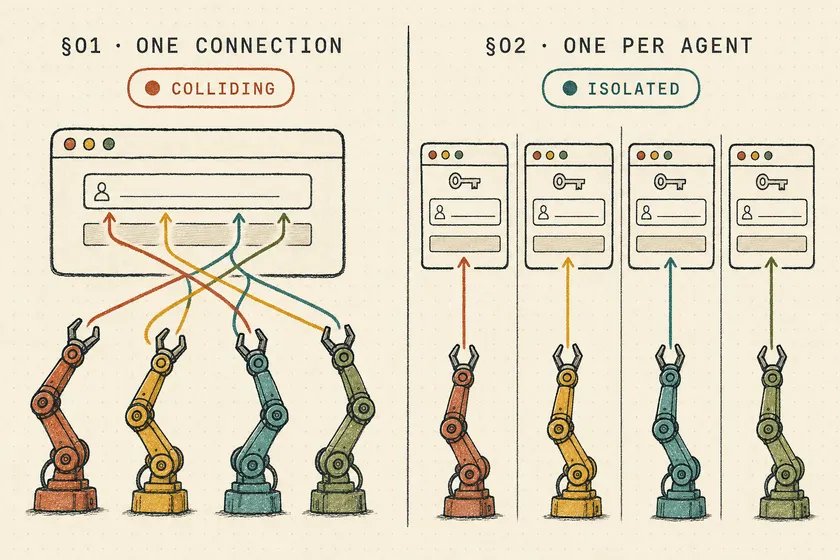
Table of Contents
Four agents, four technicians, four work orders to close. After one parallel pass through a single Playwright MCP server, my demo app’s audit log had three closed orders, every one signed tech-3. Tech-1’s note sat on the right order under the wrong name, and tech-3’s own note landed on tech-2’s order. Playwright MCP shipped a multi-account feature, isolatedContext, on October 31. Giving each parallel agent its own isolatedContext didn’t help: across 5 runs, the agents closed 0 of 20 orders correctly.
The fix that worked, 20 out of 20 in my scripted harness and 12 out of 12 with real Claude Code subagents, is boring: give every agent its own MCP connection to a server started with --isolated. Isolation in Playwright MCP is per connection. It isn’t per agent, and it isn’t per tab.
| Server layout (4 scripted agents, 5 runs) | Orders closed correctly |
|---|---|
| One server, one shared connection | 0 / 20 |
Shared connection + isolatedContext per agent | 0 / 20 |
One server per agent, no --isolated | 5 / 20 |
One --isolated HTTP server, one connection per agent | 20 / 20 |
One --isolated stdio server per agent | 20 / 20 |
What did the #1804 report actually say?
On October 28, 2026, a user filed microsoft/playwright-mcp#1804: 8 parallel Claude Code agents on SAP Fiori test cases “navigate over each other, corrupt form state, and produce unreliable results.” Maintainer Dmitry Gozman closed it the same day as not planned (“This issue doesn’t seem like it is using playwright mcp”). The reporter replied with the error they saw, Browser is already in use ... use --isolated to run multiple instances of the same browser, and argued --isolated can’t help when every subagent talks to one server process.
Three days later, Playwright MCP v0.0.84 added isolatedContext to browser_tabs, to “work with multiple accounts without sharing their cookies or storage.” It reads like the answer to #1804. My demo says it isn’t.
How I reproduced the collision
The app under test is 35 lines of Node: a login form that sets a session cookie, and a /orders/WO-10N page with a closing-note textarea. Every save goes into an audit log with the order, the note, and the technician the server thinks is signed in. Agent N signs in as tech-N, opens WO-10N, and saves Valve replaced (tech-N). A save counts only if all three line up.
I drove it two ways against @playwright/mcp@0.0.84 (bundling Playwright 1.65.0-alpha-2026-10-30) with headless Chrome:
- A scripted harness: 86 lines of Node on the MCP TypeScript SDK. Four async “agents” make real tool calls, each preceded by a random 200–1,200 ms pause to stand in for model latency. Five seeded runs per setup (three for the storage-state variant).
- Real Claude Code subagents: Claude Code 2.1.319, four Sonnet subagents dispatched in one message, two to three runs per setup.
Every scripted agent runs this function at the same time:
async function agent(i) { const c = clients[i], tech = `tech-${i + 1}`, order = `WO-10${i + 1}`; const call = async (name, args) => { await think(); const r = await c.callTool({ name, arguments: args }); if (r.isError) errors.push(`${tech} ${name}: ${r.content[0].text.replace('### Error\n','').split('\n')[0].slice(0, 150)}`); return r; }; if (mode === 'shared-isolatedContext') await call('browser_tabs', { action: 'new', isolatedContext: tech }); if (mode !== 'per-agent-storage') { await call('browser_navigate', { url: `${APP}/login` }); await call('browser_type', { target: 'input[name=tech]', text: tech }); await call('browser_click', { target: 'button' }); } await call('browser_navigate', { url: `${APP}/orders/${order}` }); await call('browser_type', { target: 'textarea', text: `Valve replaced (${tech})` }); await call('browser_click', { target: 'button' });}Only clients[i] changes between setups: one shared client, or one per agent, pointed at different server layouts.
Why do parallel agents collide in one Playwright MCP browser?
Because Playwright MCP’s action tools act on “the current tab,” and the current tab belongs to the connection, not to whoever is calling. browser_click, browser_type and browser_navigate take no tab index or agent ID. When four agents share one connection, the last agent to navigate decides where everyone else’s next click lands.
Across 5 shared-connection runs, the audit log recorded 10 saves and none was correct: 5 had an empty note, 4 carried another technician’s note, and 4 landed on the wrong order (some had more than one fault). The 45 tool errors were the noisy part, like "textarea" does not match any elements after another agent had moved the tab back to the login page. The saves that went through are the problem: "Valve replaced (tech-2)" on WO-104, signed by tech-4. With 8 agents, the count in #1804, it was 0 of 24 across 3 runs, and 14 of the 17 saves had an empty note.
Does isolatedContext fix parallel agents?
No. isolatedContext isolates cookies and storage, not the current tab. Each agent opened its own tab with isolatedContext: "tech-N", but opening a tab makes it current for the whole connection. This probe shows it in three calls:
await call('browser_tabs', { action: 'new', isolatedContext: 'agent-a', url: 'http://localhost:4400/login' }); // agent A opens its tabawait call('browser_tabs', { action: 'new', isolatedContext: 'agent-b', url: 'http://localhost:4400/login' }); // agent B opens its tabawait call('browser_navigate', { url: 'http://localhost:4400/orders/WO-101' }); // agent A's next stepconsole.log(await call('browser_tabs', { action: 'list' }));- 0: [](http://localhost:4400/login) [isolatedContext: agent-a]- 1: (current) [](http://localhost:4400/orders/WO-101) [isolatedContext: agent-b]Agent A’s navigation landed in agent B’s tab, inside agent B’s cookies. That’s worse than plain sharing: an agent acts inside another agent’s identity, and nothing in the tool result tells it so.
The feature is good at what the release note says it’s for: one agent juggling several accounts in sequence, like an admin approving a request a user just submitted. It isn’t a concurrency primitive.
What does “Browser is already in use” mean?
That error is the good failure: two Playwright MCP servers tried to launch Chrome on the same persistent profile (by default ms-playwright-mcp/mcp-chrome-<hash> in your cache directory). One server per agent without --isolated gave me the reporter’s error:
Error: Browser is already in use for ~/Library/Caches/ms-playwright-mcp/mcp-chrome-357a142, use --isolated to run multiple instancesOne agent per run got the browser and closed its order; the other three failed on every call (90 errors over 5 runs), so 5 of 20 closed. Nothing was corrupted, and a loud failure beats a quiet wrong write. An HTTP server without --isolated was worse: 1 of 20 closed, and in 4 runs the one save that landed was signed by nobody, because its agent’s login had failed with the same error. The error’s advice is correct. It just doesn’t help when agents share a connection.
How do you isolate parallel agents in Playwright MCP?
Give each agent its own MCP connection, and start the server with --isolated so each connection gets an in-memory profile instead of fighting over the one on disk. Two layouts do this, and both scored 20 out of 20 with zero tool errors. They differ in memory:
| Setup (4 agents, 5 runs) | Closed correctly | Browsers | Chrome memory (summed RSS) |
|---|---|---|---|
| One shared connection (baseline) | 0 / 20 | 1 | ~630 MB |
One stdio server per agent, --isolated | 20 / 20 | 4 | ~2.2–2.5 GB |
One HTTP server, --isolated, one connection per agent | 20 / 20 | 1 | ~1.3–1.8 GB |
Memory is the summed resident memory of every Chrome process in the run, recorded on three runs per layout. Summed RSS double-counts shared pages, so treat it as a rough comparison, not a budget.
Option 1: one HTTP server, one connection per agent
This is the layout I’d pick. Run a single server over HTTP with --isolated (flags are documented in the Playwright MCP README):
npx @playwright/mcp@0.0.84 --headless --isolated --port 8931Every client that connects to http://localhost:8931/mcp gets its own browser context on one shared Chrome, and since 0.0.84 each isolated client has its own idle timer. One flag undoes all of this: --shared-browser-context “reuse[s] the same browser context between all connected HTTP clients.” With it on, I got 2 out of 20.
I ran the demo on the standalone 0.0.84 package. The server bundled with Playwright 1.65.0, npx playwright mcp, lists the same --isolated, --port, --storage-state and --shared-browser-context flags, and it’s the one I’d pin in a real repo: 0.0.84 runs a 1.65.0-alpha core that drops agent refs for every control outside an open modal.
Option 2: one stdio server per agent
More memory, no shared process. Each agent launches its own npx @playwright/mcp@0.0.84 --isolated. Pick it when agents need different launch flags, like different --device or --proxy-server values.
Option 3: give each agent its own logged-in session
--storage-state seeds an isolated session from a file, so agents can skip the login form completely. Start one stdio server per agent, each with that agent’s file:
npx @playwright/mcp@0.0.84 --headless --isolated --storage-state=auth/tech-1.jsonThat got 12 out of 12 over 3 runs, at 3.3–4.0 seconds per run instead of 6.1–6.9, because no agent typed into a login form. One file per agent, though. On the single HTTP server, --storage-state is a server flag, so every connection starts as the same user: the shared-session-cookie bug all over again. And keep those files cookie-only, for the reasons in the storageState contamination post.
Does this work with Claude Code subagents?
Only if each subagent gets its own connection and can only see that connection. As covered in how Claude Code subagents get their tools and context, subagents inherit from the parent session, and the Claude Code subagents docs say an mcpServers entry that names a configured server will “share the parent session’s connection.” Four subagents pointed at one playwright server are the shared-connection setup from the first table. Here’s what four real Sonnet subagents did:
| Claude Code setup (4 subagents) | Closed correctly |
|---|---|
One playwright server in .mcp.json | 3 / 12 |
Inline --isolated server inside one subagent definition | 2 / 12 |
Four named connections, no tools allowlist | 4 / 8 (2 runs) |
Four named connections to one --isolated HTTP server, tools allowlist | 12 / 12 |
The working layout is four server names that all point at the Option 1 server:
{ "mcpServers": { "pw-1": { "type": "http", "url": "http://localhost:8931/mcp" }, "pw-2": { "type": "http", "url": "http://localhost:8931/mcp" }, "pw-3": { "type": "http", "url": "http://localhost:8931/mcp" }, "pw-4": { "type": "http", "url": "http://localhost:8931/mcp" } }}Then each subagent is pinned to one of them. Line 5 is the one that matters:
---name: wo-closer-2description: Closes one work order in the local work-order app as a given technician.model: sonnettools: mcp__pw-2__browser_navigate, mcp__pw-2__browser_type, mcp__pw-2__browser_click, mcp__pw-2__browser_snapshot, mcp__pw-2__browser_fill_formmcpServers: - pw-2---Why the tools allowlist matters
Without tools:, a subagent “inherits every tool available to subagents,” which means all four servers. In both runs without the allowlist, several subagents piled onto pw-1, first in the list, and collided there; one reported that it had switched to “idle pw-2.” The mcpServers entry made the server available. It didn’t make it exclusive.
The inline-server setup failed differently. I gave one subagent definition an inline --isolated stdio server and dispatched four instances of it. They still saw each other’s sessions in all three runs, and a process sampler never showed more than two Playwright MCP servers alive at once. I can’t see the mechanism from outside Claude Code, but the rule is the same: one definition per parallel slot.
The agents noticed. The scripts didn’t.
The real subagents did better than my scripted ones because they read the page. When a page said “Signed in as tech-3,” a subagent signed in as tech-4 usually stopped instead of saving, and across the 24 attempts in the first two setups, the audit log shows no note saved under the wrong technician. That’s the model saving you, not the setup. My page printed the signed-in user in plain text; many SAP Fiori screens don’t. And one shared run still wrote WO-102 twice: the subagent decided its first save had failed and retried. That’s the duplicate-side-effect problem, set off by a browser another agent had just moved.
How is this different from parallel Playwright tests?
Playwright Test gives each test its own browser context by construction, so you opt in to sharing state. MCP turns that around: one connection is one shared session until you split it. It’s a concrete case, beyond the comparison of Playwright MCP, CLI and Test Agents, where a test runner’s defaults protect you and an agent tool’s don’t.
Server-side isolation is still on you. Separate connections stop agents from sharing a tab, not from editing the same record as one shared QA user. Use one identity per agent, the same way you’d use one per worker.
Fix it in your setup today
Open your MCP config and count how many parallel agents can reach each Playwright server name. If any server has more than one, start one --isolated HTTP server, give it one name per parallel slot, and lock each subagent to its own name with an explicit tools: list. Then run your parallel dispatch once against a page that prints the signed-in user, and check every save against that user on the server side, not in the agent’s summary.
Does Playwright MCP support multiple agents at the same time?
Yes, if each agent has its own MCP connection to a server started with --isolated. Agents that share one connection share one current tab. In my demo, 4 agents on one connection closed 0 of 20 work orders correctly.
Does isolatedContext make parallel agents safe?
No. isolatedContext, added to browser_tabs in Playwright MCP v0.0.84, isolates cookies and storage between tabs, but the current tab is still shared across the connection. In my demo, agents using it on one connection still closed 0 of 20 orders correctly.
How do I fix 'Browser is already in use, use --isolated to run multiple instances'?
Add --isolated to every Playwright MCP server that runs at the same time as another one. Without it, each server tries to launch Chrome on the same persistent profile directory, and all but one fail.
Do Claude Code subagents share the Playwright MCP browser?
If they reference the same configured server, yes. The Claude Code subagent docs say string references “share the parent session’s connection.” Give each parallel subagent its own server name and restrict its tools: to that server.
Is one HTTP server or one server per agent better?
One HTTP server with --isolated ran a single Chrome at about 1.3–1.8 GB summed RSS in my demo, against four Chromes at 2.2–2.5 GB for one stdio server per agent. Both closed 20 of 20. Use per-agent servers when agents need different launch flags or their own --storage-state files.
Don't miss a thing
Subscribe to get updates straight to your inbox.

No spam · Unsubscribe anytime