Playwright MCP vs CLI vs Agents: What to Use in 2026
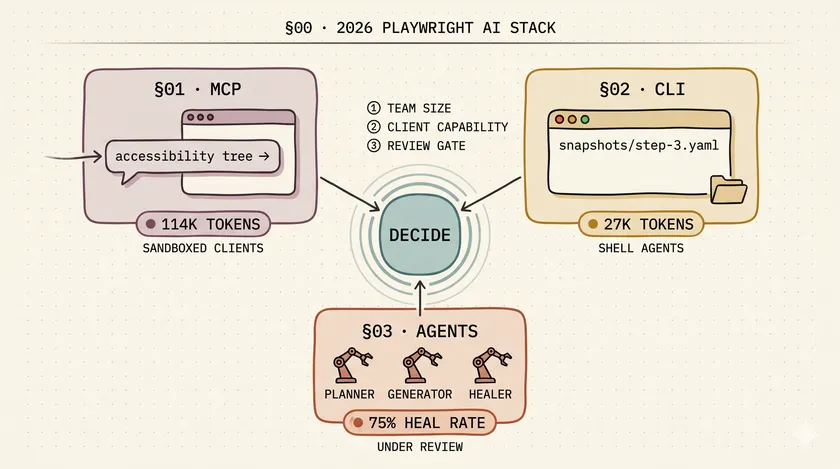
Table of Contents
There are now three official ways to let an AI drive Playwright. Somebody on the Ministry of Testing thread this week asked — in the polite way senior engineers ask when they already know the answer is “it depends” — which one a brand-new QA org should adopt. The top reply was “just use MCP.” That reply is wrong.
Not wrong in a way that breaks your tests. Wrong in a way that silently costs you $240K/year at enterprise scale while you wonder why the finance team is asking questions about your AI spend. The Playwright MCP vs CLI debate looked academic in 2025 when MCP was the only option. Now that all three integration layers are mature enough to run in production, picking the right one for the right context is an actual architectural decision.
What Is Playwright MCP and When Should You Use It?
@playwright/mcp is the Model Context Protocol server that exposes approximately 50 browser tools to any MCP-compatible client. The agent gets live browser access — click, navigate, screenshot, snapshot — through a standardized protocol. Use it when your AI client cannot read or write files: Claude Desktop, ChatGPT Desktop, sandboxed Copilot contexts, or any MCP host that runs in a browser extension rather than a shell. Installation is one line:
claude mcp add playwright npx @playwright/mcp@latestMCP has been the default integration since 2024, which is partly why “just use MCP” became the knee-jerk recommendation. It works out of the box with the widest range of clients. The problem is what it costs to operate.
Every time the agent performs a meaningful action, it streams an accessibility-tree snapshot of the entire page into the LLM context. Not just the element it needs — the whole page, every turn. Pramod Dutta benchmarked this in February 2026: a typical non-trivial browser task costs approximately 114K tokens over an MCP session.
The Context Pollution Problem
The real-world pain emerges around step 15 of a session. By then you’re carrying 60–80K tokens of stale accessibility-tree data in context. The agent starts hallucinating button names that don’t exist on the current page — it’s pattern-matching against a snapshot from eight steps ago. I’ve watched an agent confidently click a “Save Changes” button on a page that had already navigated away from the form. The agent had no idea.
MCP is the right tool when sandboxed clients are the constraint. It’s the wrong default when cost and reliability at scale are the constraint.
What Is Playwright CLI (@playwright/cli) and Why Is It Cheaper?
Playwright CLI is the token-efficient alternative shipped in v1.58 in January 2026. The architectural difference is simple but profound: instead of streaming accessibility snapshots inline on every turn, CLI writes them to disk as YAML files and returns a file path. The agent reads the file only when it actually needs the content.
npm install -D @playwright/clinpx playwright-cli initSame browser access as MCP. Same test authoring capability. Approximately 27K tokens for the same task that costs MCP roughly 114K — a 4x reduction that Pramod Dutta documented in the same benchmark. The math compounds fast once you’re running these workflows in CI.
The architectural shift is that CLI trusts the agent to decide when it needs context. MCP doesn’t make that choice — it inlines everything, every turn. With CLI, the agent gets a message like “snapshot written to ./snapshots/step-3.yaml, read it if you need to.” A capable agent (Claude Code, Cursor CLI, Codex) uses that file when relevant and skips it when the action is obvious. A sandboxed agent that can’t read files can’t use CLI at all — that’s the constraint.
This is why “just use MCP” is actually correct for some teams: if your organization’s AI tooling runs in sandboxed environments, CLI literally isn’t available to you. If your SDETs are running Claude Code in the terminal, CLI is almost always the better choice for daily authoring work.
For enterprise teams, the context-staleness problem with MCP is actually worse than the token cost. A 114K-token session that produces correct tests is still expensive but defensible. A session that hallucinates locators because the accessibility tree is stale produces flaky tests that take hours to debug. I’ve seen teams spend days chasing “intermittent” test failures that were actually consistent failures against wrong elements — caused by context pollution in long MCP sessions.
What Are Playwright Test Agents (Planner, Generator, Healer)?
Test Agents are three role-specialized agents bundled with Playwright since v1.56 (October 2025) and matured through v1.59. They’re not a browser integration layer like MCP and CLI — they’re a coordinated pipeline for authoring and maintaining test suites at scale.
Planner explores an application and produces a Markdown test plan. Generator converts that plan into executable Playwright test files, verifying selectors live as it writes them. Healer runs a failing test suite and auto-patches failing locators and waits, with Microsoft reporting approximately 75% success on selector-related failures.
Bootstrap the pipeline:
npx playwright init-agents --loop=claudeThat generates this layout in your repo:
.github/ # agent role definitionsspecs/ # human-readable test plans (Planner output) basic-operations.mdtests/ # generated Playwright tests (Generator output) seed.spec.ts create/add-valid-todo.spec.tsplaywright.config.tsWhere Test Agents Break First
On paper, this is the most powerful option. In practice, there are two failure modes you’ll hit before you read about them anywhere:
Healer false positives. Healer sometimes “fixes” a failing selector by grabbing a visually similar but functionally wrong element — same text, different component, different behavior. The test turns green. The coverage is gone. The suite looks healthy and isn’t. I saw this on a retail client’s cart functionality: Healer patched a failing add-to-cart button locator by finding another button with similar text in the product comparison modal. Green test, wrong button, no one noticed for two weeks.
Test explosion without governance. Generator can produce 200 tests in an afternoon — literally, I’ve watched it happen on a mid-size e-commerce app. Your CI runtime absorbs that overnight. Your flake budget doesn’t. Most teams discover this around week three of adoption when the pipeline is running 15 minutes longer than it should and nobody knows which of the 200 new tests is responsible.
Which One Should a 3-Person QA Team Pick?
Playwright CLI with Claude Code, for the short answer. Small teams win by cutting cost and increasing authoring speed. You don’t have governance capacity for Test Agents yet, and you shouldn’t be burning 114K tokens per MCP task when the same task costs 27K via CLI.
The one exception: if your team uses Claude Desktop or any sandboxed MCP client as the primary AI interface, MCP is still your only option. Buy the efficiency loss, or advocate for a shell-capable client as part of your tooling stack.
Don’t touch Test Agents as a 3-person team unless you have a specific, contained use case — Planner for a new app greenfield, for example. Generator and Healer introduce review overhead that a small team can’t absorb without letting the backlog compound.
Which One Should a 50-Person Enterprise QA Org Pick?
All three, with a clear division of labor. This is the enterprise answer that nobody writes because it doesn’t make a clean tutorial:
- MCP for exploratory and ad-hoc browser work by product, design, and PM teams. They’re on Claude Desktop, not shell-capable clients. Token cost per task is fine because they’re running sessions occasionally, not continuously.
- CLI for SDET daily authoring loops. Code review gates already exist in your workflow — cost per task matters when it’s compounding across a 30-person SDET org running sessions all day.
- Test Agents for specific high-leverage projects under deliberate governance: Planner for new-application test strategy, Generator behind a review gate (output lands in
proposed/, CI doesn’t touch it until a human promotes it), Healer in a walled-off CI lane with flake-budget tracking.
Here’s the six-dimension comparison that determines which fits each context:
| Dimension | MCP | CLI | Test Agents |
|---|---|---|---|
| Typical token cost per task | ~114K | ~27K | Varies by role (Generator runs many MCP-equivalent calls) |
| Filesystem access required | No | Yes | Yes |
| Primary user | Anyone with an MCP client | SDETs with shell-capable agents | Coordinated pipelines |
| Review surface | Conversation output | PR diffs | PR diffs (after human gate) |
| Where it breaks first | Context pollution past step 15 | Agent doesn’t request snapshot when it should | Healer false positives |
| When it’s right | Sandboxed clients, quick exploration | Daily SDET work | New-app scaffolding, flake-heavy suites under governance |
Why Did Most Teams Pick the Wrong One in Q1 2026?
Because MCP was the only option for 12 months, so it became the default. CLI landed in January 2026 and hasn’t had time to displace the muscle memory. “Install MCP” is in every tutorial written since late 2024. “Consider CLI instead if you have shell access” is not.
The 4x token-cost gap matters less for individual developers running occasional sessions. It matters enormously for enterprise CI pipelines, where the same agents are running continuously against large test suites. At 500 browser flows per day with $15 per 1M input tokens — a realistic number for a mid-size org running nightly regression — MCP costs approximately $855/day. CLI costs approximately $202/day. That’s roughly $240K/year of unnecessary spend, and it doesn’t appear as a single line item. It accumulates invisibly across team AI budgets until someone runs a cost analysis.
Bug0’s 2026 analysis frames the broader picture: DIY AI-testing systems cost $208K–$415K in year one when you include self-healing infrastructure, flake handling, and governance overhead. Token costs are only part of that — but they’re the part most teams don’t model before adoption.
For the question of which Claude Code primitive to use inside these integrations, the same cost reasoning I described in when Claude Code skills beat subagents applies directly: don’t dispatch an autonomous agent for something a deterministic skill would handle for 5K tokens.
What About Test Explosion and Governance?
The 2026 pain point is no longer “will the AI write correct tests?” — it’s “who reviews the 200 tests it produced yesterday?” Test explosion is a governance problem, not a technology one. Every team adopting Generator or Healer needs three things in place before they turn the agents loose: a review gate, a flake budget, and a kill switch.
These are the three patterns that have actually worked at organizations I’ve advised:
1. Review gate. Generator output lands in a proposed/ directory. CI does not execute anything in that directory. A human reviews the proposed tests against the test plan, moves vetted specs to tests/, and that PR is what triggers CI. This sounds like overhead until you discover the alternative: 180 generated tests that cover redundant happy paths while missing the two edge cases that matter.
2. Flake budget. If Healer’s auto-fix rate in a given test suite exceeds 10% over seven days, trigger an alert. That threshold isn’t a sign that Healer is working — it’s a sign you have a test-design problem that Healer is papering over. High Healer activity on a suite means the selectors are unstable, which usually means the tests are tied to implementation details instead of user behavior. Fix the tests, don’t celebrate the healing rate.
3. Kill switch. One environment variable — PLAYWRIGHT_AGENTS_DISABLE=1 — that halts all agent activity immediately. It has to work in CI, in pre-commit hooks, in local dev, everywhere. You will need this the first time an agent run goes sideways mid-sprint. Having to chase down multiple configs to stop a runaway agent while your CI queue piles up is the wrong kind of enterprise experience.
The Currents.dev 2026 State of Playwright AI Ecosystem report surfaces the same governance gaps across the teams they surveyed: adoption is outpacing governance frameworks by roughly two quarters. Most teams are shipping the agents before they’ve designed the review process. The self-healing locator mechanics post covers the underlying selector stability work that governance patterns depend on — worth reading before you configure Healer on a flaky suite.
Start From Data, Not From Defaults
This week: run npx playwright-cli --version. If the command doesn’t exist, install it. Pick one test you’re about to author by hand — a login flow, a checkout flow, anything you’d otherwise spend 45 minutes writing locator by locator. Let Claude Code drive it via CLI. Note the token usage. Compare it to your last equivalent MCP session.
You don’t need a framework migration. You don’t need a team decision. You need one data point from your own workflow. Decide from that.
If you want a deeper look at the ecosystem context, the TestDino Playwright AI Ecosystem overview has a good map of where each tool sits. The Currents.dev report linked above is worth a read for benchmark data on adoption patterns.
Do I have to pick one — MCP, CLI, or Test Agents?
No. At enterprise scale you’ll end up with all three running in different lanes: MCP for sandboxed exploration, CLI for SDET daily work, Test Agents for specific high-leverage pipelines under review. The question is which one to start with and where to gate each.
Is Playwright CLI a replacement for MCP?
For shell-capable clients like Claude Code and Cursor — yes, usually. For sandboxed clients like Claude Desktop — no, MCP is still the only option. The differentiator is not which is better, it’s which your agent runtime supports.
How reliable is Playwright's Healer agent?
Microsoft reports ~75% selector-fix success rate. In practice, we see genuine fixes plus a meaningful minority of false positives — where Healer “fixes” a test by grabbing a visually similar but functionally wrong element. Never let Healer auto-commit to main.
What's the real cost difference between MCP and CLI at scale?
For a 500-flow-per-day agentic load at $15 per 1M input tokens, MCP runs about $855/day versus CLI’s $202/day. That’s roughly $240K/year of avoidable spend on a single team’s daily workflow.
When does MCP still win?
When your agent can’t read files. Claude Desktop, Claude.ai, and sandboxed Copilot contexts can’t access the local filesystem. MCP is the only option there. It’s also fine for one-off exploratory sessions where token cost doesn’t compound.
Don't miss a thing
Subscribe to get updates straight to your inbox.

No spam · Unsubscribe anytime