Reviewing AI-Generated Tests with Playwright Screencast
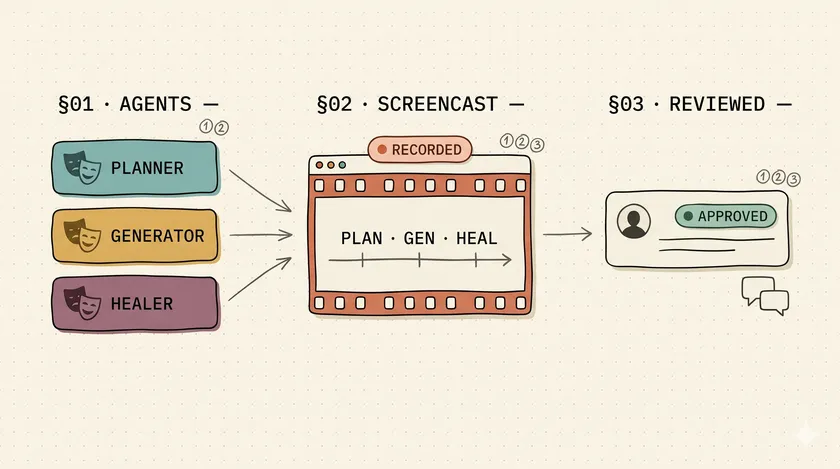
Table of Contents
It’s Friday at 4 PM. The generator agent opened a PR that adds three Playwright tests with names like “checkout — promo code happy path.” Before Playwright 1.59, you had two options: trust the test name and approve, or git-checkout, npm-install, npx-playwright-test, watch the headless browser do its thing, read the new page objects, and approve half an hour later. There’s now a third option, and it’s the one that makes Playwright Test Agents actually shippable.
Playwright 1.56 shipped three agent roles — planner, generator, healer — that any LLM running in Claude Code, Copilot, or opencode can invoke through a single npx playwright init-agents command. They’re useful in isolation. The problem I kept running into on teams that adopted them was that agent-generated test code is brutal to review at PR speed. Did the test exercise the flow it claims, or did the locator pick a similar-looking element? Did the assertions match the intent, or are they soft enough to pass on any page state? And for healer specifically — did the heal preserve the original intent, or did it relax the assertion to turn a flake green?
That last one is the concern I’ve written about separately: healer’s silent false-positive rate pushes into double digits when you’re not paying attention, and the CI-side mitigation I use is a gate that blocks auto-merge from the playwright-healer[bot] user. Good lock. Doesn’t tell the reviewer what changed semantically. From what I’ve seen on agent-augmented teams, once you’re running five-plus agent PRs per reviewer per week, manual checkout-and-run is the bottleneck. Without a faster review primitive, teams either stop trusting the agents or rubber-stamp the diffs. Both outcomes negate the productivity gain that motivated adopting agents in the first place.
That’s the gap 1.59 closes. The Screencast API is the receipt layer — chapter markers, action callouts, and overlays baked into the video stream. Microsoft markets it as “agentic video receipts” for coding agents. The actually-useful framing, which is the one I’ll spend this post on, is that it makes the three agents reviewable in two to three minutes per PR instead of twenty to thirty-five.
How does screencast change planner output review?
The planner produces a Markdown plan from app exploration. Without screencast, you compare the plan against the spec and assume the agent walked the right flow. With screencast wrapping the planner’s exploration, you can verify the plan covers what the agent actually saw, not what it inferred from the README.
The wire-up is small. Start a screencast before the planner agent takes control of the page, drop chapter markers at the boundaries of each explored flow, and stop it when the agent hands back. In my workflow I wrap the exploration with showActions burned in the top-right corner so the callouts are visible without dominating the frame:
import { chromium } from '@playwright/test';
const browser = await chromium.launch();const page = await browser.newPage();await page.screencast.start({ path: 'planner-exploration.webm' });await page.screencast.showActions({ position: 'top-right' });
await page.screencast.showChapter('Exploring checkout flow');// ... planner agent navigates and explores ...
await page.screencast.showChapter('Exploring user settings');// ... continues ...
await page.screencast.stop();
Reviewer workflow: open the .webm next to the Markdown plan. Chapter markers map plan sections to actual UI exploration. If the plan claims “covered checkout error states” but no chapter exists for that section, the plan is overstating coverage. That’s the kind of drift you catch in thirty seconds with video and never catch by reading the plan alone. The plan is the agent’s story about what it did. The screencast is the evidence. They should match. When they don’t, the plan goes back.
This is also where I stop pretending plans are the important artifact. They aren’t. The agent can produce beautifully formatted Markdown that has nothing to do with what the browser actually rendered. Chapter markers are the cheapest way to force the plan and the execution into the same frame of reference.
How do you verify generator output without running it locally?
The generator turns the planner’s Markdown into Playwright Test files. Pair the generated test with a screencast of its first run, attach both to the PR, and the reviewer watches sixty to ninety seconds and confirms the test does what its name claims — without git checkout, without local install, without spinning up the local browser.
The leverage point is at the page-object layer. Have the generator agent emit page-object methods that already include showChapter() calls, and every test downstream gets self-describing video for free. You don’t instrument each test individually; you instrument the vocabulary the tests are written in:
export class CheckoutPage {  constructor(private readonly page: Page) {}
  async applyPromoCode(code: string) {    await this.page.screencast.showChapter('Apply promo code', {      description: `Testing promo: ${code}`,    });    await this.page.getByRole('textbox', { name: 'Promo code' }).fill(code);    await this.page.getByRole('button', { name: 'Apply' }).click();  }
  async placeOrder() {    await this.page.screencast.showChapter('Place order');    await this.page.getByRole('button', { name: 'Place order' }).click();  }}
Then route the screencast globally through playwright.config.ts so every test the generator produces emits annotated video with the test name overlaid:
import { defineConfig } from '@playwright/test';
export default defineConfig({  use: {    video: {      mode: 'retain-on-failure-and-retries',      show: {        actions: { position: 'top-left' },        test: { position: 'top-right' },      },    },  },});
The test: overlay shows the test name on every recorded run — the reviewer immediately knows which generated test they’re watching without renaming files or chasing CI artifact IDs. The retain-on-failure-and-retries mode is the other piece of the 1.59 puzzle: it keeps every retry’s trace so you can diff a flake against itself, which matters more than it sounds the first time you deal with a test that passes on retry-two and nobody knows why.
The other thing to notice about the page-object approach is that it survives generator churn. The generator regenerates tests all the time — that’s the point — but the page objects are authored once and extended by hand. Putting the chapter markers there means you don’t fight the agent every regeneration. You teach it once, you get the annotation forever.
How does the healer dual-screencast pattern catch silent regressions?
Healer’s biggest failure mode is silently relaxing assertions or weakening locators to make a flaky test green. The pattern I’ve landed on — not documented by Microsoft, not part of the official workflow — is to record both the pre-heal failing run and the post-heal passing run, then diff them side-by-side. If the post-heal video shows a different element being clicked or a different assertion firing, the heal changed test semantics even though both runs now report green.
This is the post’s headline technique, and I want to be honest that it’s a pattern I recommend rather than something Microsoft ships. The API is there. The workflow is mine.
import { test, expect } from '@playwright/test';
test('healer-supervised: checkout promo', async ({ page }) => {  // Pre-heal: record the failing run as evidence of the original intent  await page.screencast.start({ path: 'pre-heal.webm' });  await page.screencast.showActions({ position: 'top-right' });  await page.screencast.showChapter('Original test — failing');  // ... original test steps that fail ...  await page.screencast.stop();
  // Healer runs and rewrites the test ...
  // Post-heal: record the passing run for diff against pre-heal  await page.screencast.start({ path: 'post-heal.webm' });  await page.screencast.showActions({ position: 'top-right' });  await page.screencast.showChapter('Healed test — passing');  // ... healed test steps that pass ...  await page.screencast.stop();});
In practice you’d refactor this into a fixture or split the two runs into separate tests — the example above collapses both sides into one function body for clarity, which is fine for a blog example but noisy in a real codebase. A fixture that takes a mode: 'pre-heal' | 'post-heal' parameter and names the output file accordingly is how I structure it on actual teams.
The reviewer opens both videos side-by-side. Same chapter markers, same action callouts, same overlays. If the post-heal video clicks a different element on the “Apply promo code” chapter — for example, healer found a visually similar “Apply” button on a neighboring coupons panel and grabbed it — the heal changed what the test exercises, not just how it asserts. That’s a regression dressed as a fix. The dual-screencast is what turns an invisible semantic drift into a thirty-second visual diff.
This pairs directly with the CI-side concern I mentioned earlier. The gate that blocks auto-merge from playwright-healer[bot] is the lock; the dual-screencast is the audit log. Together they form a workflow I trust enough to leave running overnight without an on-call babysitter — which, before 1.59, I did not.
What to watch for in agent-generated tests
Screencast catches most of these because they’re behavioral. Assertion relaxing doesn’t show up in a diff the same way it shows up in a video where the “pass” is clearly against the wrong thing. Locator drift is obvious when the video shows the wrong button animating. The missing-wait class is the hardest — you often have to slow playback and compare frame-by-frame, which is still faster than running the test locally.
Here’s the quantified argument that justifies wiring any of this up. From what I’ve seen on enterprise teams, PR review of an agent-generated test without screencast takes a senior SDET roughly twenty to thirty-five minutes per test: git checkout, npm install if dependencies changed, boot the local environment, run the test — sometimes re-run it when it flakes on the first pass — watch the headless browser in debug mode, read the new page-object changes, write the PR comment. Half that time is wasted on environment plumbing rather than actual review judgment. With the screencast attached to the PR, review drops to roughly two to three minutes: open the .webm, watch with chapter markers, verify the test exercises what its name claims, approve.
At five agent PRs per week per reviewer, that’s one and a half to two and a half hours weekly per senior reviewer. Across a six-engineer team, that’s nine to fifteen hours a week — nearly two full work-days of senior-engineer time recovered. Not the headline number I’d lead a consulting engagement with, but it’s the one that justifies the afternoon it takes to wire screencast into your agent pipeline. These are estimates I’ve pieced together from consulting engagements I’ve been part of, not measured benchmarks from a single team — the variance is high, but the direction of the effect isn’t.
How do you actually share the receipts with the team?
Drop the .webm in the PR comment, paste the same URL in Slack, and the team can review without scheduling a walkthrough call. That’s the short version, and it’s why screencast matters for async teams more than for co-located ones.
Three sharing patterns are worth putting into your workflow deliberately.
PR comments, Slack previews, and async review
The first is PR comment attachment — both GitHub and GitLab inline-render .webm uploads in PR comments, so there’s no separate hosting needed, no S3 bucket to manage, no Loom link that expires after ninety days. Drop the file, it plays inline, reviewers scrub without leaving the PR tab. The second is Slack inline preview — modern Slack renders .webm in-thread, which matters for the 2 AM page. The original test author who got woken up by a healer-flagged failure watches a ninety-second video from their phone before they decide whether to open the PR, not after.
The third is the async cross-timezone review, which is the pattern that saves the most real wall-clock time. The agent runs overnight in CI, the screencast lands in the PR comment automatically, and the morning-shift reviewer in Halifax or Manila catches up by watching one video instead of scheduling a thirty-minute Zoom with whoever authored the agent config. I’ve lost entire mornings to “let me just share my screen and walk you through what the agent did last night” calls. Screencast ends those calls. You paste a link, they watch, they comment. Done.
One note for regulated-industry teams
Chapter markers plus showOverlay() for run IDs and environment names produce audit-grade evidence without any custom tooling. I don’t work heavily in regulated industries, but compliance-adjacent SDET friends tell me this is the first Playwright feature they’ve been able to hand to a compliance officer without a forty-slide explanation.
For the API surface itself — all the start, stop, showActions, showChapter, and showOverlay details that didn’t fit in this post — I covered the full Screencast API surface separately. The companion piece on how to pick between MCP, CLI, and Test Agents in the first place covers the upstream decision of whether Test Agents are the right integration for your team at all.
Start with healer, not with all three
Don’t wire all three agents at once. Start with healer because it’s the highest-risk of the three: planner and generator produce reviewable artifacts — Markdown plans and code diffs — that a human can inspect with familiar tools. Healer silently changes test semantics and produces a commit that claims everything is fine. If you’re going to add the dual-screencast pattern anywhere this week, add it there. The integration is about twenty minutes of work — a fixture, a config flag, two artifact names. The trust gain shows up on the next CI heal that lands in your review queue.
If you’ve been through what I broke letting AI write a test suite last year, this is the workflow I wish I’d had then. Screencast doesn’t make the agents smarter. It makes their output reviewable fast enough that smart humans can stay in the loop without getting buried.
Can I run Playwright Test Agents without screencast?
Yes — the agents shipped in 1.56 and worked before screencast existed. The workflow problem isn’t whether the agents run; it’s whether their output is reviewable at PR speed. Without screencast, you fall back to git checkout and local replay, which doesn’t scale past a few agent PRs per week.
Does screencast work with all three agent clients (vscode, claude, opencode)?
Yes. The screencast API is part of Playwright itself, not the agent client. Whichever loop you scaffold via npx playwright init-agents --loop=..., the screencast calls go in the test code or page objects — the agent client never sees them directly.
Will reviewers actually watch the videos?
Only if the videos are short and chapter-marked. A 90-second screencast with three chapters gets watched. A 6-minute unannotated recording gets ignored — same as recordVideo before 1.59. Keep individual screencast clips under 2 minutes; if the test is longer, scope the screencast to the critical sub-flow.
What's the storage cost at PR scale?
Roughly 50–100 MB per 5-minute screencast at 15 fps with overlays. For a team running 20 agent PRs per day with screencasts on retain-on-failure-and-retries, expect 500 MB–1 GB per day of net-new artifacts. Set CI retention to 7 days for screencasts; longer-term audit storage should be selective, not blanket.
Don't miss a thing
Subscribe to get updates straight to your inbox.

No spam · Unsubscribe anytime