Playwright 1.59's Screencast API Ends Useless Test Videos
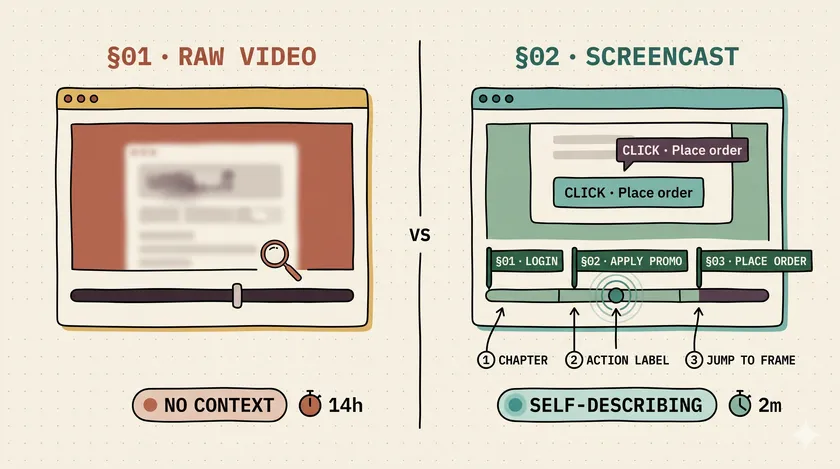
Table of Contents
I have sat through more Playwright test videos than I care to count. A 4-minute 720p MP4 of a headless Chromium doing things, with no sync to the action log, no markers for where it went wrong. You scrub. You squint. You rewatch. Then you give up and read the trace zip instead. Playwright 1.59 just fixed that — and the framing Microsoft is using to sell the Playwright Screencast API is wrong.
Why Raw recordVideo Was Practically Useless
The problem was never the video format. It was context. When recordVideo drops a .webm into your CI artifacts, it captures everything — but annotates nothing. There’s no “this is where the user clicked the promo code field.” There’s no “this chapter is the checkout step.” You get a film of a ghost browser doing things, and you’re expected to reverse-engineer which frame corresponds to which action in the log.
Three ways teams cope (all of them bad)
Teams respond to this pain in one of three ways. They turn off video entirely to stop the CI storage bills from getting flagged — especially common in suites that run 500+ tests per PR and produce gigabytes of artifacts nobody opens. They keep it on as a checkbox but never actually watch it, letting the retention window expire. Or they build a custom post-processing step to annotate frames after the fact, which I’ve seen three separate teams spend a combined two weeks implementing, only to abandon it when the approach didn’t survive an upgrade.
Playwright 1.59 shipped on April 1, 2026 — and for once the release notes weren’t a joke. This is the first cycle where the video artifact is genuinely worth keeping.
What Does Playwright’s New Screencast API Actually Do?
The Screencast API does three things the old recordVideo configuration could not: it gives you imperative start/stop control scoped to individual tests, it burns action annotations directly into the video file, and it lets you insert chapter markers at semantic boundaries you define.
The API surface is small and deliberate:
test('checkout happy path', async ({ page }) => {  await page.goto('/cart');  await page.screencast.start({ path: 'receipts/checkout.webm' });  await page.screencast.showActions({ position: 'top-right', duration: 2000 });
  await page.screencast.showChapter('Apply promo code', {    description: 'Expected: cart total drops by 10%',  });  await page.getByRole('textbox', { name: 'Promo code' }).fill('SAVE10');  await page.getByRole('button', { name: 'Apply' }).click();
  await page.screencast.showChapter('Place order');  await page.getByRole('button', { name: 'Place order' }).click();  await expect(page.getByText('Order confirmed')).toBeVisible();
  await page.screencast.stop();});
Two things to notice. First, showActions is a separate method on the screencast — not a start() option. It accepts position (one of top-left, top, top-right, bottom-left, bottom, bottom-right), duration (ms each annotation stays on screen), and fontSize (px). It returns an async disposable, so await using actions = page.screencast.showActions(...) works for scope-bounded annotations. Second, the chapter titles and action callouts are baked into the video stream itself — not as a sidecar metadata file, not as a post-process render, but written directly into the frames. Open the artifact in any video player and the annotations are there.
There’s also page.screencast.showOverlay(html) for arbitrary overlays — build numbers, environment names, test run IDs — and an onFrame callback that streams JPEG frames out for use in AI vision pipelines. The overlay is genuinely useful for regulated environments where audit videos need identifying metadata. The onFrame callback I’ll address separately.
The full release notes and API reference are at the Playwright v1.59.0 GitHub release and the official Screencast API docs.
Why Does This Matter More for Humans Than for AI Agents?
Microsoft’s marketing hook for this feature is “agentic video receipts” — an AI coding agent records annotated video as evidence of what it did. The case for it is real and worth steelmanning. PMs, security reviewers, and compliance auditors don’t read 200-line trace dumps. They watch a 90-second clip. When an agent ships a checkout-flow change at 11 PM and a human has to sign off before deploy, an annotated walkthrough is more persuasive than a JSON log — Anton Gulin made this argument well in his Medium piece on the release. Agents need evidence that travels, and video does that.
But that’s a verification artifact, not a debugging tool. An AI agent producing the receipt already has the trace, the DOM snapshot, the network log, and the console output for its own reasoning. The video is for the human stakeholder downstream. Where the API actually pays for itself is the inverse case: a human on-call at 2 AM with a pager alert about a flaky checkout test has exactly one need — fast time-to-insight on what broke where. That’s the use case Microsoft undersells.
Here’s a specific example. Last year I was working with a team at a large Canadian financial institution — around 800 automated Playwright tests in their regression suite, running on Jenkins with a 40-minute pipeline. They had a completeCheckout test that was failing intermittently in CI at a rate of about 12%, never reproducible locally. The old recordVideo output was six minutes long. The failure happened somewhere in the promo code application step, but the video gave you no way to jump there — you had to scrub from timestamp zero every time. Three engineers across two time zones burned a combined 14 hours over two weeks trying to pin it down. Eventually we found it: a race condition in the discount calculation endpoint that only manifested when CI latency pushed the response past a 1,500ms implicit timeout.
With chapter markers on the “Apply promo code” step and “Calculate discount” step, that investigation takes 20 minutes: open the artifact, jump to chapter, see the spinner still running when the next action fires. Done.
The time savings aren’t hypothetical — that’s a reduction from 14 hours of investigation to under an hour once you have the context the chapter markers provide. That’s what “tooling for humans” looks like. The AI agent angle is a secondary use case that required zero new design to support.
How Do You Wire This Up in an Existing Playwright Suite?
Opt in globally via playwright.config.ts and then use page.screencast.showChapter() at natural boundaries in your tests. If your suite already uses page objects, those navigation methods are the perfect hook — add one showChapter call per method and every test that uses that page object gets annotated video automatically.
Start with global config, then add chapters to page objects
The global config looks like this:
import { defineConfig } from '@playwright/test';
export default defineConfig({  use: {    video: {      mode: 'retain-on-failure-and-retries',      show: {        actions: { position: 'top-left', fontSize: 14 },        test: { position: 'top-right' },      },    },  },});
A few things to flag here. The show.test option is the closest config-side equivalent to a “free chapter” — it stamps the test name as an overlay on every recorded run, so when you crack open an artifact you immediately know which test you’re looking at without renaming files. Real chapter markers are runtime-only via page.screencast.showChapter() — there’s no chapters: true shortcut in config, despite what you might assume from the API surface. The retain-on-failure-and-retries mode is also new in 1.59 and directly relevant to flaky-suite triage: every retry of a failing test gets its own video, so you can diff a passing attempt against a failing one and see where the timing diverged. For the Canadian checkout case above, that diff would have collapsed the 14-hour investigation by another half — you’d see the spinner still spinning in the failing-attempt video and stopped in the passing-attempt video at the same wall-clock moment, and you’d know it was a timing-sensitive race before you opened the trace.
The enterprise pattern is to drop showChapter calls inside page-object methods rather than in individual tests:
export class CheckoutPage {  constructor(private readonly page: Page) {}
  async applyPromoCode(code: string) {    // Chapter marker is free for every test that calls this method    await this.page.screencast.showChapter('Apply promo code', {      description: `Testing promo: ${code}`,    });    await this.page.getByRole('textbox', { name: 'Promo code' }).fill(code);    await this.page.getByRole('button', { name: 'Apply' }).click();  }
  async placeOrder() {    await this.page.screencast.showChapter('Place order');    await this.page.getByRole('button', { name: 'Place order' }).click();  }}
One addition to the page object, and every test in your suite that hits that checkout flow gets self-describing video artifacts. That’s the kind of leverage that justifies updating your framework — not because it’s a fun API to play with, but because it pays compound dividends across your entire test population.
This approach pairs naturally with the patterns for scaling parallel test execution covered elsewhere on this blog — annotated video is especially valuable in parallel runs where multiple failures need rapid triage in sequence.
Where Does the Screencast API Fall Short?
This is a v1.59 release, not a final design, and there are real limitations worth knowing before you commit to it.
Storage is the first one nobody talks about. Anton Gulin’s writeup on the release pegs a 5-minute screencast at 15 fps with overlays at roughly 50–100 MB per artifact. A suite that runs 200 failing tests across a flaky deployment week will produce 10–20 GB of video alone. If your CI artifact retention is 30 days and you don’t actively prune, you’ll find the storage cost line item before your team finds the videos useful. Set retention to 7 days for screencasts specifically, and only retain on failure — retain-on-failure-and-retries already does the right thing here, but the default mode: 'on' will absolutely blow your budget.
The headless pixel-fidelity trap is the second one. The screencast in headless mode is a compressed video stream, not a pixel-perfect render capture. Anti-aliasing, sub-pixel font rendering, and color profiles all compress lossily. Don’t substitute screencast frames for visual regression assertions — keep using expect(page).toHaveScreenshot() for that, which captures uncompressed PNG snapshots. Screencast is for narrative; screenshots are for diffing. Conflating the two will give you false-positive visual regressions on a video frame that looks fine to a human.
The onFrame callback is the third limitation. Streaming JPEG frames at up to 30fps for AI vision pipelines is technically impressive, but it’s bandwidth-heavy and CPU-expensive. On a smaller CI runner — the kind you spin up 20 of in parallel to keep your pipeline under 15 minutes — enabling onFrame on all tests will noticeably degrade throughput. Leave it off unless you’re explicitly building an AI vision integration; it’s not a human-triage feature.
Chapter markers also work best when your tests are already structured around semantic user journeys, not raw click sequences. If your current test style is click → assert → click → assert without page-object abstraction, adding showChapter calls inside test bodies creates noise rather than signal. You’ll want to refactor to a journeys model first, which is work you should probably do anyway — but it means the Screencast API isn’t a zero-effort drop-in for every codebase.
Finally, this is Playwright 1.59+ only, and the upgrade isn’t free. If your CI runners are still pinned to 1.58 or earlier, you’re looking at a version bump that may require coordinating with your DevOps team, especially if you’re using pinned Docker images. The 1.59 release also drops macOS 14 support for WebKit — if any of your Mac CI runners are still on Sonoma, you’ll need to either upgrade the OS to Sequoia (15+) or pin Playwright at 1.58 for those runners. Browser versions in 1.59 are Chromium 147, Firefox 148, and WebKit 26.4 — worth verifying against your minimum-supported-browser matrix before you cut the upgrade ticket.
Is This a Competitive Moat vs Cypress and WebdriverIO?
Yes, and it’s widening. Cypress has raw video recording via cypress-video but no programmatic chaptering — you get the same undifferentiated footage problem. WebdriverIO has no equivalent built-in. Neither framework has anything close to the showActions burned-in annotation or the imperative start/stop scope.
If your team is currently on Cypress and already thinking about migration, the Screencast API is another data point for the Playwright side — but it shouldn’t be the deciding one. The case for migrating usually comes down to flakiness patterns, parallelization architecture, and browser support requirements, not video quality. If you’re on Cypress and it’s working, read the full breakdown of when to keep Cypress instead of migrating before making a decision based on CI artifact ergonomics.
For teams already on Playwright, there’s no real reason to wait. The config change is two lines. The page-object enhancement is one line per method. The upside is the first video artifact your team will actually open when a test fails at midnight.
The 20-Minute Test
Open your biggest flaky test file — the one that everyone knows is the problem and nobody has fixed. Add page.screencast.showChapter('...') to the first three step boundaries. Push. Watch the video artifact on the next CI failure.
That’s it. Not “read the docs and build a framework.” Not “stand up a new annotation pipeline.” One push, one failure, one video — and you’ll immediately see whether the chapter markers collapse your triage time. If they don’t, you lost 20 minutes. If they do, you’ve just made every future failure in that test faster to diagnose.
The async trap is worth watching if you encounter unexpected timing issues — understanding the async trap that creates most flaky Playwright tests is useful context when interpreting what you see in the annotated video.
Subscribe to the newsletter if you want more of this — no framework tutorials, no documentation rewrites, just patterns that only make sense after you’ve debugged enough enterprise test suites to know which problems actually hurt.
Does Playwright's Screencast API replace recordVideo?
It complements it. recordVideo is still the right default for fire-and-forget retention; screencast is for scoped, annotated recordings inside a specific test. You can use both — recordVideo catches unexpected failures, screencast produces self-describing evidence for known-critical flows.
Does Screencast work in headless CI?
Yes — that’s where it adds the most value. The chapter markers and action annotations are written directly into the video file, so they persist through artifact upload and display in any video player. No special CI viewer, no re-rendering layer.
What's the performance cost of screencast.onFrame?
The onFrame callback streams JPEG frames at up to 30fps. For most CI use cases, leave it off — it exists for AI vision pipelines, not human triage. If you enable it, expect 10–20% slower test execution and meaningful memory pressure on smaller runners.
Can I use Screencast with Playwright 1.58 or earlier?
No. The Screencast API is v1.59.0+. If you’re on 1.58, the closest equivalent is manual recordVideo plus post-process annotation — which is exactly what 1.59 makes obsolete.
Don't miss a thing
Subscribe to get updates straight to your inbox.

No spam · Unsubscribe anytime