Playwright Test Locks Don't Cross Shards. Pin Them.
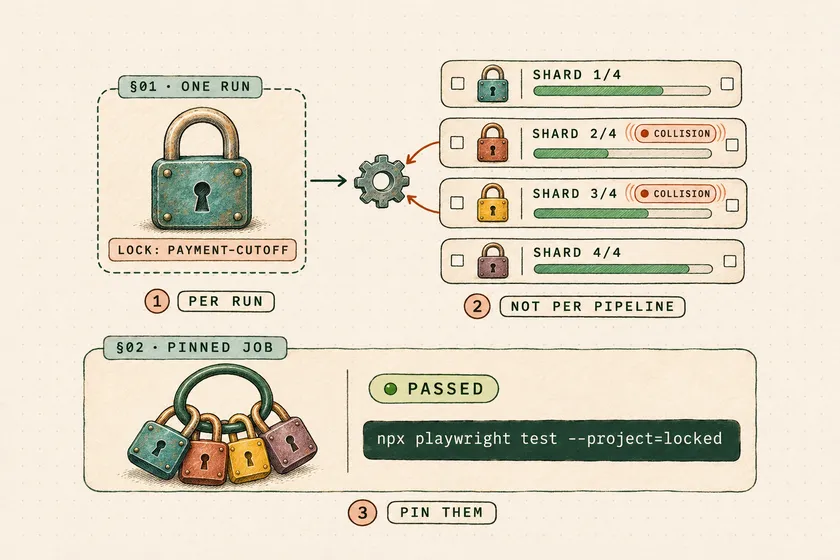
Table of Contents
Our payment-cutoff tests had a lock long before Playwright test locks existed. A file semaphore in os.tmpdir(), about 40 lines, kept six tests off a tenant-wide setting across four workers for most of a year. The week we split the suite across four CI runners, those six tests started failing on every other PR. Each runner had its own /tmp, so four semaphores were now guarding one setting.
Playwright test locks have exactly the same blind spot across shards. The named lock option from 1.63 replaces that kind of hack with one line, but it coordinates tests inside a single npx playwright test run, and every --shard=x/y job is a separate run. In a demo on Playwright 1.65.0, 8 of 12 locked tests failed in every one of 10 four-shard runs. The fix is to pin every lock-sharing test to one CI job, and keep that job short.
Why does this matter now?
Locks are new enough (1.63, with test.describe.configure({ lock }) in 1.64 and the built-in -exclusive- lock in 1.65) that most teams are adopting them in suites that are already sharded. The migration looks safe because it passes locally. On your laptop you run one process, so the lock holds.
The failure is quiet. Nothing errors and nothing warns you that two shards hold “the same” lock. You get the race-condition flakiness you added the lock to remove, on PRs that didn’t touch those tests, and it shows up only when the shard jobs overlap in time, which in a CI matrix is always.
Why don’t Playwright test locks work across shards?
Locks are scheduled by the test runner process, and each shard runs its own runner on its own machine. The docs say locks work “across files, worker processes and projects”. Shards aren’t on that list, and the sharding guide describes each shard as “like a separate job that can run independently.” The PR that added locks says it outright: “sharding [is] not affected by locks” (#41862).
The demo: one shared setting, four shards
I rebuilt the cutoff scenario as a small, reproducible suite: a 10-line Node server holding one global cutoff setting, 12 tests that write and then read it, and 30 filler tests that never touch it. Config is fullyParallel: true with two workers per shard.
import { test, expect } from '@playwright/test';
for (let i = 0; i < 3; i++) {  test(`cutoff billing${i}`, { lock: 'payment-cutoff' }, async ({ request }) => {    const mine = `billing${i}`;    await request.put('http://localhost:3999/settings', { data: { cutoff: mine } });    await new Promise((r) => setTimeout(r, 300)); // the UI flow between save and verify    const res = await request.get('http://localhost:3999/settings');    expect((await res.json()).cutoff).toBe(mine);  });}
The same pattern lives in orders-cutoff, payouts-cutoff and users-cutoff, which is realistic. Tests that touch a shared setting are rarely in one folder. They live wherever the feature that reads the setting lives.
| Run | Shards | Locked-test failures | Runs |
|---|---|---|---|
| One process, 2 workers | none | 0 of 12 | 1 |
| Four shards run one after another | 4 | 0 of 12 | 1 |
| Four shards run at the same time | 4 | 8 of 12 | 10 of 10 |
The middle row is the trap. Run each shard on its own, which is how most people debug a shard failure, and everything passes. The lock only fails when shards overlap, and a CI matrix starts them together.
How sharding scattered the locked tests
With fullyParallel: true, Playwright balances shards by test count. In my demo, that meant each shard got a run of neighbouring tests, and here is where --list --shard=x/4 put the 12 locked tests:
shard 1: 3 billing-cutoffshard 2: 1 orders-cutoffshard 3: 2 orders-cutoff, 3 payouts-cutoffshard 4: 3 users-cutoffEvery shard got some. Within each shard the lock worked, which is why the failure count is 8 rather than 12: tests on the same shard still took turns. Rename one file and the split changes, which is why this kind of failure seems to come and go with unrelated PRs.
Without fullyParallel, sharding works at file level, and the docs carry a warning that matters here: “the same file may be assigned to different shards across different projects.” If you run Chromium and Firefox projects, consolidating all locked tests into one file still doesn’t keep them on one shard.
From semaphore hack to a named lock
The migration itself is worth doing, so do it. Here is the shape of the change on the cutoff suite:
import { withFileLock } from './support/file-semaphore';import { locked } from './support/locks';
test('cutoff moves to 16:00', async ({ page }) => {  await withFileLock('payment-cutoff', async () => {test('cutoff moves to 16:00', locked('payment-cutoff'), async ({ page }) => {    await page.goto('/admin/settings');    await page.getByLabel('Payment cutoff').fill('16:00');    await page.getByRole('button', { name: 'Save' }).click();    await expect(page.getByTestId('cutoff-banner')).toContainText('16:00');  });  await page.goto('/admin/settings');  await page.getByLabel('Payment cutoff').fill('16:00');  await page.getByRole('button', { name: 'Save' }).click();  await expect(page.getByTestId('cutoff-banner')).toContainText('16:00');});
The built-in lock fixes three things the semaphore never handled well. A crashed worker can’t leave a stale lock file behind. Time spent waiting for a lock doesn’t count against the test timeout (PR #41862), so we could delete the extra 30 seconds we had added to those six tests. And the lock is visible in the test declaration instead of buried in a fixture.
If you haven’t used locks yet, I covered the basics, including when -exclusive- is the right call, in the post on shuffling AI-generated Playwright tests across workers. The rest of this post assumes you know the syntax.
Note what the diff imports: locked() from a helper, not a bare { lock: ... }. That’s the first step of pinning.
How do you pin lock-sharing tests to one shard?
Put every test that holds a lock in its own Playwright project, run that project as one unsharded CI job, and shard everything else. Inside the pinned job all locked tests share one dispatcher, so locks work again, and tests holding different locks still run in parallel.
Step 1: Couple every lock with a tag
Locks can’t be filtered with --grep, but tags can. A helper makes it impossible to declare one without the other:
// The only way to declare a lock in this repo. The tag routes the test// to the pinned job; a lock without it would get sharded, and do nothing.export const locked = (...names: string[]) => ({ lock: names, tag: '@locked' });export const exclusive = () => ({ lock: '-exclusive-', tag: '@exclusive' });It works on groups too, because test.describe() takes the same details object: test.describe('Payment cutoff', locked('payment-cutoff'), () => { ... }). Tags on a describe apply to every test inside it.
Step 2: Split the projects
import { defineConfig, devices } from '@playwright/test';
export default defineConfig({  fullyParallel: true,  projects: [    { name: 'main', grepInvert: /@locked|@exclusive/, use: { ...devices['Desktop Chrome'] } },    { name: 'locked', grep: /@locked/, use: { ...devices['Desktop Chrome'] } },    { name: 'exclusive', grep: /@exclusive/, use: { ...devices['Desktop Chrome'] } },  ],});
Check the split before trusting it. In the demo, --list --project=locked reported 12 tests in 4 files, and --project=main reported 30 in 5. Those two numbers should add up to your whole suite. If they don’t, a test is either in both projects or in neither.
Step 3: Give the locked project its own CI job
jobs: shards: runs-on: ubuntu-latest strategy: fail-fast: false matrix: shard: [1, 2, 3, 4] steps: - uses: actions/checkout@v6 - run: npm ci && npx playwright install --with-deps - run: npx playwright test --project=main --shard=${{ matrix.shard }}/4 locked: runs-on: ubuntu-latest steps: - uses: actions/checkout@v6 - run: npm ci && npx playwright install --with-deps - run: npx playwright test --project=lockedThe locked job runs alongside the shards, which is safe only because no main test touches the locked resources. That’s the contract the tag enforces. For @exclusive tests, add a third job with needs: [shards, locked] that runs --project=exclusive. Running after everything else is the only way “exclusive” means what its name says in a sharded pipeline. Keep the -exclusive- lock on those tests anyway, so they don’t overlap each other inside that job.
If you merge blob reports, the file names didn’t collide in my demo: Playwright 1.65 wrote report-main-2.zip for a main shard and report-locked.zip for the locked job.
Step 4: Fail the build on a bare lock
The helper only protects you if people use it. One grep in CI catches the common bypasses:
#!/usr/bin/env bash# A lock declared without locked()/exclusive() skips the pinned job.if grep -rnE '(^|[^a-zA-Z])lock[[:space:]]*[:,}]' tests --include='*.spec.ts' --include='*.test.ts'; then echo "Declare locks with locked() or exclusive() from tests/support/locks.ts" exit 1fiThe character class in front of lock is there because my first version flagged a clock: option in a time-travel test. The pattern also catches the { lock } shorthand and test.describe.configure({ lock: ... }), which is the easiest bypass to miss in review. Widen the --include list if locks can live in shared fixture files.
Verify it
Same server, same 42 tests, four main shards plus the locked job, all started at once:
| Layout | Locked-test failures (10 runs) | Wall clock per run |
|---|---|---|
| Locks only, 4 shards | 8 of 12, every run | 2.8 s |
Pinned: 4 main shards + locked job | 0 of 12, every run | 4.6 s |
That second column has a cost hiding in it, and it’s the next section.
When is pinning the wrong fix?
When the locked job becomes your slowest job. In the demo, each main shard finished in about 2 seconds, and the locked job took 4. All 12 tests hold the same lock, so they run one at a time no matter how many workers the job has. Twelve tests at 300 ms each is about 3.6 seconds of forced serial time, and that became the pipeline’s critical path.
Scale that up and it hurts. On the cutoff suite, six tests at roughly 40 seconds each meant a four-minute serial floor, against shards that finished in about nine minutes. That was fine. Thirty tests on one lock wouldn’t have been. Three things keep the pinned job short:
- Name locks by resource, not by area.
payment-cutoffandfx-ratescan run at the same time in the pinned job. Oneadmin-settingslock makes them queue. - Scope data instead of locking it. If a test can get its own tenant, account or record, it doesn’t need a lock at all. Giving each worker its own test user removed most of our candidates before we wrote a single
locked()call. - Treat the locked set as a budget. I’d cap it at the length of your fastest shard. Past that, every new
locked()call slows every PR.
The file-level alternative, and why I don’t use it
You can also pin by putting all tests that share a lock in one file set to test.describe.configure({ mode: 'default' }). The file runs in one worker, in order, as one unit, so it lands on one shard. It’s less config, but I don’t recommend it. The docs note that in default mode a lock on any test is held for the whole file, so the lock adds nothing inside it. It also breaks the moment you add a second browser project, because each project’s copy of the file can land on a different shard. And it forces one file per resource, which fights your feature-folder structure.
Troubleshooting
--project=lockedlists 0 tests. Tags must start with@. A tag oflockedwithout the@won’t match/@locked/.- A locked test runs twice. It matched both projects.
mainneedsgrepInvertfor every pinned tag, not just@locked. - Pinned job passes, shards still flake on the same resource. Some test touches the resource without a lock. Search the failing shard’s traces for the resource’s endpoint. It’s usually a
beforeEachthat resets it. - Locked tests wait far longer than expected. In
defaultorserialmode, a lock declared on one test is held for the whole file (docs). KeepfullyParallel: trueon the locked project.
Your next step
Run npx playwright test --list --shard=1/4 through --shard=4/4 today and search the output for every test that declares a lock. If the same lock name shows up on more than one shard, those tests are unprotected in CI right now, however green they look on your laptop. Then add locked() and the two projects. That’s about 30 lines of config and one new CI job.
Do Playwright test locks work across shards?
No. Locks coordinate tests across files, workers and projects inside one Playwright run (docs). Each --shard=x/y job is a separate run on its own machine, so two shards can run tests holding the same lock at the same time. In my demo that failed 8 of 12 locked tests in every four-shard run.
Which Playwright version added test locks?
Named test locks shipped in Playwright 1.63. Version 1.64 added the lock option to test.describe.configure(), and 1.65 added the built-in -exclusive- lock.
Does the -exclusive- lock stop other shards from running?
No. It runs the test alone within its own shard only. To run a test with nothing else touching the environment, put it in a separate CI job with needs: on the shard jobs, so it starts after they all finish.
Can I filter tests by lock with --grep?
No. --grep matches titles and tags, not locks. Pair every lock with a tag through a helper like locked(), then filter projects with grep and grepInvert on that tag.
Does waiting for a lock count against the test timeout?
No. Time spent waiting to acquire a lock isn’t counted against the test timeout (PR #41862), so you don’t need to raise timeouts for locked tests.
Don't miss a thing
Subscribe to get updates straight to your inbox.

No spam · Unsubscribe anytime