Your Playwright Timeouts Are Wrong for AI Features
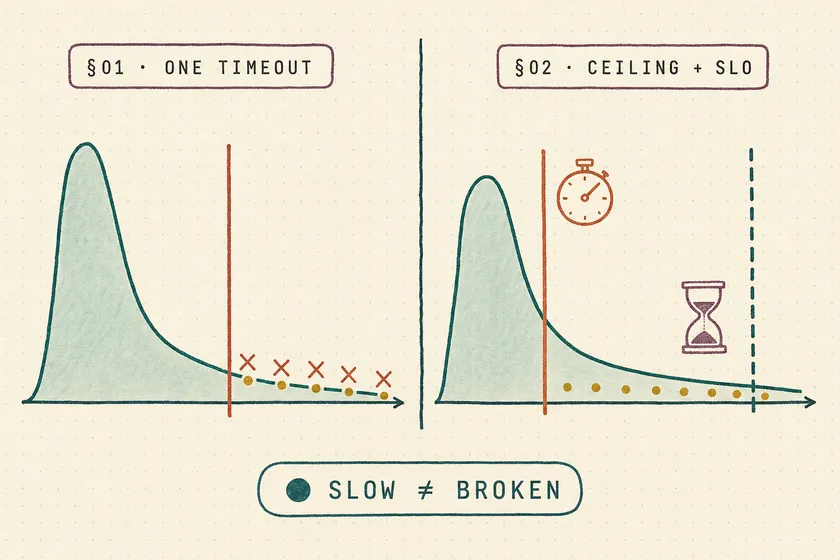
Table of Contents
The AI-summary test that “passes” in 42 seconds is lying to you. A fixed timeout can’t tell the difference between the model is slow today and the feature is broken — it swallows both and shows you a green check. Every timeout heuristic you trust for a login form is wrong for an LLM feature, because the thing you’re waiting on doesn’t have a bounded, DOM-shaped completion event. It has a latency distribution that spans two orders of magnitude, and your single timeout number is trying to straddle all of it.
This is the failure mode nobody demos. The conference talk clicks “Summarize,” waits, asserts the text isn’t empty, and moves on. What it doesn’t show is that same test at 9 a.m. on a Monday when the provider is queuing, or right after a scale-to-zero cold start, or the week someone doubled the prompt and p95 quietly crept from 4 seconds to 19. The test stays green through all of it — until the day it flakes, and you “fix” it by bumping the timeout, which buries the regression deeper.
Why this matters now
Playwright shipped expect.poll and expect.toPass as first-class retrying assertions, and by v1.61 (June 2026) most enterprise suites have LLM features under test — chat, summarization, RAG answers, agent actions. Playwright’s auto-waiting is genuinely excellent for the web it was built for: it waits for elements to be attached, visible, and actionable before it acts. But generation-complete is not an actionability state. The DOM is “ready” the instant the streaming container mounts — long before the answer exists. So SDETs fall back to the one tool that always compiles: a hard-coded wait.
The stakes are that AI latency is not driven by your code, so you can’t reason about it the way you reason about a page load. P99 latency is usually driven by cold starts, provider load spikes, and queuing, not by your prompt. That means the variable you’re timing out on is mostly outside your test’s control — which is exactly why a single fixed number is the wrong instrument.
Why do fixed timeouts fail on AI features specifically?
Because an AI feature’s response time isn’t a value, it’s a distribution — and the spread between typical and worst-case is enormous. Queuing theory puts it plainly: P99 latency grows roughly as 1/(1-ρ), so at 80% utilization tail latency is 5x higher than at 20%. In real serving benchmarks that shows up as a P50 of 4.64 seconds against a P99 of 28 seconds on the same endpoint — a 6x gap that has nothing to do with whether your feature works. Add serverless inference and it gets worse: a scale-to-zero deployment can eat a 40-90 second penalty just to load the model and produce the first token, versus ~30ms per token once warm.
5x
p99 vs p20 at load
Tail latency growth from queuing alone, per 1/(1-ρ)
6x
p50 → p99 gap
4.64s median vs 28s tail on the same endpoint under load
40-90s
Cold-start penalty
Serverless GPU model load before the first token streams
No single number fits a two-orders-of-magnitude spread
A login form resolves in a tight band — 200ms warm, maybe 2 seconds on a bad day. You can pick a 10-second ceiling and be right essentially always. An AI feature lives between 4 seconds and 90 seconds depending on cache state, queue depth, and whether you’re the request that triggered a scale-out. There is no single number that is both tight enough to catch a regression and loose enough to survive a cold start. Pick tight, you flake. Pick loose, you’re blind.
What’s actually wrong with just setting one big timeout?
It converts every latency regression and every half-broken state into a slow pass. Set the ceiling at 90 seconds so cold starts never flake, and you’ve also told the test to happily wait 89 seconds for a feature that used to answer in 4 — and to call it green. The timeout stopped being a correctness check the moment it got big enough to be reliable.
await page.getByRole('button', { name: 'Summarize' }).click();// The lie: a ceiling high enough to never flake is also high enough to hide everythingawait page.waitForTimeout(60_000);await expect(page.getByTestId('summary')).not.toBeEmpty();That waitForTimeout is the async trap that makes suites both slow and flaky: it always waits the full duration on a fast run, and it still races on a slow one, because 60 seconds is a guess, not a signal. And not.toBeEmpty() will pass on a single streamed token, an error toast rendered as text, or a truncated answer. You’ve built a test that asserts “something appeared within a minute,” which is not a feature working.
How do you wait for an AI response without waitForTimeout?
Wait on an explicit generation-complete signal that the application sets when the stream ends — not a fixed sleep, and not the text “looking done.” The unfakeable part here is that you have to make completion observable. I’ve watched teams poll for the answer text to “stop changing” for 500ms and call that done; it fails the first time the model pauses mid-stream on a slow token, and it fires early on a two-word answer. Heuristics on rendered text are guessing at a state the app already knows. Have the app expose it — a data-gen-state attribute, a completion event, a done flag in a status region — and poll that.
await page.getByRole('button', { name: 'Summarize' }).click();
// The app flips data-gen-state to "complete" when the stream terminates.// Poll the signal: generous ceiling for cold starts, cheap early exit when warm.await expect  .poll(() => page.getByTestId('summary').getAttribute('data-gen-state'), {    intervals: [250, 500, 1000, 2000],    timeout: 90_000, // covers a serverless cold start — a ceiling, not the SLO  })  .toBe('complete');
expect.poll retries your function on a backoff schedule — the default intervals are [100, 250, 500, 1000] — until the matcher passes or the timeout hits. On a warm run this returns in a few hundred milliseconds; on a cold start it patiently waits without you sleeping the full duration on every green run. Reach for expect.poll when one value changes over time (a status attribute); reach for expect.toPass when several reads-and-asserts must all succeed in one attempt. One footgun worth knowing: toPass defaults to the test timeout unless you set expect.toPass.timeout, so it’s easy to accidentally inherit a giant ceiling and recreate the exact problem you’re trying to solve.
Make completion observable
Have the app set an explicit signal when generation terminates — data-gen-state="complete", a done event, an ARIA status region. Never infer “done” from rendered text stabilizing.
Poll the signal, not a clock
Use expect.poll against that attribute with a backoff interval array. The test exits the instant the signal flips, so fast runs stay fast.
Set the ceiling from p99, not a guess
The timeout is a cold-start safety net. Size it from your production p99 plus margin — high enough that it never flakes, because catching slowness is a different assertion’s job.
How do you catch latency regressions instead of hiding them?
Split the two questions the fixed timeout was conflating: did the feature respond at all (liveness) and did it respond within SLO (performance). The liveness wait is generous so it never flakes on a cold start. The latency check is tight, measured, and fails loud when the feature gets slow — and it runs only after liveness passes, so it never races.
const started = Date.now();await page.getByRole('button', { name: 'Summarize' }).click();await expect  .poll(() => page.getByTestId('summary').getAttribute('data-gen-state'),        { timeout: 90_000 })  .toBe('complete');
// Liveness passed. Now hold the feature to its SLO — as a separate assertion.const elapsedMs = Date.now() - started;expect(elapsedMs, `summary latency regressed: ${elapsedMs}ms`)  .toBeLessThan(SUMMARY_SLO_MS); // your production p95, not the 90s ceiling
One ceiling absorbs cold starts; one assertion holds the SLO
Now the 90-second ceiling does one job — absorb cold starts so the suite doesn’t flake — and SUMMARY_SLO_MS does the other: fail the build when a prompt change pushes p95 from 4 seconds to 19. One number can’t do both, which is the whole reason a single waitForTimeout was never going to work. If you want the earlier, sharper signal, assert on time-to-first-token as its own gate — TTFT catches provider-side slowness before the full generation even finishes, and it’s the metric users actually feel first.
Where should the timeout budget actually come from?
From your measured production percentiles, never from a pricing page or a round number that “felt safe.” Track p50, p95, and p99 segmented by model, prompt version, and input-token bucket, because the tails are where users suffer and an average hides every spike that matters. Set the liveness ceiling above your observed p99 with margin — it exists to not flake. Set the SLO assertion at the p95 you’re actually willing to ship. If you don’t have production numbers yet, run the latency assertion in report-only mode for two weeks, log the elapsed time per run, and derive both thresholds from the data instead of a vibe.
Your one next step
Pick your single most-tested AI feature and do one thing this week: ask the developers to expose a data-gen-state (or equivalent completion signal), then replace the waitForTimeout in that spec with an expect.poll on the signal plus a separate expect(elapsedMs).toBeLessThan(...) in report-only mode. Don’t set the SLO threshold yet — just log the elapsed time for two weeks. You’ll learn two things you don’t currently know: what that feature’s real latency distribution looks like in CI, and how often your “passing” test was actually waiting 40 seconds for a cold start it never told you about. Set the p95 threshold from that data, flip enforcement on, and you’ve turned a silenced alarm back into a real one.
Doesn't Playwright's auto-waiting handle this already?
No. Auto-waiting waits for elements to be attached, visible, and actionable — states of the DOM. Generation-complete is not a DOM state; the streaming container is “ready” the moment it mounts, long before the answer exists. You need to wait on an explicit completion signal the application sets, using expect.poll, not rely on actionability checks.
Why not just poll until the answer text stops changing?
Because text-stability heuristics guess at a state the app already knows. They fire early on short answers and fail when the model pauses mid-stream on a slow token. Have the application expose an explicit signal — a data attribute, done event, or status region — and poll that instead of inferring completion from rendered text.
What timeout value should I use for an LLM feature?
Two different numbers for two different jobs. The liveness ceiling on expect.poll should sit above your production p99 with margin so it never flakes on a cold start. The SLO assertion — a separate expect on elapsed time — should sit at the p95 you’re willing to ship. Derive both from measured production percentiles, not a round number.
expect.poll or expect.toPass for AI responses?
Use expect.poll when a single value changes over time, like a data-gen-state attribute flipping to complete — that’s the common AI case. Use expect.toPass when several reads and assertions must all succeed within one attempt. Note that toPass defaults to the test timeout unless you set expect.toPass.timeout, so it’s easy to inherit a giant ceiling by accident.
Don't miss a thing
Subscribe to get updates straight to your inbox.

No spam · Unsubscribe anytime