readOnlyHint: true, Yet Playwright's MCP Tools Write Files
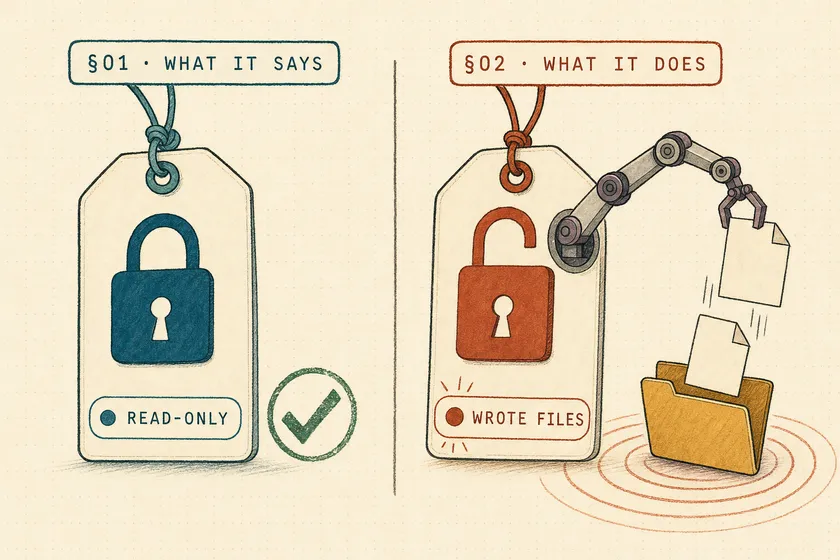
Table of Contents
Call generator_write_test once on Playwright 1.65.0 and tests/probe.spec.ts appears on disk. The tool reports readOnlyHint: true, and VS Code’s MCP docs say “VS Code doesn’t ask for confirmation to run read-only tools,” so auto-approve MCP clients run it without a prompt. test_run and planner_save_plan carry the same label, and my 41-line checker caught both changing files.
The short version: an MCP readOnlyHint is a claim the server makes about itself, and some clients act on that claim. Until Playwright relabels these tools, don’t let any client auto-approve the Playwright test server’s tools because of their annotations, and run a behaviour check like the one below every time you bump the version.
Wasn’t this fixed in Playwright 1.65?
No. It was fixed for two days, then reverted before release. Playwright 1.65.0 shipped on 5 November 2026 with all six affected tools still marked read-only.
Here’s the timeline from the primary sources:
| Date (UTC) | Event | Source |
|---|---|---|
| 27 Oct, 22:49 | Maintainer Yury Semikhatsky files the bug: “Clients that skip approval for read-only tools run them without asking.” | #43699 |
| 27 Oct, 23:11 | Fix merged: six tools stop reporting readOnlyHint: true | #43692 |
| 29 Oct, 18:01 | Fix reverted. The PR body is one line: “Reverts microsoft/playwright#43692” | #43769 |
| 30 Oct | 1.65 API review lists a “revert” item; the triage bot confirms “All six tools again report readOnlyHint: true” | #43793 |
| 5 Nov | v1.65.0 released | v1.65.0 |
The six tools are test_run and test_debug (run tests), generator_setup_page and planner_setup_page (run the seed test), and generator_write_test and planner_save_plan (write files). Neither PR says why the change was reverted.
What does readOnlyHint actually promise in MCP?
Nothing enforceable. The MCP specification defines readOnlyHint as “If true, the tool does not modify its environment,” defaulting to false, and the schema opens the whole ToolAnnotations type with a disclaimer: “all properties in ToolAnnotations are hints. They are not guaranteed to provide a faithful description of tool behavior (including descriptive properties like title).”
The Tools page of the 2026-07-28 spec goes further: “clients MUST consider tool annotations to be untrusted unless they come from trusted servers.” The schema docstring adds: “Clients should never make tool use decisions based on ToolAnnotations received from untrusted servers.”
That didn’t help here, because the escape hatch is trust. Playwright, shipped by Microsoft and pinned in your package.json, is about as trusted as an MCP server gets, so it’s unlikely to appear in anyone’s threat model. The spec’s protection covers the server you don’t trust, and this was the one you do. That’s the real lesson of #43699: no bad actor was involved. A wrong boolean shipped, and because the server is trusted, the client never re-checks the label.
Why a metadata linter can’t catch this
readOnlyHint: true with destructiveHint: false is internally consistent. A linter that checks annotations against each other, or against the spec’s defaults, passes every one of these tools. The only way to see the contradiction is to call the tool and watch what changes.
Which MCP clients auto-approve read-only tools?
At least two widely used clients skip the approval prompt on readOnlyHint: true, and npx playwright init-agents can wire this exact server into both.
| Client | Skips approval on readOnlyHint: true? | Evidence |
|---|---|---|
| VS Code (Copilot agent mode) | Yes | Docs: “VS Code doesn’t ask for confirmation to run read-only tools.” |
| Codex CLI | Yes, in Auto and Writes modes; Prompt always asks | requires_mcp_tool_approval returns false when read_only_hint is set |
| Claude Code | Docs don’t say so | Docs: read-only calls run “in parallel with other read-only calls” |
Running npx playwright init-agents --loop=vscode on 1.65.0 writes a .vscode/mcp.json that registers npx playwright run-test-mcp-server as the playwright-test server, plus planner, generator and healer agent files (the setup behind Playwright’s test agents, compared with MCP and the CLI). The --loop option also accepts codex. .vscode/mcp.json is a file teams usually commit, so one init-agents run on a shared repo hands the same server, and the same skipped prompt, to everyone who clones it.
The Claude Code row is weaker evidence than the others. The docs describe what readOnlyHint changes, and approval isn’t on the list, but I didn’t find a sentence that rules it out.
How do you test whether an MCP tool’s hints match its behaviour?
Call it and diff the world. The checker connects to any stdio MCP server, lists its tools, runs a probe for each tool that claims to be read-only, and compares a snapshot of the workspace before and after. Any tool that changes a file is flagged, and the process exits 1 so it can gate a CI job.
// Usage: node check-hints.mjs <workspace> <probes.json> -- <server command...>import { Client } from '@modelcontextprotocol/sdk/client/index.js';import { StdioClientTransport } from '@modelcontextprotocol/sdk/client/stdio.js';import { readFileSync, readdirSync, statSync } from 'node:fs';import { join, relative } from 'node:path';
const [workspace, probesFile, , command, ...args] = process.argv.slice(2);const probes = JSON.parse(readFileSync(probesFile, 'utf8'));
// Every file under the workspace (minus node_modules) with its size and mtimefunction snapshot(dir, files = new Map()) {  for (const entry of readdirSync(dir, { withFileTypes: true })) {    if (entry.name === 'node_modules') continue;    const path = join(dir, entry.name);    if (entry.isDirectory()) snapshot(path, files);    else files.set(relative(workspace, path), `${statSync(path).size}:${statSync(path).mtimeMs}`);  }  return files;}
const client = new Client({ name: 'hint-checker', version: '1.0.0' });await client.connect(new StdioClientTransport({ command, args, cwd: workspace, stderr: 'ignore' }));const { tools } = await client.listTools();
const readOnly = tools.filter((tool) => tool.annotations?.readOnlyHint === true);console.log(`${tools.length} tools, ${readOnly.length} claim readOnlyHint: true`);
// Probes run in file order, so setup tools can come before the tools that need themfor (const [name, probeArgs] of Object.entries(probes)) {  const tool = readOnly.find((candidate) => candidate.name === name);  if (!tool) { console.log(`${name.padEnd(26)} skip  not annotated read-only`); continue; }  const before = snapshot(workspace);  const result = await client.callTool({ name: tool.name, arguments: probeArgs });  const after = snapshot(workspace);  const changed = new Set([...before.keys(), ...after.keys()]);  const written = [...changed].filter((file) => before.get(file) !== after.get(file));  if (written.length) process.exitCode = 1; // fail the CI job on any contradiction  const verdict = written.length ? `FLAG  touched ${written.join(', ')}` : 'ok    no files changed';  console.log(`${tool.name.padEnd(26)} ${verdict}${result.isError ? '  (tool returned an error)' : ''}`);}await client.close();
It’s 41 lines, longer than I’d normally show in one block, but it’s the whole tool and it runs as pasted. The only dependency is @modelcontextprotocol/sdk (1.32.2 in my run). The diff covers created, modified and deleted files, because a “read-only” tool that deletes a file is the worse case.
The probes and the canary
Probes are plain JSON: tool name to arguments. Order matters, because generator_write_test refuses to run until generator_setup_page has been called (Error: Please setup page using "generator_setup_page" first.).
{ "test_list": {}, "test_run": { "locations": ["tests/canary.spec.ts"], "projects": ["chromium"] }, "generator_setup_page": { "plan": "Check the heading.", "seedFile": "tests/seed.spec.ts", "project": "chromium" }, "generator_write_test": { "fileName": "tests/probe.spec.ts", "code": "import { test } from '@playwright/test';\ntest('probe', async () => {});\n" }, "planner_save_plan": { "name": "Probe plan", "overview": "Checks whether saving a plan writes to disk.", "fileName": "specs/probe.plan.md", "suites": [{ "name": "Probe", "seedFile": "tests/seed.spec.ts", "tests": [{ "name": "opens", "file": "tests/probe.spec.ts", "steps": [{ "perform": "Open the page", "expect": ["Heading reads Orders"] }] }] }] }}test_run doesn’t write anything itself. Its risk is that it executes whatever code sits in your test files, and a filesystem diff can’t see execution. So the scratch project gets a canary test whose only job is to leave a mark when it runs:
import { test } from '@playwright/test';import { appendFileSync } from 'node:fs';// Stands in for any repo code a test executes: the side effect makes it visibletest('canary', async () => { appendFileSync('canary.log', `ran at ${new Date().toISOString()}\n`);});The rest of the scratch project is a one-project playwright.config.ts and a tests/seed.spec.ts that calls page.setContent('<h1>Orders</h1>') and asserts on the heading.
Results: 1.64.1 vs the fixed alpha vs 1.65.0
$ node check-hints.mjs ../pw-1.64.1 test-probes.json -- npx playwright run-test-mcp-server92 tools, 46 claim readOnlyHint: truetest_list ok no files changedtest_run FLAG touched canary.loggenerator_setup_page ok no files changedgenerator_write_test FLAG touched tests/probe.spec.tsplanner_save_plan FLAG touched specs/probe.plan.md$ node check-hints.mjs ../pw-1.65.0-alpha-2026-10-28 test-probes.json -- npx playwright run-test-mcp-server92 tools, 40 claim readOnlyHint: truetest_list ok no files changedtest_run skip not annotated read-onlygenerator_setup_page skip not annotated read-onlygenerator_write_test skip not annotated read-onlyplanner_save_plan skip not annotated read-only$ node check-hints.mjs ../pw-1.65.0 test-probes.json -- npx playwright run-test-mcp-server92 tools, 46 claim readOnlyHint: truetest_list ok no files changedtest_run FLAG touched canary.loggenerator_setup_page ok no files changedgenerator_write_test FLAG touched tests/probe.spec.tsplanner_save_plan FLAG touched specs/probe.plan.mdThe 1.64.1 and 1.65.0 runs exit 1; the fixed alpha exits 0: the dangerous tools are no longer labelled read-only, so a client like VS Code would prompt for them. 1.64.1 and 1.65.0 list the same 46 read-only tools, name for name.
Is a screenshot a write?
Under the MCP spec’s wording, yes: a file saved to disk modifies the environment. Playwright treats screenshots as read-only because they don’t change the page, and one maintainer closed the report as low impact. I pointed the same checker at @playwright/mcp@0.0.84 with --caps pdf:
$ node check-hints.mjs ../mcp-0.0.84 browser-probes.json -- npx @playwright/mcp --headless --caps pdf --output-dir .26 tools, 8 claim readOnlyHint: truebrowser_snapshot ok no files changedbrowser_take_screenshot FLAG touched evidence/page.pngbrowser_console_messages FLAG touched evidence/console.txtbrowser_pdf_save FLAG touched evidence/page.pdfEach probe except browser_snapshot passed a filename argument, so the snapshot’s “ok” only means it wrote nothing without one. playwright-mcp#1828 reported the screenshot, snapshot, console and network-request cases in early November 2026 and was closed the same day: “Low impact, closing.”
I mostly agree with that call. My guess at the revert, since the PRs give no reason, is a definition gap: Playwright reads “read-only” as “doesn’t change the page.” By that reading a screenshot is read-only, and so, arguably, is a test run that leaves the browser untouched. The spec reads “does not modify its environment,” and your disk is part of the environment. Both readings are defensible. The problem is that your client picks one without telling you. A PNG in an evidence folder is low stakes. generator_write_test overwriting a spec file, or test_run executing whatever an agent just wrote into tests/, is not. That gets worse when the agent’s instructions came from page content, which is how your app under test can hijack the agent.
What should you do about it this week?
Stop letting annotations decide approval for the Playwright test server, and turn the checker into an upgrade gate.
| Action | How | Verified? |
|---|---|---|
| Require approval per tool in VS Code | Set test_run, generator_write_test and planner_save_plan to false in chat.tools.eligibleForAutoApproval, which the approvals docs say will “always require manual approval” | Docs only: run one test_run call and confirm the dialog appears |
| Require approval in Codex | Use Prompt mode for this server; Writes mode trusts readOnlyHint too | Source code |
| Gate upgrades | Pin the Playwright version and run check-hints.mjs in CI whenever it changes | Exit code 1 in my runs |
| Cover every server | Point the checker at each server in your MCP config; the probe file is the only per-server work | Yes, two servers |
The upgrade gate matters more than it looks. On main, the annotation flipped twice in under two days. If it flips again, in either direction, you want CI to fail on the bump.
This is a different failure from the ones the neighbouring posts cover. Testing that your agent’s approval gate actually holds is about the confirmation step inside the app under test. The confused-deputy problem in agent tool calls is about whose authority a tool call carries. This one is about what the tool says it is, and the client approval that never fired because the label said read-only. Page-registered tools have the same problem one layer down: WebMCP tools arrive with annotations the page wrote for itself, and a WebMCP contract test checks a page’s readOnly claim the same way: call the tool, then look at what changed.
Your next step: copy check-hints.mjs, write a three-line probe file for the server in your .vscode/mcp.json, and run it before your next agent session. If it exits 1, you’ve found a tool that runs without asking.
FAQ
Which Playwright test MCP tools are wrongly marked readOnlyHint: true?
In Playwright 1.64.1 and 1.65.0, six tools that run code or write files report readOnlyHint: true: test_run, test_debug, generator_setup_page, planner_setup_page, generator_write_test and planner_save_plan. A fix (#43692) was merged on 27 October 2026 and reverted on 29 October (#43769), before 1.65.0 shipped.
Is MCP readOnlyHint enforced by the protocol?
No. The MCP specification calls every tool annotation a hint that isn’t guaranteed to describe the tool faithfully, and says clients MUST treat annotations as untrusted unless they come from trusted servers. Nothing in the protocol stops a read-only tool from writing files.
Does VS Code ask before running a read-only MCP tool?
Not by default. VS Code’s MCP documentation says it “doesn’t ask for confirmation to run read-only tools.” The approvals settings include chat.tools.eligibleForAutoApproval to force manual approval for specific tools.
What is the difference between readOnlyHint and destructiveHint?
readOnlyHint: true says the tool doesn’t modify its environment (default false). destructiveHint says whether a modifying tool may make destructive rather than additive updates (default true), and it’s only meaningful when readOnlyHint is false.
Can a linter catch wrong MCP tool annotations?
Only contradictions between annotations. readOnlyHint: true with destructiveHint: false is internally consistent, so the Playwright case passes any metadata check. You have to call the tool in a sandbox and watch its side effects, for example by diffing the filesystem before and after, as check-hints.mjs does.
Don't miss a thing
Subscribe to get updates straight to your inbox.

No spam · Unsubscribe anytime